My Checklist
Be more efficient. Remember whats on your list - and get the satisfying feeling, when marking a task as done!
ما هو My Checklist؟
My Checklist هو إضافة Chrome تم تطويرها بواسطة devjonas، والميزة الرئيسية لها هي "Be more efficient. Remember whats on your list - and get the satisfying feeling, when marking a task as done!".
لقطات شاشة التمديد
تحميل ملف CRX للإضافة My Checklist
قم بتنزيل ملفات الامتداد My Checklist بتنسيق crx ، وقم بتثبيت الامتدادات يدويًا في متصفح Chrome ، أو شارك ملفات crx مع الأصدقاء لتثبيت الامتدادات بسهولة.
تعليمات استخدام التمديد
                        The vision with My Checklist, is to increase your efficiency the easiest way possible.
No need for pen and paper. No need to switch tab to task management page.
And most importantly - you will keep this satisfying feeling, marking a task as done! 🥳

The use of My Checklist is very simple.
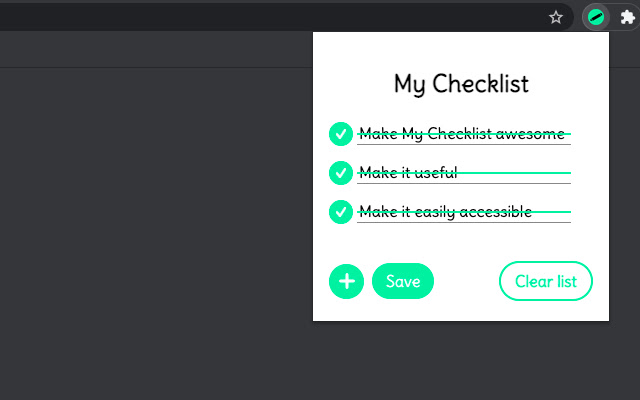
First you will make a list of the tasks and press save. The red dot of each line, indicate that the task is saved or not.

Later on, when the task is done, you will press on the checkmark, and the task will now be highlighting it is done - just the way we like it with pen and paper ✅

The task is automatically saved, when marked as done.

Whenever you want to remove the tasks, simply press the Clear list button.

That's it!
معلومات أساسية عن التمديد
| الاسم |  My Checklist My Checklist |
| ID | abijmmmajjhcadmfibojkljenlidhpbf |
| عنوان URL الرسمي | https://chrome.google.com/webstore/detail/my-checklist/abijmmmajjhcadmfibojkljenlidhpbf |
| الوصف | Be more efficient. Remember whats on your list - and get the satisfying feeling, when marking a task as done! |
| حجم الملف | 29.09 KB |
| عدد التثبيتات | 118 |
| النسخة الحالية | 1.0.0 |
| آخر تحديث | 2021-04-05 |
| تاريخ النشر | 2021-04-05 |
| المطور | devjonas |
| البريد الإلكتروني | [email protected] |
| نوع الدفع | free |
| اللغات المدعومة | en |
| manifest.json | |
{
    "update_url": "https:\/\/clients2.google.com\/service\/update2\/crx",
    "manifest_version": 2,
    "name": "My Checklist",
    "version": "1.0.0",
    "description": "Be more efficient. Remember whats on your list - and get the satisfying feeling, when marking a task as done!",
    "author": "Jonas K",
    "icons": {
        "16": "icons\/16.png",
        "48": "icons\/48.png",
        "128": "icons\/128.png"
    },
    "browser_action": {
        "default_popup": "popup.html",
        "default_icon": "icons\/16.png"
    },
    "permissions": [
        "activeTab",
        "storage"
    ]
} | |