Stickies Web Assistant
A web browser extension for the Stickies app
ما هو Stickies Web Assistant؟
Stickies Web Assistant هو إضافة Chrome تم تطويرها بواسطة http://stickies.app، والميزة الرئيسية لها هي "A web browser extension for the Stickies app".
لقطات شاشة التمديد


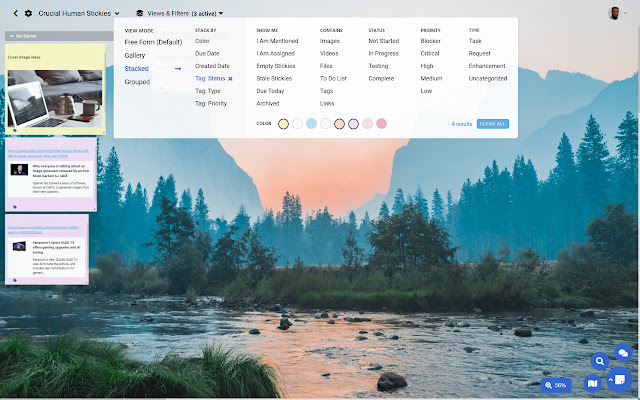
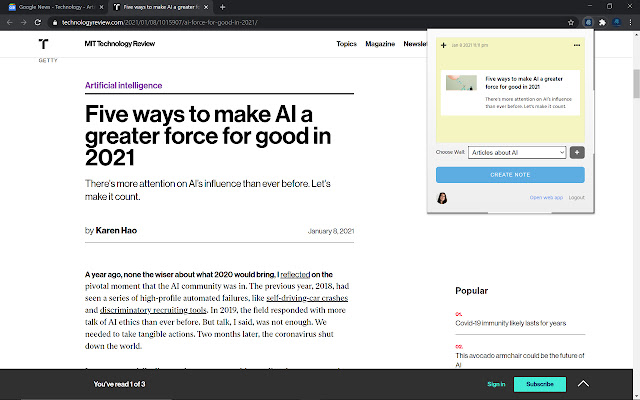
تحميل ملف CRX للإضافة Stickies Web Assistant
قم بتنزيل ملفات الامتداد Stickies Web Assistant بتنسيق crx ، وقم بتثبيت الامتدادات يدويًا في متصفح Chrome ، أو شارك ملفات crx مع الأصدقاء لتثبيت الامتدادات بسهولة.
تعليمات استخدام التمديد
                        Stickies is a fun visual way to curate, organize, and manage your work by yourself or with a team. Use it to brainstorm, collect ideas, take notes, manage projects, and more.

Stickies are versatile notes that are organized into Walls. You can create rich content such as to-do lists, files, voice and video recordings, screen recordings.

Stickies Web Assistant makes it easy to take quick notes, save web pages and articles, and add bookmarks from inside your Chrome browser.

Enjoy collaboration features such as chat, video conferencing, and real-time updates.
معلومات أساسية عن التمديد
| الاسم |  Stickies Web Assistant Stickies Web Assistant |
| ID | cgoomljlmmkghednbilakakfciaclkam |
| عنوان URL الرسمي | https://chrome.google.com/webstore/detail/stickies-web-assistant/cgoomljlmmkghednbilakakfciaclkam |
| الوصف | A web browser extension for the Stickies app |
| حجم الملف | 649 KB |
| عدد التثبيتات | 90 |
| النسخة الحالية | 1.0.1 |
| آخر تحديث | 2022-02-27 |
| تاريخ النشر | 2021-01-10 |
| المطور | http://stickies.app |
| البريد الإلكتروني | [email protected] |
| نوع الدفع | free |
| موقع الإضافة | https://stickies.app |
| عنوان صفحة سياسة الخصوصية | https://crucialhuman.com/legal |
| اللغات المدعومة | en-US |
| manifest.json | |
{
    "update_url": "https:\/\/clients2.google.com\/service\/update2\/crx",
    "manifest_version": 2,
    "name": "Stickies Web Assistant",
    "description": "A web browser extension for the Stickies app",
    "version": "1.0.1",
    "icons": {
        "32": "logo-32.png",
        "64": "logo-64.png",
        "128": "logo-128.png"
    },
    "browser_action": {
        "default_icon": "logo-32.png",
        "default_popup": "popup.html",
        "default_title": "Add this page your Stickies Wall"
    },
    "content_security_policy": "script-src 'self'; object-src 'self'",
    "permissions": [
        "tabs",
        "storage",
        "https:\/\/api.stickies.app\/*"
    ]
} | |