ZipApply
Find decision makers and Hiring managers fast!
ما هو ZipApply؟
ZipApply هو إضافة Chrome تم تطويرها بواسطة http://zipapply.com، والميزة الرئيسية لها هي "Find decision makers and Hiring managers fast!".
لقطات شاشة التمديد
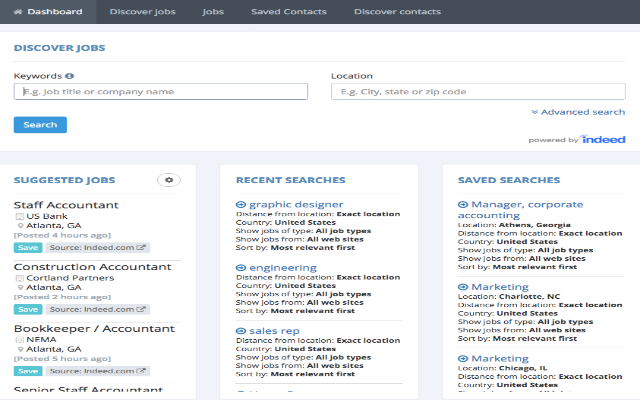
تحميل ملف CRX للإضافة ZipApply
قم بتنزيل ملفات الامتداد ZipApply بتنسيق crx ، وقم بتثبيت الامتدادات يدويًا في متصفح Chrome ، أو شارك ملفات crx مع الأصدقاء لتثبيت الامتدادات بسهولة.
تعليمات استخدام التمديد
ZipApply helps you find and save people online. ZipApply is a productivity tool for job seekers. Save Jobs and Contacts while searching the web. ZipApply enables job seekers to find hiring companies in by city or zipcode radius. You can then find Hiring Managers or Decision Makers at the desired companies. The software will then identify the corporate email address of the hiring manager and validate. Once validated it will look for all the social profiles associated with the email address and link them inside zipapply in the contacts record. You can verify and apply the social updates. ZipApply allows you to add notes to contacts and essentially manage your job search in one place. Download our free chrome extension and try it today! معلومات أساسية عن التمديد
| الاسم |  ZipApply ZipApply |
| ID | ckkcmppakkinjdpifkdlgnggjjhlkocp |
| عنوان URL الرسمي | https://chrome.google.com/webstore/detail/ckkcmppakkinjdpifkdlgnggjjhlkocp |
| الوصف | Find decision makers and Hiring managers fast! |
| حجم الملف | 1.16 MB |
| عدد التثبيتات | 126 |
| النسخة الحالية | 0.5.5 |
| آخر تحديث | 2018-02-23 |
| تاريخ النشر | 2018-02-23 |
| تقييم | 4.50/5 مجموع تقييمات 2 |
| المطور | http://zipapply.com |
| البريد الإلكتروني | [email protected] |
| نوع الدفع | free |
| اللغات المدعومة | en |
| manifest.json | |
{
    "update_url": "https:\/\/clients2.google.com\/service\/update2\/crx",
    "name": "ZipApply",
    "short_name": "Profile grabber",
    "version": "0.5.5",
    "description": "Find decision makers and Hiring managers fast!",
    "permissions": [
        "notifications",
        "activeTab",
        "tabs",
        "webRequest",
        "webRequestBlocking",
        "*:\/\/*\/*",
        "https:\/\/*\/*"
    ],
    "content_security_policy": "script-src 'self' 'unsafe-eval' https:\/\/www.google.com https:\/\/cse.google.com https:\/\/www.googleapis.com; object-src 'self'",
    "browser_action": {
        "default_icon": "icons\/icon-19g.png",
        "default_popup": "components\/browseraction\/search.html",
        "default_title": "zipapply Title"
    },
    "icons": {
        "128": "icons\/icon-128.png",
        "48": "icons\/icon-48.png",
        "38": "icons\/icon-38.png",
        "24": "icons\/icon-19.png",
        "16": "icons\/icon-16.png"
    },
    "background": {
        "scripts": [
            "libs\/jquery.js",
            "background.js"
        ]
    },
    "content_scripts": [
        {
            "matches": [
                "http:\/\/*\/*",
                "https:\/\/*\/*",
                "*:\/\/*\/*"
            ],
            "include_globs": [
                "*:\/\/www.linkedin.com\/*",
                "*:\/\/*.indeed.*\/viewjob*",
                "*:\/\/*.indeed.*\/cmp\/*"
            ],
            "css": [
                "css\/button.css"
            ],
            "js": [
                "libs\/jquery.js",
                "contentscripts\/button.js",
                "contentscripts\/linkedin_parser.js",
                "contentscripts\/linkedin_urlaction.js",
                "contentscripts\/emailaddress.js",
                "libs\/jquery-ui.js"
            ],
            "run_at": "document_idle",
            "all_frames": false
        },
        {
            "matches": [
                "https:\/\/www.zipapply.com\/*"
            ],
            "js": [
                "contentscripts\/ping_web.js"
            ],
            "run_at": "document_end",
            "all_frames": false
        }
    ],
    "manifest_version": 2,
    "web_accessible_resources": [
        "contentscripts\/get_discover_email_data.js",
        "contentscripts\/getdata.js",
        "libs\/*",
        "img\/*",
        "css\/*",
        "html\/*"
    ]
} | |