Handy Screenshot
An easy tool for taking screenshots (full screen / visible part / selected by yourself)
ما هو Handy Screenshot؟
Handy Screenshot هو إضافة Chrome تم تطويرها بواسطة https://ohhandy.com، والميزة الرئيسية لها هي "An easy tool for taking screenshots (full screen / visible part / selected by yourself)".
لقطات شاشة التمديد

تحميل ملف CRX للإضافة Handy Screenshot
قم بتنزيل ملفات الامتداد Handy Screenshot بتنسيق crx ، وقم بتثبيت الامتدادات يدويًا في متصفح Chrome ، أو شارك ملفات crx مع الأصدقاء لتثبيت الامتدادات بسهولة.
تعليمات استخدام التمديد
                        Capture the web page, either part of it or full page. Edit your screenshots in a very user-friendly interface.

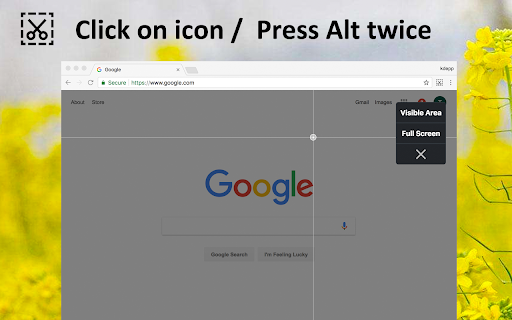
Click on icon or Press Alt twice to take screenshots.

-----

Notes:

- With 1.3.0 rolled out,  it's been migrated to manifest v3, and now you can copy the image with one click, no need for right click and copy image any more

- With the latest change shipped with Chrome 92, the time spent on taking full page screenshot becomes slower.   Reference:  https://developer.chrome.com/docs/extensions/reference/tabs/#property-MAX_CAPTURE_VISIBLE_TAB_CALLS_PER_SECOND
معلومات أساسية عن التمديد
| الاسم |  Handy Screenshot Handy Screenshot |
| ID | dajlhodahakobmgdiglkajjgbchiiccf |
| عنوان URL الرسمي | https://chromewebstore.google.com/detail/handy-screenshot/dajlhodahakobmgdiglkajjgbchiiccf |
| الوصف | An easy tool for taking screenshots (full screen / visible part / selected by yourself) |
| حجم الملف | 353 KB |
| عدد التثبيتات | 23,299 |
| النسخة الحالية | 1.3.0 |
| آخر تحديث | 2022-09-14 |
| تاريخ النشر | 2020-05-30 |
| تقييم | 4.83/5 مجموع تقييمات 361 |
| المطور | https://ohhandy.com |
| البريد الإلكتروني | [email protected] |
| نوع الدفع | free |
| موقع الإضافة | https://www.ohhandy.com/ |
| عنوان صفحة المساعدة | https://www.ohhandy.com/ |
| اللغات المدعومة | en |
| manifest.json | |
{
"update_url": "https:\/\/clients2.google.com\/service\/update2\/crx",
"manifest_version": 3,
"name": "Handy Screenshot",
"description": "An easy tool for taking screenshots (full screen \/ visible part \/ selected by yourself)",
"version": "1.3.0",
"author": "ohhandy.com",
"icons": {
"256": "logo.png"
},
"action": {
"default_icon": {
"38": "logo.png"
}
},
"background": {
"service_worker": "background.js"
},
"content_scripts": [
{
"matches": [
" | |