Salesforce OmniLogin
Free and Open Source extension for store and manage Salesforce logins using OAuth2.
ما هو Salesforce OmniLogin؟
Salesforce OmniLogin هو إضافة Chrome تم تطويرها بواسطة Javier Martínez de Pissón Caruncho، والميزة الرئيسية لها هي "Free and Open Source extension for store and manage Salesforce logins using OAuth2.".
لقطات شاشة التمديد
تحميل ملف CRX للإضافة Salesforce OmniLogin
قم بتنزيل ملفات الامتداد Salesforce OmniLogin بتنسيق crx ، وقم بتثبيت الامتدادات يدويًا في متصفح Chrome ، أو شارك ملفات crx مع الأصدقاء لتثبيت الامتدادات بسهولة.
تعليمات استخدام التمديد
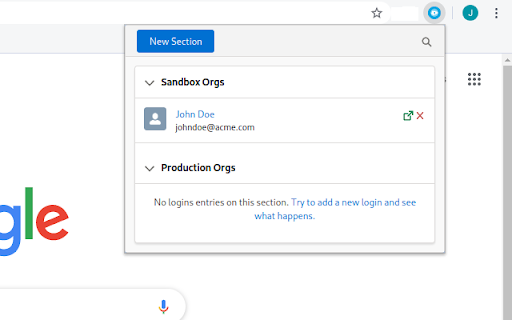
                        Salesforce OmniLogin provides Salesforce admins and developers a tool to manage accesses to their orgs using standard OAuth2, avoiding the use of passwords to login in Salesforce - you only have to enter its username/password once!

All your usernames are foldered in sections, keeping your orgs always organized and filterable; by using the Salesforce OAuth2 flow, you or your admin can revoke the access from the extension at any time, securing all your accesses.

Salesforce OmniLogin is written using Open Source Lightning Web Components, as a proof of concept to test LWC Framework outside Salesforce Platform or the more frequent "Web app" context - as this was the original idea, the extension is Free and Open Source. You can browse the code in GitHub.

Keep in mind that the extension is still experimental - don't use it in production environments!
معلومات أساسية عن التمديد
| الاسم |  Salesforce OmniLogin Salesforce OmniLogin |
| ID | daknjjebdbcihmlfifnaflconldlhhpl |
| عنوان URL الرسمي | https://chromewebstore.google.com/detail/salesforce-omnilogin/daknjjebdbcihmlfifnaflconldlhhpl |
| الوصف | Free and Open Source extension for store and manage Salesforce logins using OAuth2. |
| حجم الملف | 291 KB |
| عدد التثبيتات | 95 |
| النسخة الحالية | 0.7.4 |
| آخر تحديث | 2020-06-20 |
| تاريخ النشر | 2020-06-19 |
| تقييم | 5.00/5 مجموع تقييمات 1 |
| المطور | Javier Martínez de Pissón Caruncho |
| البريد الإلكتروني | [email protected] |
| نوع الدفع | free |
| اللغات المدعومة | en |
| manifest.json | |
{
    "update_url": "https:\/\/clients2.google.com\/service\/update2\/crx",
    "name": "Salesforce OmniLogin",
    "version": "0.7.4",
    "description": "Free and Open Source extension for store and manage Salesforce logins using OAuth2.",
    "permissions": [
        "storage",
        "identity",
        "https:\/\/login.salesforce.com\/services\/oauth2\/*",
        "https:\/\/test.salesforce.com\/services\/oauth2\/*",
        "https:\/\/*.my.salesforce.com\/services\/oauth2\/*",
        "https:\/\/*.force.com\/*\/services\/oauth2\/*",
        "https:\/\/*.salesforce.com\/services\/oauth2\/*"
    ],
    "icons": {
        "32": "icons\/32.png",
        "128": "icons\/128.png"
    },
    "background": {
        "scripts": [
            "background.js"
        ],
        "persistent": false
    },
    "browser_action": {
        "default_title": "Salesforce OmniLogin",
        "default_popup": "index.html"
    },
    "manifest_version": 2
} | |