CreditKarma Tax 1099-B CapGains Import
Extends the CreditKarma interface to allow CSV file imports of 1099-B infomation.
ما هو CreditKarma Tax 1099-B CapGains Import؟
CreditKarma Tax 1099-B CapGains Import هو إضافة Chrome تم تطويرها بواسطة mattotodd، والميزة الرئيسية لها هي "Extends the CreditKarma interface to allow CSV file imports of 1099-B infomation.".
لقطات شاشة التمديد
تحميل ملف CRX للإضافة CreditKarma Tax 1099-B CapGains Import
قم بتنزيل ملفات الامتداد CreditKarma Tax 1099-B CapGains Import بتنسيق crx ، وقم بتثبيت الامتدادات يدويًا في متصفح Chrome ، أو شارك ملفات crx مع الأصدقاء لتثبيت الامتدادات بسهولة.
تعليمات استخدام التمديد
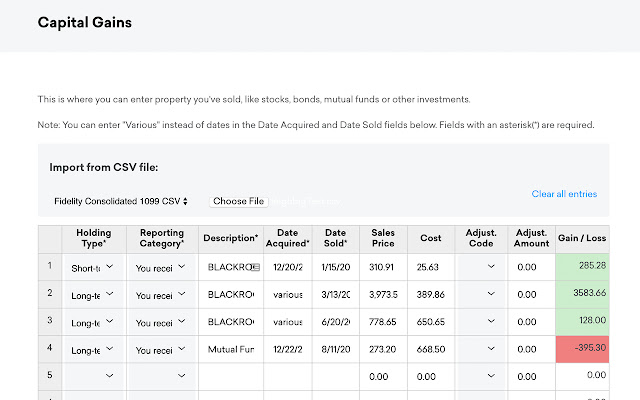
                        This extension adds an Import section to the top of the CreditKarma Tax Capital Gains table. This will allow users to import data from csv files they get from exchanges, brokerages, or trades tracked in speadsheets.

After installing the extension, csv files can be imported by Choosing a format in the dropdown, and then "Choose File" and selecting the csv file from your computer.

CreditKarma CapGains Form:  https://tax.creditkarma.com/taxes/CapitalGainsFullListSummary.action

Source code for the extension can be found at:  https://github.com/mattotodd/ck-tax-extension

Currently Supported formats:

-Fidelity 1099 (Consolidated CSV)
-Cointracking.info (Tax CSV Export)
-Bitcoin.tax (Tax CSV Export)
-Default

Default Import will accept any CSV file with the following headers in row 1:
holdingType - short or long
reportingCategory - 1 for 1099 was reported, 2  for 1099 was not reported, 3 for no 1099
description - 'description of sale'
dateAcquired -  mm/dd/yyyy
dateSold - mm/dd/yyyy
salesPrice - 0.00
costBasis - 0.00

The import will not overwrite any rows that have a description, sale price or cost.

You can clear the whole table by selecting "Clear all entries" and then click the green "Next" button.

This extension and software is not developed or affiliated with Credit Karma.
معلومات أساسية عن التمديد
| الاسم |  CreditKarma Tax 1099-B CapGains Import CreditKarma Tax 1099-B CapGains Import |
| ID | dehmakdmiooeomgajgfjjfibkelmheob |
| عنوان URL الرسمي | https://chrome.google.com/webstore/detail/creditkarma-tax-1099-b-ca/dehmakdmiooeomgajgfjjfibkelmheob |
| الوصف | Extends the CreditKarma interface to allow CSV file imports of 1099-B infomation. |
| حجم الملف | 307 KB |
| عدد التثبيتات | 285 |
| النسخة الحالية | 1.3 |
| آخر تحديث | 2018-02-05 |
| تاريخ النشر | 2018-02-05 |
| تقييم | 3.86/5 مجموع تقييمات 7 |
| المطور | mattotodd |
| نوع الدفع | free |
| عنوان صفحة المساعدة | https://github.com/mattotodd/ck-tax-extention |
| اللغات المدعومة | en-US |
| manifest.json | |
{
    "update_url": "https:\/\/clients2.google.com\/service\/update2\/crx",
    "manifest_version": 2,
    "name": "CreditKarma Tax 1099-B CapGains Import",
    "description": "Extends the CreditKarma interface to allow CSV file imports of 1099-B infomation.",
    "version": "1.3",
    "permissions": [
        "tabs",
        "https:\/\/tax.creditkarma.com\/taxes"
    ],
    "content_scripts": [
        {
            "matches": [
                "https:\/\/tax.creditkarma.com\/taxes\/CapitalGainsFullListSummary.action"
            ],
            "js": [
                "lib\/jquery-3.3.1.min.js",
                "importers\/default.js",
                "importers\/bitcoinTax.js",
                "importers\/cointrackingInfo.js",
                "importers\/fidelity.js",
                "CapitalGainsImporter.js"
            ]
        }
    ]
} | |