Internet Downloader
Internet Downloader enables you to download a desired item with an Internet Download Manager (IDM) application.
ما هو Internet Downloader؟
Internet Downloader هو إضافة Chrome تم تطويرها بواسطة internetdownloadpro، والميزة الرئيسية لها هي "Internet Downloader enables you to download a desired item with an Internet Download Manager (IDM) application.".
لقطات شاشة التمديد
تحميل ملف CRX للإضافة Internet Downloader
قم بتنزيل ملفات الامتداد Internet Downloader بتنسيق crx ، وقم بتثبيت الامتدادات يدويًا في متصفح Chrome ، أو شارك ملفات crx مع الأصدقاء لتثبيت الامتدادات بسهولة.
تعليمات استخدام التمديد
                        Internet Downloader is a browser extension that enables you to open and download a desired item like a movie, mp3, pdf .. with an Internet Download Manager (IDM) application. In order to operate with this extension you need a native-client patch to connect your browser with native IDM application in your OS.

Internet Downloader is NOT a Youtube Downloader. Due to restrictions of the Google Webstore Policies and Developer Program Policies we can not download Youtube Videos. Thank you for understanding.
Allows you to download MP4, MOV, FLV, WEBM - Files, but not streams. No Youtube Downloader.

Please read the following to get more info on how to install native-client and operate with this extension.

Note: After installing the extension, you need to connect it with native IDM application on your machine. If you do not have IDM, please head to https://www.internetdownloadmanager.com/download.html and install IDM on your machine. Once you have IDM, you need to make the connection between IDM and your browser. In order to make this connection, a separate patch is provided in GitHub. Please download and install this patch from: https://github.com/adoluisa/native-client

Follow the instructions in the above GitHub page to download and install the related patch to your system. After installing, the Internet Downloader extension, your browser can communicate with IDM on your machine (Windows, Linux and Mac).

Note: Before using the extension, please open the option's page and make sure the path to IDM is correct based on your Operating System. For example, the path to IDM in Window 10 is: C:\Program Files (x86)\Internet Download Manager\IDMan.
Next, please follow the below steps to open and download desired links in IDM.

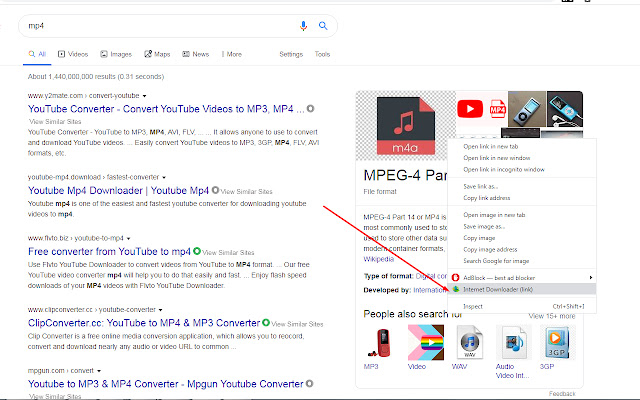
a. Right click on a download link and then click on the Internet Downloader from the context-menu.
b. IDM has several input arguments to enhance downloading desired files. The default argument for downloading is: /d. To get more info about other arguments please open the extension options page and read section arguments. Please note that, you need to add parameters comma separated, for example to automatically download a file write: "/d,/n" in the designated area.
c. You can set the IDM path in your machine from the options page.

Sample Installation Guide:
https://youtu.be/vnkw6LMh-3E

When you contact us in writing we will aim to acknowledge your correspondence within 2 working days.
https://www.internetdownloadpro.com/contact
Thank you!
معلومات أساسية عن التمديد
| الاسم |  Internet Downloader Internet Downloader |
| ID | djanbhnjkgmpfcackklijlijgkcenjjf |
| عنوان URL الرسمي | https://chrome.google.com/webstore/detail/internet-downloader/djanbhnjkgmpfcackklijlijgkcenjjf |
| الوصف | Internet Downloader enables you to download a desired item with an Internet Download Manager (IDM) application. |
| حجم الملف | 120 KB |
| عدد التثبيتات | 60,000 |
| النسخة الحالية | 1.0 |
| آخر تحديث | 2020-02-19 |
| تاريخ النشر | 2020-02-19 |
| تقييم | 4.23/5 مجموع تقييمات 40 |
| المطور | internetdownloadpro |
| نوع الدفع | free |
| اللغات المدعومة | en |
| manifest.json | |
{
    "manifest_version": 2,
    "version": "1.0",
    "name": "Internet Downloader",
    "homepage_url": "https:\/\/www.internetdownloadpro.com\/",
    "description": "Internet Downloader enables you to download a desired item with an Internet Download Manager (IDM) application.",
    "icons": {
        "16": "data\/icons\/16.png",
        "19": "data\/icons\/19.png",
        "32": "data\/icons\/32.png",
        "38": "data\/icons\/38.png",
        "48": "data\/icons\/48.png",
        "64": "data\/icons\/64.png",
        "128": "data\/icons\/128.png"
    },
    "update_url": "https:\/\/clients2.google.com\/service\/update2\/crx",
    "offline_enabled": true,
    "permissions": [
        "tabs",
        "storage",
        "notifications",
        "alarms",
        "idle",
        "cookies",
        "webNavigation",
        "webRequest",
        "webRequestBlocking",
        "nativeMessaging",
        "contextMenus",
        "downloads",
        "*:\/\/*\/*"
    ],
    "background": {
        "scripts": [
            "core\/webext\/utils\/EventEmitter.js",
            "core\/webext\/core\/base.js",
            "core\/webext\/core\/chrome.storage.js",
            "core\/webext\/core\/chrome.runtime.js",
            "core\/webext\/core\/chrome.notifications.js",
            "core\/webext\/core\/chrome.browserAction.js",
            "core\/webext\/core\/chrome.contextMenus.js",
            "core\/webext\/core\/chrome.tabs.js",
            "core\/background.js",
            "termlib_parser.js",
            "config.js",
            "background.js"
        ]
    },
    "browser_action": {
        "default_icon": {
            "16": "data\/icons\/disabled\/16.png",
            "18": "data\/icons\/disabled\/18.png",
            "19": "data\/icons\/disabled\/19.png",
            "32": "data\/icons\/disabled\/32.png",
            "36": "data\/icons\/disabled\/36.png",
            "38": "data\/icons\/disabled\/38.png",
            "48": "data\/icons\/disabled\/48.png",
            "64": "data\/icons\/disabled\/64.png"
        }
    },
    "options_ui": {
        "page": "data\/options\/index.html",
        "chrome_style": true
    }
} | |










![▷ IDM Integration Module [IDM Extension]](https://lh3.googleusercontent.com/piubbGlu8qYRkXNjjxwOAGEenzPXLunfF_LVrDVSYkPIBekThkXH870_8YBQmmDSRPmtjkrzmmNIDLB25s2N73RixA=w128-h128-e365-rj-sc0x00ffffff)