Mouse Dictionary
A super fast dictionary for language learners
ما هو Mouse Dictionary؟
Mouse Dictionary هو إضافة Chrome تم تطويرها بواسطة https://mouse-dictionary.netlify.app، والميزة الرئيسية لها هي "A super fast dictionary for language learners".
لقطات شاشة التمديد
تحميل ملف CRX للإضافة Mouse Dictionary
قم بتنزيل ملفات الامتداد Mouse Dictionary بتنسيق crx ، وقم بتثبيت الامتدادات يدويًا في متصفح Chrome ، أو شارك ملفات crx مع الأصدقاء لتثبيت الامتدادات بسهولة.
تعليمات استخدام التمديد
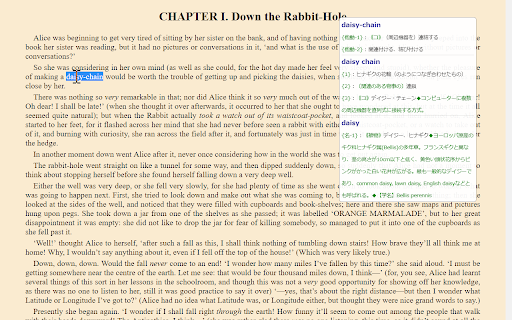
                        Mouse Dictionary is a super fast dictionary for Google Chrome.

Designed mainly for English and Japanese.

Features:
* Super fast!!!
* Awesome phrases detection
* Capable of importing your own text data
* Customizable view
* Available on various documents:
  * PDF documents
  * YouTube captions
  * input elements
  * textarea
--------

In addition to the built-in default English-Japanese dictionary, you can import data as you like including Japanese-English, English-English and so on. Please check here.

https://github.com/wtetsu/mouse-dictionary/wiki/Download-dictionary-data
معلومات أساسية عن التمديد
| الاسم |  Mouse Dictionary Mouse Dictionary |
| ID | dnclbikcihnpjohihfcmmldgkjnebgnj |
| عنوان URL الرسمي | https://chromewebstore.google.com/detail/mouse-dictionary/dnclbikcihnpjohihfcmmldgkjnebgnj |
| الوصف | A super fast dictionary for language learners |
| حجم الملف | 3.48 MB |
| عدد التثبيتات | 103,315 |
| النسخة الحالية | 1.6.6 |
| آخر تحديث | 2024-01-07 |
| تاريخ النشر | 2020-06-21 |
| تقييم | 4.75/5 مجموع تقييمات 100 |
| المطور | https://mouse-dictionary.netlify.app |
| البريد الإلكتروني | [email protected] |
| نوع الدفع | free |
| موقع الإضافة | https://qiita.com/wtetsu/items/c43232c6c44918e977c9 |
| عنوان صفحة المساعدة | https://github.com/wtetsu/mouse-dictionary/issues |
| اللغات المدعومة | en,ja |
| manifest.json | |
{
"update_url": "https:\/\/clients2.google.com\/service\/update2\/crx",
"name": "Mouse Dictionary",
"manifest_version": 3,
"version": "1.6.6",
"description": "__MSG_appDesc__",
"default_locale": "en",
"author": "wtetsu",
"options_ui": {
"page": "options\/options.html",
"open_in_tab": true
},
"permissions": [
"storage",
"unlimitedStorage",
"activeTab",
"scripting"
],
"background": {
"service_worker": "background.js"
},
"action": {
"default_icon": "icons\/icon19.png",
"default_title": "Mouse Dictionary"
},
"commands": {
"_execute_action": {
"description": "Activate the extension"
},
"scroll_down": {
"description": "__MSG_scrollDown__"
},
"scroll_up": {
"description": "__MSG_scrollUp__"
}
},
"icons": {
"16": "icons\/icon16.png",
"48": "icons\/icon48.png",
"128": "icons\/icon128.png"
},
"web_accessible_resources": [
{
"resources": [
"data\/rule.json",
"data\/dict*.json"
],
"matches": [
" | |