LoL Stream Browser
Browse and watch League of Legends livestreams. Mark streams as favorites and receive alerts when they're live.
ما هو LoL Stream Browser؟
LoL Stream Browser هو إضافة Chrome تم تطويرها بواسطة Kyle Schouviller، والميزة الرئيسية لها هي "Browse and watch League of Legends livestreams. Mark streams as favorites and receive alerts when they're live.".
لقطات شاشة التمديد
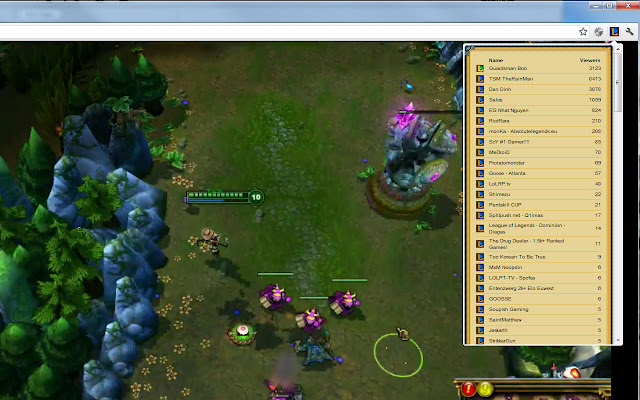

تحميل ملف CRX للإضافة LoL Stream Browser
قم بتنزيل ملفات الامتداد LoL Stream Browser بتنسيق crx ، وقم بتثبيت الامتدادات يدويًا في متصفح Chrome ، أو شارك ملفات crx مع الأصدقاء لتثبيت الامتدادات بسهولة.
تعليمات استخدام التمديد
Always know when your favorite League of Legends streamers are online! LoL Stream Browser displays the currently live streams in a handy drop down within Chrome. Like a particular streamer? Click on the icon next to their stream to mark it as a favorite stream and receive notifications when they're online and streaming! معلومات أساسية عن التمديد
| الاسم |  LoL Stream Browser LoL Stream Browser |
| ID | edidfaijmhpefkbnobdcepampbncgejp |
| عنوان URL الرسمي | https://chrome.google.com/webstore/detail/lol-stream-browser/edidfaijmhpefkbnobdcepampbncgejp |
| الوصف | Browse and watch League of Legends livestreams. Mark streams as favorites and receive alerts when they're live. |
| حجم الملف | 276 KB |
| عدد التثبيتات | 10,000 |
| النسخة الحالية | 1.4.0.3 |
| آخر تحديث | 2019-08-29 |
| تاريخ النشر | 2019-08-29 |
| تقييم | 4.61/5 مجموع تقييمات 1237 |
| المطور | Kyle Schouviller |
| البريد الإلكتروني | [email protected] |
| نوع الدفع | free |
| اللغات المدعومة | en |
| manifest.json | |
{
    "update_url": "https:\/\/clients2.google.com\/service\/update2\/crx",
    "manifest_version": 2,
    "name": "LoL Stream Browser",
    "version": "1.4.0.3",
    "description": "Browse and watch League of Legends livestreams. Mark streams as favorites and receive alerts when they're live.",
    "icons": {
        "16": "pages\/foreground\/image\/icon_16.png",
        "19": "pages\/foreground\/image\/icon_19.png",
        "32": "pages\/foreground\/image\/icon_32.png",
        "48": "pages\/foreground\/image\/icon_48.png",
        "64": "pages\/foreground\/image\/icon_64.png",
        "96": "pages\/foreground\/image\/icon_96.png",
        "128": "pages\/foreground\/image\/icon_128.png"
    },
    "browser_action": {
        "default_icon": "\/pages\/foreground\/image\/icon_19.png",
        "default_title": "LoL Stream Browser",
        "default_popup": ".\/pages\/foreground\/streams_popup.html"
    },
    "background": {
        "scripts": [
            "\/pages\/background\/js\/jquery.min.js",
            "\/pages\/background\/js\/utility.js",
            "\/pages\/background\/js\/analytics.js",
            "\/pages\/background\/js\/host_chrome.js",
            "\/pages\/background\/js\/storage.js",
            "\/pages\/background\/js\/settings.js",
            "\/pages\/background\/js\/favorites.js",
            "\/pages\/background\/js\/stream_base.js",
            "\/pages\/background\/js\/game_base.js",
            "\/pages\/background\/js\/service_twitch_auth.js",
            "\/pages\/background\/js\/service_base.js",
            "\/pages\/background\/js\/service_twitch.js",
            "\/pages\/background\/js\/service_beam.js",
            "\/pages\/background\/js\/game_lol.js",
            "\/pages\/background\/js\/streambg.js"
        ]
    },
    "permissions": [
        "tabs",
        "notifications",
        "storage",
        "identity",
        "https:\/\/id.twitch.tv\/",
        "https:\/\/api.twitch.tv\/",
        "https:\/\/beam.pro\/",
        "http:\/\/www.livestreambrowser.com\/"
    ],
    "web_accessible_resources": [
        "\/pages\/foreground\/image\/icon_48.png"
    ],
    "content_security_policy": "script-src 'self' https:\/\/ssl.google-analytics.com; object-src 'self'"
} | |