Mouse Clerk - Easy image downloader
Allows you to organize, download and create images by simply clicking on them.
ما هو Mouse Clerk - Easy image downloader؟
Mouse Clerk - Easy image downloader هو إضافة Chrome تم تطويرها بواسطة https://www.studiowolfree.com، والميزة الرئيسية لها هي "Allows you to organize, download and create images by simply clicking on them.".
لقطات شاشة التمديد
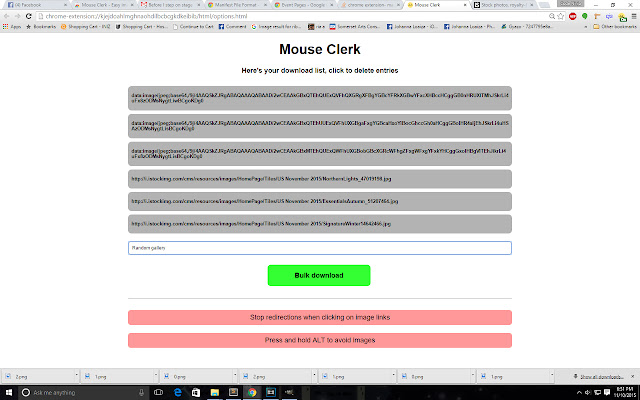


تحميل ملف CRX للإضافة Mouse Clerk - Easy image downloader
قم بتنزيل ملفات الامتداد Mouse Clerk - Easy image downloader بتنسيق crx ، وقم بتثبيت الامتدادات يدويًا في متصفح Chrome ، أو شارك ملفات crx مع الأصدقاء لتثبيت الامتدادات بسهولة.
تعليمات استخدام التمديد
                        Ever want to download tens, hundreds or even thousands of images without having to open tab after tab, right click after right click, drop after drop and rename after rename? Then Mouse Clerk is probably your best bet!

Mouse Clerk allows you to:

- Download images on base64
- Automatically create folders
- Automatically rename files
- Download images on bulk
- Generate source lists by simply clicking on them
- Disable image links temporarily
- Enable and disable it to browse freely

Ready to click and download? Then get Mouse Clerk! It is completely free and will stay free!

Developed by Cristian Herrera
معلومات أساسية عن التمديد
| الاسم |  Mouse Clerk - Easy image downloader Mouse Clerk - Easy image downloader |
| ID | ehebkcpogpoedmlkhpgcmpmkepenacch |
| عنوان URL الرسمي | https://chrome.google.com/webstore/detail/mouse-clerk-easy-image-do/ehebkcpogpoedmlkhpgcmpmkepenacch |
| الوصف | Allows you to organize, download and create images by simply clicking on them. |
| حجم الملف | 127 KB |
| عدد التثبيتات | 324 |
| النسخة الحالية | 0.9.2 |
| آخر تحديث | 2017-08-14 |
| تاريخ النشر | 2017-08-14 |
| تقييم | 3.38/5 مجموع تقييمات 8 |
| المطور | https://www.studiowolfree.com |
| البريد الإلكتروني | [email protected] |
| نوع الدفع | free |
| اللغات المدعومة | en |
| manifest.json | |
{
"update_url": "https:\/\/clients2.google.com\/service\/update2\/crx",
"manifest_version": 2,
"name": "Mouse Clerk - Easy image downloader",
"description": "Allows you to organize, download and create images by simply clicking on them.",
"version": "0.9.2",
"version_name": "Beta 9.2",
"short_name": "MouseClerk",
"browser_action": {
"name": "Click to start Mouse Clerk"
},
"homepage_url": "http:\/\/www.studiowolfree.com",
"permissions": [
"activeTab",
"downloads",
"contextMenus",
"storage"
],
"icons": {
"16": "img\/icon16.png",
"64": "img\/icon.png",
"48": "img\/icon48.png",
"128": "img\/icon128.png"
},
"content_scripts": [
{
"matches": [
" | |