gifstasher
Store your reaction gifs for quick and easy access!
ما هو gifstasher؟
gifstasher هو إضافة Chrome تم تطويرها بواسطة cloudbuster، والميزة الرئيسية لها هي "Store your reaction gifs for quick and easy access!".
لقطات شاشة التمديد
تحميل ملف CRX للإضافة gifstasher
قم بتنزيل ملفات الامتداد gifstasher بتنسيق crx ، وقم بتثبيت الامتدادات يدويًا في متصفح Chrome ، أو شارك ملفات crx مع الأصدقاء لتثبيت الامتدادات بسهولة.
تعليمات استخدام التمديد
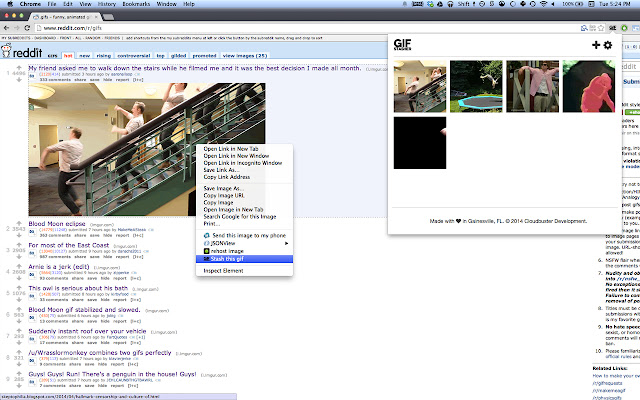
                        Quickly stash gifs while browsing simply by right-clicking and selecting "Stash this gif." Select from your stash and copy the link simply by clicking the gif!

Latest update:

1.0.6
 - Bug fixes

1.0.5
 - Now you can "Copy and Stash" from the Chrome context menu
 - Various bug fixes and performance fixes
معلومات أساسية عن التمديد
| الاسم |  gifstasher gifstasher |
| ID | enegbanenghjkfmmkjimbckfihbamcfi |
| عنوان URL الرسمي | https://chrome.google.com/webstore/detail/gifstasher/enegbanenghjkfmmkjimbckfihbamcfi |
| الوصف | Store your reaction gifs for quick and easy access! |
| حجم الملف | 407 KB |
| عدد التثبيتات | 47 |
| النسخة الحالية | 1.0.7 |
| آخر تحديث | 2014-04-21 |
| تاريخ النشر | 2014-04-21 |
| تقييم | 3.67/5 مجموع تقييمات 3 |
| المطور | cloudbuster |
| نوع الدفع | free |
| اللغات المدعومة | en-US |
| manifest.json | |
{
    "update_url": "https:\/\/clients2.google.com\/service\/update2\/crx",
    "manifest_version": 2,
    "name": "gifstasher",
    "description": "Store your reaction gifs for quick and easy access!",
    "version": "1.0.7",
    "permissions": [
        "storage",
        "contextMenus",
        "clipboardRead",
        "clipboardWrite",
        "notifications"
    ],
    "icons": {
        "16": "img\/icon-bitty.png",
        "48": "img\/icon-small.png",
        "128": "img\/icon-large.png"
    },
    "options_page": "options.html",
    "browser_action": {
        "default_icon": "img\/icon.png",
        "default_popup": "popup.html"
    },
    "background": {
        "scripts": [
            "js\/require.js",
            "js\/background.js"
        ]
    },
    "web_accessible_resources": [
        "img\/icon-small.png"
    ]
} | |