Automatic Keywords Highlighter
Automatically highlights given keywords on any web page you visit.
ما هو Automatic Keywords Highlighter؟
Automatic Keywords Highlighter هو إضافة Chrome تم تطويرها بواسطة Matthias Path، والميزة الرئيسية لها هي "Automatically highlights given keywords on any web page you visit.".
لقطات شاشة التمديد


تحميل ملف CRX للإضافة Automatic Keywords Highlighter
قم بتنزيل ملفات الامتداد Automatic Keywords Highlighter بتنسيق crx ، وقم بتثبيت الامتدادات يدويًا في متصفح Chrome ، أو شارك ملفات crx مع الأصدقاء لتثبيت الامتدادات بسهولة.
تعليمات استخدام التمديد
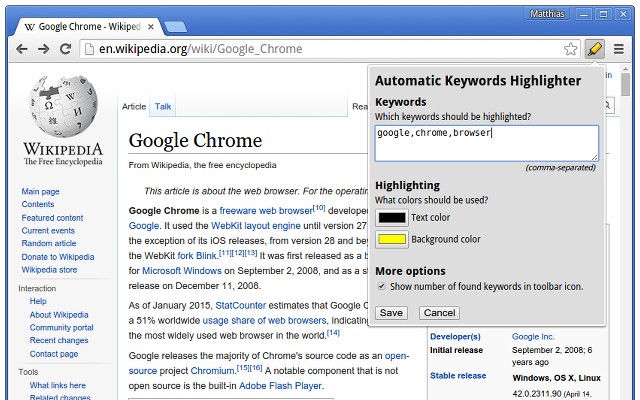
                        Set a list of keywords and Automatic Keywords Highlighter will automatically highlight them on any web page you visit. The icon shows you how often a keyword was highlighted on the current page.

Instead of searching for the interesting bits of a web page, let Automatic Keywords Highlighter show them to you instantly. Simply type in a list of keywords and pick your favourite highlighter color.

Stop searching! Use Automatic Keywords Highlighter!
معلومات أساسية عن التمديد
| الاسم |  Automatic Keywords Highlighter Automatic Keywords Highlighter |
| ID | gcpknobcboilhnacklgmaamlcnblneoi |
| عنوان URL الرسمي | https://chrome.google.com/webstore/detail/automatic-keywords-highli/gcpknobcboilhnacklgmaamlcnblneoi |
| الوصف | Automatically highlights given keywords on any web page you visit. |
| حجم الملف | 46.37 KB |
| عدد التثبيتات | 5,000 |
| النسخة الحالية | 0.1.0 |
| آخر تحديث | 2015-04-15 |
| تاريخ النشر | 2015-04-15 |
| تقييم | 3.36/5 مجموع تقييمات 36 |
| المطور | Matthias Path |
| نوع الدفع | free |
| موقع الإضافة | https://github.com/wrzlbrmft/chrome-keywords-highlighter/blob/master/README.md |
| اللغات المدعومة | en |
| manifest.json | |
{
    "update_url": "https:\/\/clients2.google.com\/service\/update2\/crx",
    "manifest_version": 2,
    "name": "Automatic Keywords Highlighter",
    "short_name": "Automatic Keywords Highlighter",
    "description": "Automatically highlights given keywords on any web page you visit.",
    "version": "0.1.0",
    "icons": {
        "16": "icons\/icon16.png",
        "24": "icons\/icon24.png",
        "32": "icons\/icon32.png",
        "48": "icons\/icon48.png",
        "64": "icons\/icon64.png",
        "72": "icons\/icon72.png",
        "96": "icons\/icon96.png",
        "128": "icons\/icon128.png",
        "256": "icons\/icon256.png"
    },
    "homepage_url": "https:\/\/github.com\/wrzlbrmft\/chrome-keywords-highlighter\/blob\/master\/README.md",
    "permissions": [
        "tabs"
    ],
    "background": {
        "scripts": [
            "background.js"
        ]
    },
    "content_scripts": [
        {
            "matches": [
                "http:\/\/*\/*",
                "https:\/\/*\/*"
            ],
            "js": [
                "content.js"
            ],
            "css": [
                "content.css"
            ]
        }
    ],
    "browser_action": {
        "default_icon": {
            "16": "icons\/icon16.png",
            "24": "icons\/icon24.png",
            "32": "icons\/icon32.png",
            "48": "icons\/icon48.png",
            "64": "icons\/icon64.png",
            "72": "icons\/icon72.png",
            "96": "icons\/icon96.png",
            "128": "icons\/icon128.png",
            "256": "icons\/icon256.png"
        },
        "default_title": "Automatic Keywords Highlighter",
        "default_popup": "popup.html"
    },
    "options_page": "options.html"
} | |