Youtube Output Devices
This extension allows you to select an output audio device for each youtube video you are watching.
ما هو Youtube Output Devices؟
Youtube Output Devices هو إضافة Chrome تم تطويرها بواسطة BinaryBench، والميزة الرئيسية لها هي "This extension allows you to select an output audio device for each youtube video you are watching.".
لقطات شاشة التمديد
تحميل ملف CRX للإضافة Youtube Output Devices
قم بتنزيل ملفات الامتداد Youtube Output Devices بتنسيق crx ، وقم بتثبيت الامتدادات يدويًا في متصفح Chrome ، أو شارك ملفات crx مع الأصدقاء لتثبيت الامتدادات بسهولة.
تعليمات استخدام التمديد
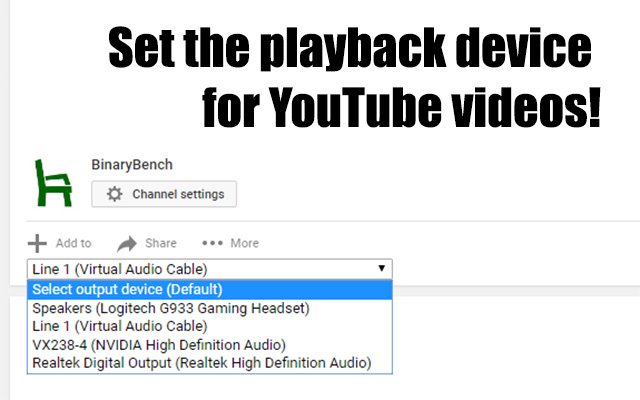
                        This extension allows you to select which device each YouTube video plays to by adding a drop-down right above the video description.  Devices are stored per-session, so the device will not reset when the next video is played via auto-play or a playlist.


This extension is targeted toward streamers who need to play videos into a specific device.  However it is also great for listening to music on your speakers and your headphones at the same time!  (I have no idea why'd you do that, but you do you man, you do you...)
معلومات أساسية عن التمديد
| الاسم |  Youtube Output Devices Youtube Output Devices |
| ID | hecekbdnfioifkbcnemlpnhdfdmgoinj |
| عنوان URL الرسمي | https://chrome.google.com/webstore/detail/youtube-output-devices/hecekbdnfioifkbcnemlpnhdfdmgoinj |
| الوصف | This extension allows you to select an output audio device for each youtube video you are watching. |
| حجم الملف | 11.15 KB |
| عدد التثبيتات | 2,093 |
| النسخة الحالية | 0.2 |
| آخر تحديث | 2017-09-02 |
| تاريخ النشر | 2017-09-02 |
| تقييم | 2.78/5 مجموع تقييمات 67 |
| المطور | BinaryBench |
| البريد الإلكتروني | [email protected] |
| نوع الدفع | free |
| اللغات المدعومة | en-US |
| manifest.json | |
{
    "update_url": "https:\/\/clients2.google.com\/service\/update2\/crx",
    "name": "Youtube Output Devices",
    "short_name": "Yt Devices",
    "version": "0.2",
    "manifest_version": 2,
    "description": "This extension allows you to select an output audio device for each youtube video you are watching.",
    "content_scripts": [
        {
            "matches": [
                "https:\/\/*.youtube.com\/*",
                "http:\/\/*.youtube.com\/*"
            ],
            "js": [
                "content.js"
            ]
        }
    ],
    "permissions": [
        "http:\/\/*.youtube.com\/*",
        "https:\/\/*.youtube.com\/*"
    ],
    "icons": {
        "16": "icons\/icon16.png",
        "48": "icons\/icon48.png",
        "120": "icons\/icon120.png"
    }
} | |