MultiLogin
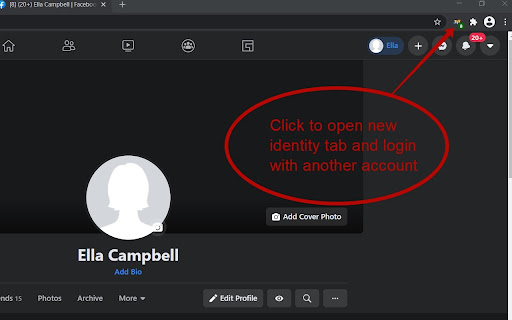
Using websites with multiple accounts at the same time is made easy. Create an independent tab with a click of a button.
ما هو MultiLogin؟
MultiLogin هو إضافة Chrome تم تطويرها بواسطة https://multilogin.top، والميزة الرئيسية لها هي "Using websites with multiple accounts at the same time is made easy. Create an independent tab with a click of a button.".
لقطات شاشة التمديد

تحميل ملف CRX للإضافة MultiLogin
قم بتنزيل ملفات الامتداد MultiLogin بتنسيق crx ، وقم بتثبيت الامتدادات يدويًا في متصفح Chrome ، أو شارك ملفات crx مع الأصدقاء لتثبيت الامتدادات بسهولة.
تعليمات استخدام التمديد
                        This plugin makes it very easy to use multiple accounts on the same site at the same time. Simply click on the plugin icon and go to the site in the created tab of the browser. Reliably works in facebook, tweeter, instagram and other social networks. The plugin is safe to use, your data is not sent anywhere. After the browser is closed, the data is deleted.

P.S. Plugin does not work correctly in google services

1.0.10 - fixed bug in 72 Chrome version
1.0.14 - fixed bug in 80 Chrome version
1.0.17 - fixed bug in 87 Chrome version
1.0.19 - fixed error in gmail
1.0.25 - change tab image check url
معلومات أساسية عن التمديد
| الاسم |  MultiLogin MultiLogin |
| ID | ijfgglilaeakmoilplpcjcgjaoleopfi |
| عنوان URL الرسمي | https://chromewebstore.google.com/detail/multilogin/ijfgglilaeakmoilplpcjcgjaoleopfi |
| الوصف | Using websites with multiple accounts at the same time is made easy. Create an independent tab with a click of a button. |
| حجم الملف | 23.4 KB |
| عدد التثبيتات | 103,698 |
| النسخة الحالية | 1.0.26 |
| آخر تحديث | 2022-03-30 |
| تاريخ النشر | 2020-04-23 |
| تقييم | 4.65/5 مجموع تقييمات 926 |
| المطور | https://multilogin.top |
| البريد الإلكتروني | [email protected] |
| نوع الدفع | free |
| موقع الإضافة | https://multilogin.top |
| عنوان صفحة المساعدة | https://multilogin.top/support/ |
| عنوان صفحة سياسة الخصوصية | https://multilogin.top/privacy-policy.php |
| اللغات المدعومة | de,en,fr,es,ru,ja |
| manifest.json | |
{
    "background": {
        "page": "background.html"
    },
    "browser_action": {
        "default_icon": "icon_128.png",
        "default_title": "New unique Tab"
    },
    "content_scripts": [
        {
            "all_frames": true,
            "js": [
                "content.min.js"
            ],
            "matches": [
                "http:\/\/*\/*",
                "https:\/\/*\/*"
            ],
            "run_at": "document_start"
        }
    ],
    "content_security_policy": "script-src 'self' https:\/\/www.google-analytics.com; object-src 'self'",
    "description": "__MSG_appDesc__",
    "icons": {
        "128": "icon_128.png"
    },
    "manifest_version": 2,
    "name": "MultiLogin",
    "permissions": [
        "contextMenus",
        "cookies",
        "storage",
        "tabs",
        "http:\/\/*\/*",
        "https:\/\/*\/*",
        "webRequest",
        "webRequestBlocking",
        "webNavigation"
    ],
    "update_url": "https:\/\/clients2.google.com\/service\/update2\/crx",
    "default_locale": "en",
    "version": "1.0.26"
} | |