Dota Scryer
Track Dota 2 match data live in Twitch
ما هو Dota Scryer؟
Dota Scryer هو إضافة Chrome تم تطويرها بواسطة https://www.dota-scryer.com، والميزة الرئيسية لها هي "Track Dota 2 match data live in Twitch".
لقطات شاشة التمديد

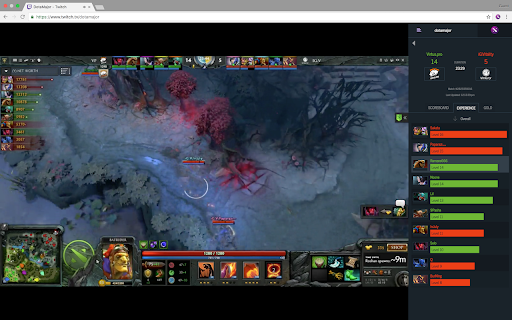

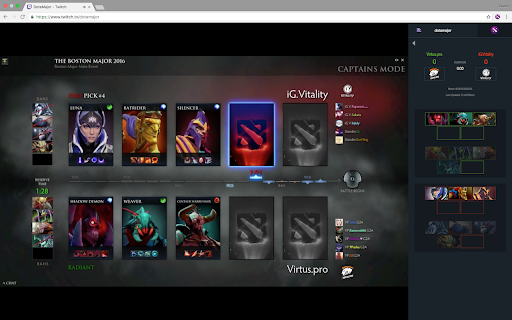

تحميل ملف CRX للإضافة Dota Scryer
قم بتنزيل ملفات الامتداد Dota Scryer بتنسيق crx ، وقم بتثبيت الامتدادات يدويًا في متصفح Chrome ، أو شارك ملفات crx مع الأصدقاء لتثبيت الامتدادات بسهولة.
تعليمات استخدام التمديد
                        Features:

- Select a match from a list of live match data
- Browse the players' heroes, skill builds, items, K/D/A and more in the scoreboard
- Compare the economy of each team in the networth and experience tabs

Dota Scryer works with both vanilla chat and BTTV.

Update History:

Version 0.0.7
- Adds colorblind option; right-click chrome shortcut or go to your chrome's extension page (chrome://extensions/) to access extension options
- Extension now remembers your match when hidden, and will reopen to the same match rather than returning to matchlist
- Minor style and copy fixes
معلومات أساسية عن التمديد
| الاسم |  Dota Scryer Dota Scryer |
| ID | ikfgldhflogacnhppcliagnbmjmlljfh |
| عنوان URL الرسمي | https://chromewebstore.google.com/detail/dota-scryer/ikfgldhflogacnhppcliagnbmjmlljfh |
| الوصف | Track Dota 2 match data live in Twitch |
| حجم الملف | 398 KB |
| عدد التثبيتات | 13 |
| النسخة الحالية | 0.0.7 |
| آخر تحديث | 2016-12-13 |
| تاريخ النشر | 2016-12-12 |
| تقييم | 4.88/5 مجموع تقييمات 8 |
| المطور | https://www.dota-scryer.com |
| البريد الإلكتروني | [email protected] |
| نوع الدفع | free |
| موقع الإضافة | https://www.dota-scryer.com |
| عنوان صفحة المساعدة | https://www.dota-scryer.com/about |
| اللغات المدعومة | en |
| manifest.json | |
{
    "update_url": "https:\/\/clients2.google.com\/service\/update2\/crx",
    "name": "Dota Scryer",
    "version": "0.0.7",
    "manifest_version": 2,
    "description": "Track Dota 2 match data live in Twitch",
    "short_name": "dota-scryer",
    "content_scripts": [
        {
            "matches": [
                "*:\/\/*.twitch.tv\/*"
            ],
            "js": [
                "dotaChromeEx.js",
                "inject.js"
            ],
            "css": [
                "styles.css"
            ]
        }
    ],
    "web_accessible_resources": [
        "styles.css",
        "content.js",
        "assets\/*"
    ],
    "permissions": [
        "https:\/\/*.twitch.tv\/*",
        "storage"
    ],
    "browser_action": {
        "default_icon": {
            "16": "assets\/favicon-16x16.png",
            "24": "assets\/favicon-24x24.png",
            "32": "assets\/favicon-32x32.png"
        }
    },
    "content_security_policy": "script-src 'self' 'unsafe-eval'; object-src 'self'",
    "options_ui": {
        "page": "options.html",
        "chrome_style": true
    }
} | |