HTML Style Quick Viewer
HTML DOM element style quick viewer
ما هو HTML Style Quick Viewer؟
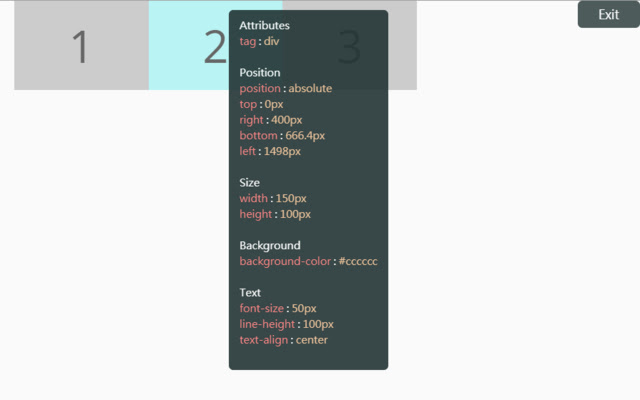
HTML Style Quick Viewer هو إضافة Chrome تم تطويرها بواسطة _(:з」∠)_، والميزة الرئيسية لها هي "HTML DOM element style quick viewer".
لقطات شاشة التمديد
تحميل ملف CRX للإضافة HTML Style Quick Viewer
قم بتنزيل ملفات الامتداد HTML Style Quick Viewer بتنسيق crx ، وقم بتثبيت الامتدادات يدويًا في متصفح Chrome ، أو شارك ملفات crx مع الأصدقاء لتثبيت الامتدادات بسهولة.
تعليمات استخدام التمديد
                        How about viewing the HTML DOM styles in a different way?
Just move your mouse and it shows the target's styles.

After installation, you may have to reload tabs to for the extension to take effect.

Instructions:
1. Click HTML Style Quick Viewer in the toolbar, then click 'run' button to start.
2. Move mouse to see the element's styles.
3. Mouse left click to close the popup panel.
4. Mouse middle click to pin the popup panel.
5. Click the 'Exit' button at the top-right or click 'Stop' button through the toolbar to stop.
معلومات أساسية عن التمديد
| الاسم |  HTML Style Quick Viewer HTML Style Quick Viewer |
| ID | inafmkpmbkldliccdbeieeafnbkcmmap |
| عنوان URL الرسمي | https://chrome.google.com/webstore/detail/html-style-quick-viewer/inafmkpmbkldliccdbeieeafnbkcmmap |
| الوصف | HTML DOM element style quick viewer |
| حجم الملف | 15.88 KB |
| عدد التثبيتات | 271 |
| النسخة الحالية | 1.0.2 |
| آخر تحديث | 2018-08-26 |
| تاريخ النشر | 2018-08-26 |
| تقييم | 5.00/5 مجموع تقييمات 3 |
| المطور | _(:з」∠)_ |
| البريد الإلكتروني | [email protected] |
| نوع الدفع | free |
| اللغات المدعومة | en |
| manifest.json | |
{
    "update_url": "https:\/\/clients2.google.com\/service\/update2\/crx",
    "name": "HTML Style Quick Viewer",
    "description": "HTML DOM element style quick viewer",
    "version": "1.0.2",
    "permissions": [
        "activeTab"
    ],
    "content_scripts": [
        {
            "matches": [
                "http:\/\/*\/*",
                "https:\/\/*\/*"
            ],
            "js": [
                "content\/content.js"
            ],
            "css": [
                "content\/content.css"
            ],
            "run_at": "document_start"
        }
    ],
    "browser_action": {
        "default_title": "HTML Style Quick Viewer\nRight click (Close)\nMiddle click (Pin)",
        "default_icon": {
            "16": "icons\/icon_16.png",
            "32": "icons\/icon_32.png",
            "48": "icons\/icon_48.png",
            "128": "icons\/icon_128.png"
        },
        "default_popup": "popup\/popup.html"
    },
    "manifest_version": 2
} | |