Wiki It
Easily Wikipedia anything on the web without having to leave the page
ما هو Wiki It؟
Wiki It هو إضافة Chrome تم تطويرها بواسطة dlask، والميزة الرئيسية لها هي "Easily Wikipedia anything on the web without having to leave the page".
لقطات شاشة التمديد
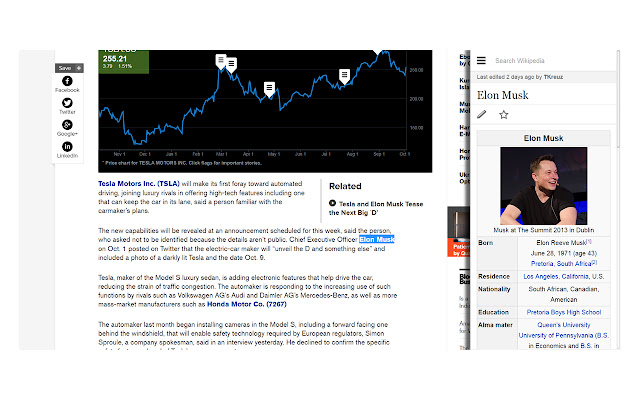
تحميل ملف CRX للإضافة Wiki It
قم بتنزيل ملفات الامتداد Wiki It بتنسيق crx ، وقم بتثبيت الامتدادات يدويًا في متصفح Chrome ، أو شارك ملفات crx مع الأصدقاء لتثبيت الامتدادات بسهولة.
تعليمات استخدام التمديد
                        Wiki It allows you to easily Wikipedia anything on a website without having to leave the page or open a new tab.

+Highlight your desired word(s) (you can do this easily by double clicking)

+Then use the shortcut CTRL + SHIFT + S or click the icon in the top right.(You can change the keyboard shortcut to whatever you want in the extension manager)

+Watch your info slide in! It is that easy!
معلومات أساسية عن التمديد
| الاسم |  Wiki It Wiki It |
| ID | jcmckdmbneffdllfpndkgidingockofb |
| عنوان URL الرسمي | https://chrome.google.com/webstore/detail/wiki-it/jcmckdmbneffdllfpndkgidingockofb |
| الوصف | Easily Wikipedia anything on the web without having to leave the page |
| حجم الملف | 44.26 KB |
| عدد التثبيتات | 447 |
| النسخة الحالية | 2.0 |
| آخر تحديث | 2014-10-05 |
| تاريخ النشر | 2014-10-05 |
| تقييم | 4.60/5 مجموع تقييمات 25 |
| المطور | dlask |
| نوع الدفع | free |
| اللغات المدعومة | en-US |
| manifest.json | |
{
    "update_url": "https:\/\/clients2.google.com\/service\/update2\/crx",
    "name": "Wiki It",
    "description": "Easily Wikipedia anything on the web without having to leave the page",
    "version": "2.0",
    "permissions": [
        "activeTab"
    ],
    "background": {
        "scripts": [
            "background.js"
        ],
        "persistent": false
    },
    "browser_action": {
        "default_title": "Wiki It",
        "default_icon": "icon.png"
    },
    "manifest_version": 2,
    "icons": {
        "16": "icon.png",
        "48": "icon.png",
        "128": "icon.png"
    },
    "commands": {
        "_execute_browser_action": {
            "suggested_key": {
                "windows": "Ctrl+Shift+S",
                "mac": "Command+Shift+S",
                "chromeos": "Ctrl+Shift+S",
                "linux": "Ctrl+Shift+S"
            }
        }
    }
} | |