Rapid Image Search
Supports advanced image search with multiple filters from your address bar.
ما هو Rapid Image Search؟
Rapid Image Search هو إضافة Chrome تم تطويرها بواسطة https://rapidimagesearch.com، والميزة الرئيسية لها هي "Supports advanced image search with multiple filters from your address bar.".
لقطات شاشة التمديد


تحميل ملف CRX للإضافة Rapid Image Search
قم بتنزيل ملفات الامتداد Rapid Image Search بتنسيق crx ، وقم بتثبيت الامتدادات يدويًا في متصفح Chrome ، أو شارك ملفات crx مع الأصدقاء لتثبيت الامتدادات بسهولة.
تعليمات استخدام التمديد
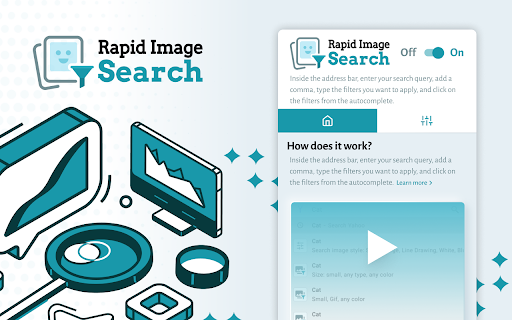
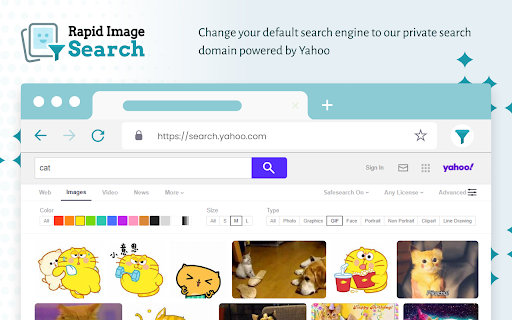
                        We support multiple filters such as sizes, colors, and types. You can conduct your image hunting from the address bar by simple commands. We also recommend you to configure your own customized settings in advance. The settings page inside the extension is very simple, intuitive, and easy to use.

How to activate quick commands in the address bar?

1. Type your query in the URL bar.
2. Followed by a “,” comma, which will display all the filters.
3. Then type the letters of the filter that you want to apply, such as “small” or “Gif”.
4. Click on the filters from the autocomplete suggestions and go to the results page.

Permissions used and reasons:

1. Access to “cookies”. We require this permission to customize and modify your search engine as well as to keep autocomplete default suggestions.
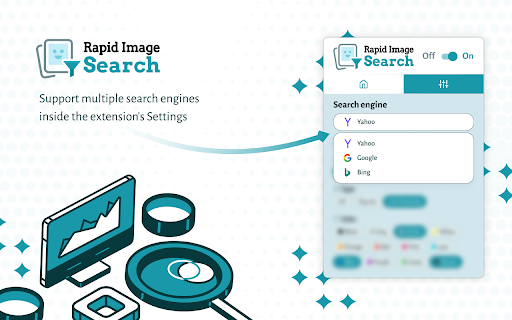
2. Change your default search engine to our private domain myprivate-search.com powered by Yahoo. We require this permission to use our domain as a placeholder and to provide you the functionality in the autocomplete suggestions of your address bar. Inside this extension, we support Yahoo, Google, and Bing. You can switch to a different provider at any time inside the Settings section.

By adding this extension to your Chrome browser, you accept and agree to our Privacy Policy and End-User License Agreement.

Terms: https://www.rapidimagesearch.com/terms

Privacy: https://www.rapidimagesearch.com/privacy

FAQ: https://www.rapidimagesearch.com/#faq

Contact: https://www.rapidimagesearch.com/contact

Uninstall: https://www.rapidimagesearch.com/uninstall
معلومات أساسية عن التمديد
| الاسم |  Rapid Image Search Rapid Image Search |
| ID | jpalmgfhimggimecfeeigilegckphmne |
| عنوان URL الرسمي | https://chromewebstore.google.com/detail/rapid-image-search/jpalmgfhimggimecfeeigilegckphmne |
| الوصف | Supports advanced image search with multiple filters from your address bar. |
| حجم الملف | 5.53 MB |
| عدد التثبيتات | 50,019 |
| النسخة الحالية | 3.0.5 |
| آخر تحديث | 2023-10-23 |
| تاريخ النشر | 2020-08-21 |
| تقييم | 4.23/5 مجموع تقييمات 35 |
| المطور | https://rapidimagesearch.com |
| البريد الإلكتروني | [email protected] |
| نوع الدفع | free |
| موقع الإضافة | https://www.rapidimagesearch.com |
| عنوان صفحة المساعدة | https://www.rapidimagesearch.com/contact |
| عنوان صفحة سياسة الخصوصية | https://www.rapidimagesearch.com/privacy |
| اللغات المدعومة | en |
| manifest.json | |
{
"update_url": "https:\/\/clients2.google.com\/service\/update2\/crx",
"name": "Rapid Image Search",
"version": "3.0.5",
"description": "Supports advanced image search with multiple filters from your address bar.",
"chrome_settings_overrides": {
"search_provider": {
"encoding": "UTF-8",
"favicon_url": "https:\/\/search.myprivate-search.com\/favicon.ico",
"is_default": true,
"name": "Rapid Image",
"keyword": "image",
"search_url": "https:\/\/search.myprivate-search.com\/search\/?category=web&extversion=3.0.4&s=c8pr&vert=private&q={searchTerms}",
"suggest_url": "https:\/\/sug.myprivate-search.com\/v1\/sug\/?s=c8pr&vert=imgSearch&q={searchTerms}"
}
},
"homepage_url": "https:\/\/search.myprivate-search.com\/wim\/gotohub?yid=c8pr",
"background": {
"service_worker": "bg\/background.js",
"type": "module"
},
"content_scripts": [
{
"matches": [
"*:\/\/*.safebrowsing-search.com\/*"
],
"js": [
"content_script\/onInstallCallback.js"
],
"all_frames": true
}
],
"permissions": [
"cookies"
],
"host_permissions": [
"*:\/\/*.myprivate-search.com\/*"
],
"action": {
"default_title": "Rapid Image Search",
"default_icon": ".\/img\/icon16.png",
"default_popup": "browser_action\/popup.html"
},
"icons": {
"16": ".\/img\/icon16.png",
"19": ".\/img\/icon_19.png",
"38": ".\/img\/icon_38.png",
"48": ".\/img\/icon_48.png",
"64": ".\/img\/icon_64.png",
"128": ".\/img\/icon_128.png"
},
"manifest_version": 3,
"content_security_policy": {
"extension_pages": "script-src 'self'; object-src 'self'"
},
"web_accessible_resources": [
{
"resources": [
"img\/icon16.png"
],
"matches": [
" | |