Myles
Compare rewards across various affiliate programs
ما هو Myles؟
Myles هو إضافة Chrome تم تطويرها بواسطة Harsh Gosar، والميزة الرئيسية لها هي "Compare rewards across various affiliate programs".
لقطات شاشة التمديد

تحميل ملف CRX للإضافة Myles
قم بتنزيل ملفات الامتداد Myles بتنسيق crx ، وقم بتثبيت الامتدادات يدويًا في متصفح Chrome ، أو شارك ملفات crx مع الأصدقاء لتثبيت الامتدادات بسهولة.
تعليمات استخدام التمديد
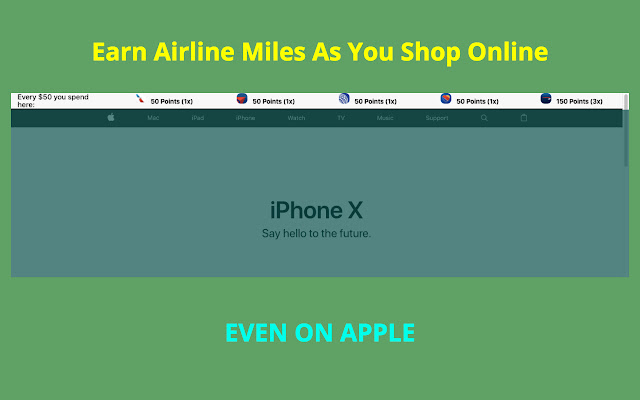
                        Compare your rewards earnings for Ebates, American Airlines, Delta Airlines, United Ailrines, Southwest Airlines shopping portal

[Points updated for Feb 2018]

Disclaimer:
1) This chrome extension is not perfect and I don't guarantee the accuracy of the points depicted.
2) I am not liable for any of your shopping decisions and points received.
3) The airline decides their own policy and it's up to you to read that.
4) Points may not be exact and you agree to confirm them yourself.

You agree to these terms by downloading the extension.

Email your suggestions to [email protected] .
معلومات أساسية عن التمديد
| الاسم |  Myles Myles |
| ID | knjgohecfkkdfmhknimolilgfcgmephf |
| عنوان URL الرسمي | https://chrome.google.com/webstore/detail/myles/knjgohecfkkdfmhknimolilgfcgmephf |
| الوصف | Compare rewards across various affiliate programs |
| حجم الملف | 1.01 MB |
| عدد التثبيتات | 51 |
| النسخة الحالية | 1.0.5 |
| آخر تحديث | 2018-02-27 |
| تاريخ النشر | 2018-02-27 |
| تقييم | 5.00/5 مجموع تقييمات 6 |
| المطور | Harsh Gosar |
| البريد الإلكتروني | [email protected] |
| نوع الدفع | free |
| موقع الإضافة | http://thatmilesapp.com |
| عنوان صفحة سياسة الخصوصية | http://gosar.us/privacy.html |
| اللغات المدعومة | en-US |
| manifest.json | |
{
    "update_url": "https:\/\/clients2.google.com\/service\/update2\/crx",
    "manifest_version": 2,
    "name": "Myles",
    "description": "Compare rewards across various affiliate programs",
    "version": "1.0.5",
    "icons": {
        "16": "icons\/16.png",
        "48": "icons\/64.png",
        "128": "icons\/128.png"
    },
    "background": {
        "persistent": false,
        "scripts": [
            "background\/location.js",
            "background\/main.js"
        ]
    },
    "browser_action": {
        "default_popup": "popup\/popup.html"
    },
    "permissions": [
        "activeTab",
        "identity",
        "tabs",
        "geolocation",
        "storage"
    ],
    "content_scripts": [
        {
            "matches": [
                "http:\/\/www.amazon.com\/",
                "https:\/\/www.amazon.com\/"
            ],
            "css": [
                "lib\/font.css",
                "content\/amazon-home\/style.css"
            ],
            "js": [
                "lib\/jquery.js",
                "lib\/tether.js",
                "lib\/bootstrap.min.js",
                "content\/amazon-home\/script.js"
            ]
        },
        {
            "matches": [
                "http:\/\/*\/*",
                "https:\/\/*\/*"
            ],
            "exclude_globs": [
                "http:\/\/www.amazon.com\/*",
                "https:\/\/www.amazon.com\/*"
            ],
            "css": [
                "lib\/font.css",
                "header\/style.css"
            ],
            "js": [
                "lib\/jquery.js",
                "lib\/tether.js",
                "lib\/bootstrap.min.js",
                "content\/db\/db_us.js",
                "content\/db\/db_in.js",
                "content\/helper\/domain_extract.js",
                "content\/header\/header_us.js",
                "content\/header\/header_in.js",
                "content\/script.js"
            ]
        },
        {
            "matches": [
                "https:\/\/shop.jetprivilege.com\/",
                "http:\/\/shop.jetprivilege.com\/"
            ],
            "css": [],
            "js": [
                "lib\/jquery.js",
                "content\/jet\/script.js"
            ]
        }
    ],
    "content_security_policy": "script-src 'self' https:\/\/ssl.google-analytics.com; object-src 'self'"
} | |