Boostflix
Netflix Booster
ما هو Boostflix؟
Boostflix هو إضافة Chrome تم تطويرها بواسطة onurgule، والميزة الرئيسية لها هي "Netflix Booster".
لقطات شاشة التمديد


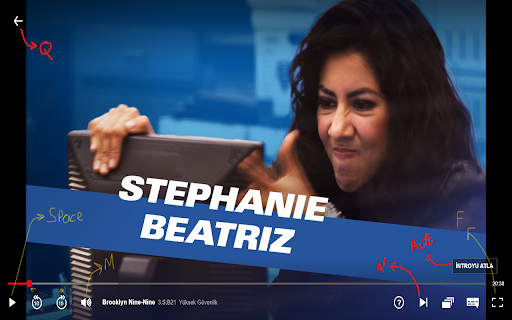
تحميل ملف CRX للإضافة Boostflix
قم بتنزيل ملفات الامتداد Boostflix بتنسيق crx ، وقم بتثبيت الامتدادات يدويًا في متصفح Chrome ، أو شارك ملفات crx مع الأصدقاء لتثبيت الامتدادات بسهولة.
تعليمات استخدام التمديد
                        Netflix Booster

You can speed up your watching time.
If you are watching something on Netflix with subtitles, you can turn on "Subtitle Slow" and fast movie will slow down while somebody is speaking.

You can turn on Auto Skip Intro!

New Shortcuts
N - Next Episode
Q - Quit Movie (Back)

Also you can buy us a coffee :)
معلومات أساسية عن التمديد
| الاسم |  Boostflix Boostflix |
| ID | lclkjhbaaobacpcegdniijkhedeafche |
| عنوان URL الرسمي | https://chromewebstore.google.com/detail/boostflix/lclkjhbaaobacpcegdniijkhedeafche |
| الوصف | Netflix Booster |
| حجم الملف | 42.01 KB |
| عدد التثبيتات | 29 |
| النسخة الحالية | 1.0.2 |
| آخر تحديث | 2020-09-22 |
| تاريخ النشر | 2020-08-25 |
| تقييم | 4.88/5 مجموع تقييمات 8 |
| المطور | onurgule |
| البريد الإلكتروني | [email protected] |
| نوع الدفع | free |
| اللغات المدعومة | en |
| manifest.json | |
{
    "update_url": "https:\/\/clients2.google.com\/service\/update2\/crx",
    "name": "Boostflix",
    "version": "1.0.2",
    "description": "Netflix Booster",
    "permissions": [
        "activeTab",
        "declarativeContent",
        "storage"
    ],
    "background": {
        "scripts": [
            "src\/js\/background.js"
        ],
        "persistent": false
    },
    "page_action": {
        "default_popup": "popup.html",
        "default_icon": {
            "16": "images\/videospeed16.png",
            "32": "images\/videospeed32.png",
            "64": "images\/videospeed64.png",
            "128": "images\/videospeed128.png"
        }
    },
    "icons": {
        "16": "images\/videospeed16.png",
        "32": "images\/videospeed32.png",
        "64": "images\/videospeed64.png",
        "128": "images\/videospeed128.png"
    },
    "options_page": "options.html",
    "manifest_version": 2
} | |