MUSE login
Automatically log in to shef.ac.uk without typing your details!
ما هو MUSE login؟
MUSE login هو إضافة Chrome تم تطويرها بواسطة georgepowell10، والميزة الرئيسية لها هي "Automatically log in to shef.ac.uk without typing your details!".
لقطات شاشة التمديد
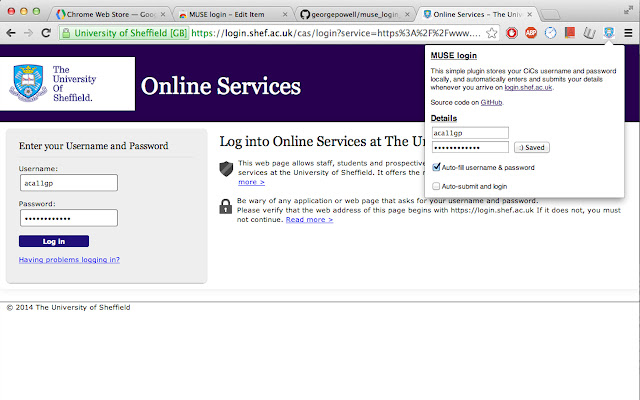
تحميل ملف CRX للإضافة MUSE login
قم بتنزيل ملفات الامتداد MUSE login بتنسيق crx ، وقم بتثبيت الامتدادات يدويًا في متصفح Chrome ، أو شارك ملفات crx مع الأصدقاء لتثبيت الامتدادات بسهولة.
تعليمات استخدام التمديد
                        Fed up of typing your MUSE login every single freaking time? Why can't chrome remember your password or keep you signed in like every other website? Now it can! Introducing the MUSE login chrome extension. The extension automatically fills in and submits the login form whenever you arrive on the university login page, so you don't have to!

Fully open source and free forever at https://github.com/georgepowell/muse_login_chrome

Extension does not access the internet and stores your details safely on the local machine. Feel free to check out the source code if you have any doubts.
معلومات أساسية عن التمديد
| الاسم |  MUSE login MUSE login |
| ID | lgemcjddblhggnfeigkgoefcedkhmdnl |
| عنوان URL الرسمي | https://chrome.google.com/webstore/detail/muse-login/lgemcjddblhggnfeigkgoefcedkhmdnl |
| الوصف | Automatically log in to shef.ac.uk without typing your details! |
| حجم الملف | 211 KB |
| عدد التثبيتات | 31 |
| النسخة الحالية | 0.1 |
| آخر تحديث | 2014-03-03 |
| تاريخ النشر | 2014-03-03 |
| تقييم | 5.00/5 مجموع تقييمات 1 |
| المطور | georgepowell10 |
| نوع الدفع | free |
| اللغات المدعومة | en-GB |
| manifest.json | |
{
    "update_url": "https:\/\/clients2.google.com\/service\/update2\/crx",
    "name": "MUSE login",
    "version": "0.1",
    "description": "Automatically log in to shef.ac.uk without typing your details!",
    "content_scripts": [
        {
            "js": [
                "jquery.js",
                "content_script.js"
            ],
            "matches": [
                "http:\/\/login.shef.ac.uk\/*",
                "https:\/\/login.shef.ac.uk\/*"
            ]
        }
    ],
    "permissions": [
        "declarativeContent",
        "storage"
    ],
    "icons": {
        "19": "icon-19.png",
        "48": "icon-48.png",
        "128": "icon-128.png"
    },
    "browser_action": {
        "default_icon": "icon-19.png",
        "default_title": "Muse Login!",
        "default_popup": "default_page.html"
    },
    "manifest_version": 2
} | |