Grab Session Links
Web extension that allows you to paste and open links, as well as copy all the links from your open tabs with one click.
ما هو Grab Session Links؟
Grab Session Links هو إضافة Chrome تم تطويرها بواسطة solidhydrogenblock، والميزة الرئيسية لها هي "Web extension that allows you to paste and open links, as well as copy all the links from your open tabs with one click.".
لقطات شاشة التمديد
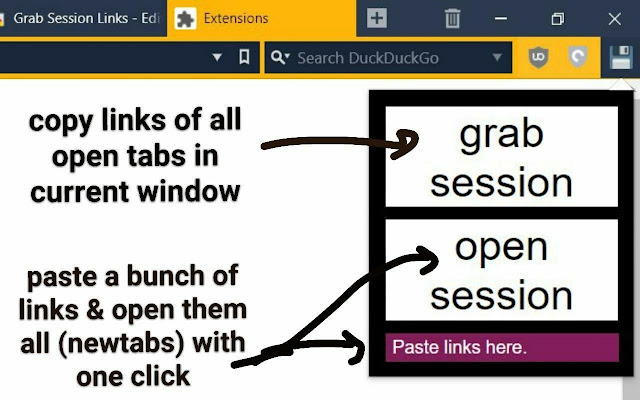
تحميل ملف CRX للإضافة Grab Session Links
قم بتنزيل ملفات الامتداد Grab Session Links بتنسيق crx ، وقم بتثبيت الامتدادات يدويًا في متصفح Chrome ، أو شارك ملفات crx مع الأصدقاء لتثبيت الامتدادات بسهولة.
تعليمات استخدام التمديد
                        - Copy all links from open tabs (in the current window).
- Reopen a bunch of copied links (in new tabs) by pressing just one button.

Useful in situations where you need to get rid of tab clutter but save links for later.

Icon made by Freepik from www.flaticon.com
معلومات أساسية عن التمديد
| الاسم |  Grab Session Links Grab Session Links |
| ID | lhciibpofggfoobnonichplmcognkgmo |
| عنوان URL الرسمي | https://chrome.google.com/webstore/detail/grab-session-links/lhciibpofggfoobnonichplmcognkgmo |
| الوصف | Web extension that allows you to paste and open links, as well as copy all the links from your open tabs with one click. |
| حجم الملف | 9.96 KB |
| عدد التثبيتات | 19 |
| النسخة الحالية | 0.4 |
| آخر تحديث | 2020-03-19 |
| تاريخ النشر | 2020-03-19 |
| تقييم | 5.00/5 مجموع تقييمات 2 |
| المطور | solidhydrogenblock |
| نوع الدفع | free |
| اللغات المدعومة | en |
| manifest.json | |
{
"update_url": "https:\/\/clients2.google.com\/service\/update2\/crx",
"manifest_version": 2,
"name": "Grab Session Links",
"version": "0.4",
"description": "Web extension that allows you to paste and open links, as well as copy all the links from your open tabs with one click.",
"content_scripts": [
{
"matches": [
" | |