Search image on 1688
Quickly search for any image while browsing on 1688!
ما هو Search image on 1688؟
Search image on 1688 هو إضافة Chrome تم تطويرها بواسطة 1688price، والميزة الرئيسية لها هي "Quickly search for any image while browsing on 1688!".
لقطات شاشة التمديد
تحميل ملف CRX للإضافة Search image on 1688
قم بتنزيل ملفات الامتداد Search image on 1688 بتنسيق crx ، وقم بتثبيت الامتدادات يدويًا في متصفح Chrome ، أو شارك ملفات crx مع الأصدقاء لتثبيت الامتدادات بسهولة.
تعليمات استخدام التمديد
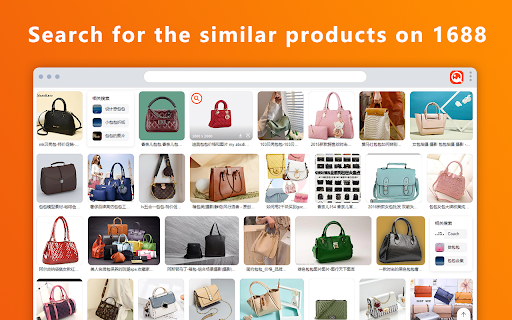
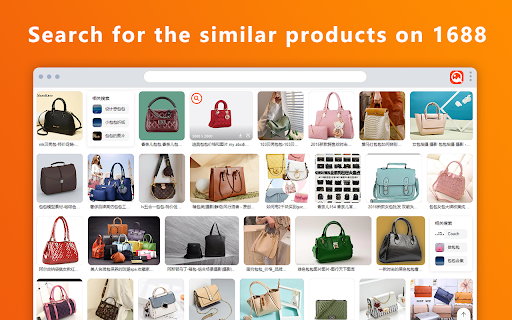
                        Quickly search 1688 for any image you see while browsing!

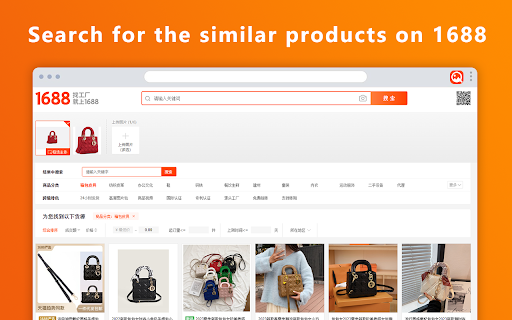
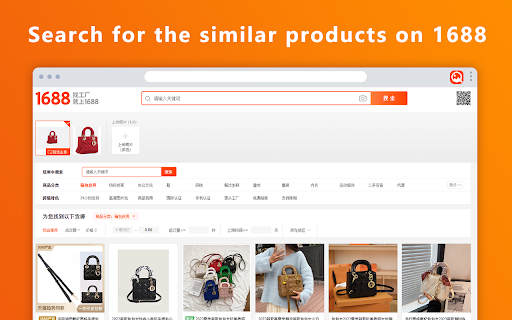
Source products from 1688 with ease! It will let you search for similar products on 1688 with one click.

When you hover on any image you see on the web, this extension's icon will appear in the image's top-left corner. Click on the icon to initiate searching for similar products on 1688 Image Search.

Click the extension icon of 1688 Search Pictures to provide shortcuts to multiple functions such as product management, purchase orders, coupons, purchase orders, and messages.

This saves you lots of time because you don't have to download the image to your computer and then go to 1688 and upload that image in their search. You just press the button and the extension does it for you!
معلومات أساسية عن التمديد
| الاسم |  Search image on 1688 Search image on 1688 |
| ID | lklcoakdokihohjokpoiiobgllhfmhpg |
| عنوان URL الرسمي | https://chromewebstore.google.com/detail/search-image-on-1688/lklcoakdokihohjokpoiiobgllhfmhpg |
| الوصف | Quickly search for any image while browsing on 1688! |
| حجم الملف | 105 KB |
| عدد التثبيتات | 282 |
| النسخة الحالية | 1.2.3 |
| آخر تحديث | 2023-11-22 |
| تاريخ النشر | 2023-07-06 |
| تقييم | 5.00/5 مجموع تقييمات 1 |
| المطور | 1688price |
| البريد الإلكتروني | [email protected] |
| نوع الدفع | free |
| عنوان صفحة سياسة الخصوصية | https://www.freeprivacypolicy.com/live/bf1c0760-535d-4622-b43a-6f45f71020cb |
| اللغات المدعومة | id,ms,de,en,en-GB,en-US,fil,fr,sw,nl,no,vi,tr,ca,da,et,es,es-419,hr,it,lv,lt,hu,pl,pt-BR,pt-PT,ro,sk,sl,fi,sv,cs,el,sr,bg,ru,uk,iw,fa,mr,hi,bn,gu,ta,te,kn-IN,ml,th,am-ET,ar,zh-CN,ja,ko |
| manifest.json | |
{
"update_url": "https:\/\/clients2.google.com\/service\/update2\/crx",
"name": "__MSG_default_title__",
"default_locale": "en",
"version": "1.2.3",
"description": "__MSG_description__",
"background": {
"service_worker": ".\/background.js"
},
"manifest_version": 3,
"action": {
"default_popup": "popup\/popup.html",
"default_icon": "assets\/logo\/logo_x48.png"
},
"icons": {
"16": "assets\/logo\/logo_x16.png",
"48": "assets\/logo\/logo_x48.png",
"128": "assets\/logo\/logo_x128.png"
},
"content_scripts": [
{
"matches": [
" | |