ARM: Application Resource Manager
ARM allows you to easily manage and track all your job applications.
ما هو ARM: Application Resource Manager؟
ARM: Application Resource Manager هو إضافة Chrome تم تطويرها بواسطة armapptracker، والميزة الرئيسية لها هي "ARM allows you to easily manage and track all your job applications.".
لقطات شاشة التمديد
تحميل ملف CRX للإضافة ARM: Application Resource Manager
قم بتنزيل ملفات الامتداد ARM: Application Resource Manager بتنسيق crx ، وقم بتثبيت الامتدادات يدويًا في متصفح Chrome ، أو شارك ملفات crx مع الأصدقاء لتثبيت الامتدادات بسهولة.
تعليمات استخدام التمديد
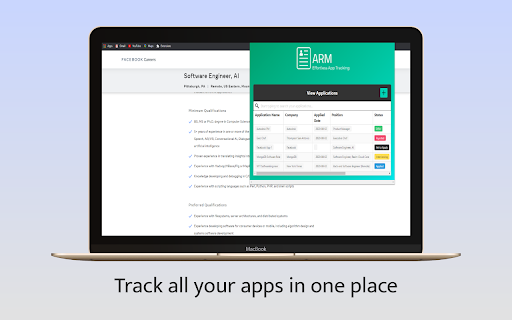
                        Gone are the days where you're left wondering where you applied and when you applied. ARM allows you to simply aggregate, track, and manage all your job applications in an easy to use chrome extension. Get armed with the tool you need to land your next dream job!

How does it work?

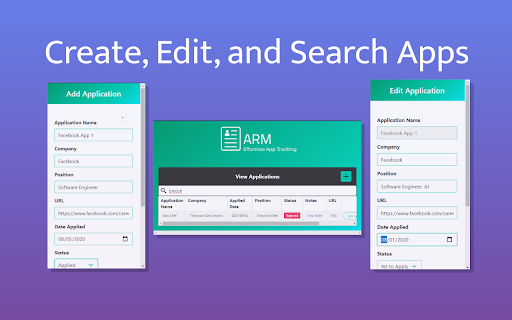
1. Create an ARM application on the page of your job listing
2. Fill in key job attributes such as company, position, application date, application status, and application notes
3. Track and edit your applications on the ARM dashboard

More features to come!
معلومات أساسية عن التمديد
| الاسم |  ARM: Application Resource Manager ARM: Application Resource Manager |
| ID | lncocmadpkincipbnejcfkjdgghnbooj |
| عنوان URL الرسمي | https://chromewebstore.google.com/detail/arm-application-resource/lncocmadpkincipbnejcfkjdgghnbooj |
| الوصف | ARM allows you to easily manage and track all your job applications. |
| حجم الملف | 97.44 KB |
| عدد التثبيتات | 104 |
| النسخة الحالية | 1.0 |
| آخر تحديث | 2020-08-19 |
| تاريخ النشر | 2020-08-18 |
| تقييم | 5.00/5 مجموع تقييمات 2 |
| المطور | armapptracker |
| البريد الإلكتروني | [email protected] |
| نوع الدفع | free |
| اللغات المدعومة | en-US |
| manifest.json | |
{
    "update_url": "https:\/\/clients2.google.com\/service\/update2\/crx",
    "name": "ARM: Application Resource Manager",
    "version": "1.0",
    "description": "ARM allows you to easily manage and track all your job applications.",
    "permissions": [
        "tabs",
        "storage"
    ],
    "browser_action": {
        "default_popup": "popup.html"
    },
    "icons": {
        "16": "arm-logo-v1-16.png",
        "48": "arm-logo-v1-48.png",
        "128": "arm-logo-v1-128.png"
    },
    "manifest_version": 2
} | |