Immediate Shot
Immediate Shot is a Chrome Extension that takes screenshots quickly with one click.
ما هو Immediate Shot؟
Immediate Shot هو إضافة Chrome تم تطويرها بواسطة Go Noji، والميزة الرئيسية لها هي "Immediate Shot is a Chrome Extension that takes screenshots quickly with one click.".
لقطات شاشة التمديد
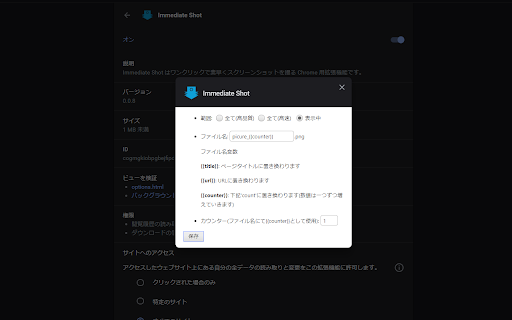
تحميل ملف CRX للإضافة Immediate Shot
قم بتنزيل ملفات الامتداد Immediate Shot بتنسيق crx ، وقم بتثبيت الامتدادات يدويًا في متصفح Chrome ، أو شارك ملفات crx مع الأصدقاء لتثبيت الامتدادات بسهولة.
تعليمات استخدام التمديد
                        Download screenshots with one click
According to the situation,

・ Capture the full screen in perfect resolution
-Capture the whole screen quickly anyway
・ Capture only the displayed area

You can set the selection in advance and also control the file name to download.

UPDATE(v0.1.0): Fixed a bug where active tabs were not being captured when multiple windows were open.
UPDATE (v0.1.1): You can now set a config value to deal with the error that occurs when doing a fast capture in Chrome 92 or later.
Added support for content that cannot be displayed without scrolling the page.
معلومات أساسية عن التمديد
| الاسم |  Immediate Shot Immediate Shot |
| ID | lopfaoacjcbbcfhmjofbfgfmdllclhln |
| عنوان URL الرسمي | https://chromewebstore.google.com/detail/immediate-shot/lopfaoacjcbbcfhmjofbfgfmdllclhln |
| الوصف | Immediate Shot is a Chrome Extension that takes screenshots quickly with one click. |
| حجم الملف | 52.35 KB |
| عدد التثبيتات | 77 |
| النسخة الحالية | 0.1.1 |
| آخر تحديث | 2021-08-24 |
| تاريخ النشر | 2020-02-28 |
| تقييم | 5.00/5 مجموع تقييمات 1 |
| المطور | Go Noji |
| البريد الإلكتروني | [email protected] |
| نوع الدفع | free |
| موقع الإضافة | https://github.com/Go-Noji/Immediate-Shot |
| اللغات المدعومة | en,ja |
| manifest.json | |
{
    "update_url": "https:\/\/clients2.google.com\/service\/update2\/crx",
    "name": "Immediate Shot",
    "version": "0.1.1",
    "description": "__MSG_msg_desc__",
    "default_locale": "en",
    "background": {
        "persistent": false,
        "scripts": [
            "background.bundle.js"
        ]
    },
    "content_scripts": [
        {
            "js": [
                "page.bundle.js"
            ],
            "matches": [
                "http:\/\/*\/*",
                "https:\/\/*\/*"
            ]
        }
    ],
    "browser_action": {
        "default_icon": {
            "128": "128.png"
        }
    },
    "icons": {
        "128": "128.png",
        "48": "48.png",
        "32": "32.png"
    },
    "permissions": [
        "activeTab",
        "tabs",
        "storage",
        "background",
        "contextMenus",
        "downloads"
    ],
    "options_ui": {
        "page": "options.html",
        "chrome_style": true
    },
    "manifest_version": 2
} | |