Whatsapp Desktop - How to Use Windows and Mac
Are you want to Use Web WhatsApp (Windows 10/8.1/8/7/Vista/XP or Mac)? Visit Offered by website link.
ما هو Whatsapp Desktop - How to Use Windows and Mac؟
Whatsapp Desktop - How to Use Windows and Mac هو إضافة Chrome تم تطويرها بواسطة https://web-whatsapp.alorbook.com، والميزة الرئيسية لها هي "Are you want to Use Web WhatsApp (Windows 10/8.1/8/7/Vista/XP or Mac)? Visit Offered by website link.".
لقطات شاشة التمديد
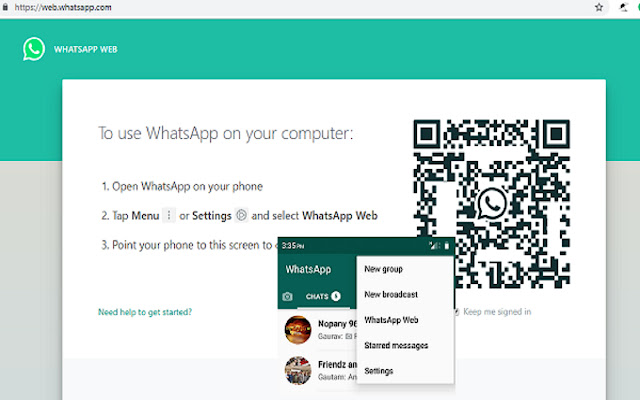


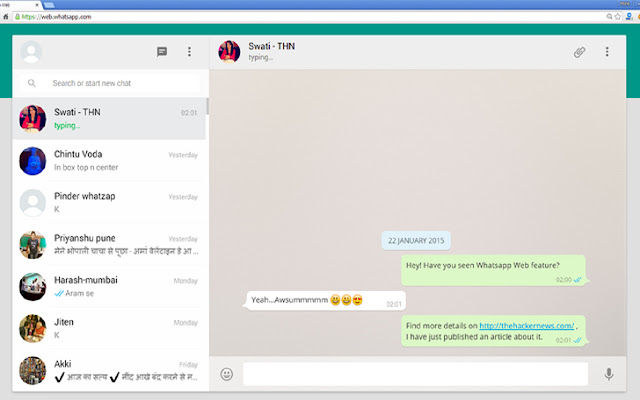
تحميل ملف CRX للإضافة Whatsapp Desktop - How to Use Windows and Mac
قم بتنزيل ملفات الامتداد Whatsapp Desktop - How to Use Windows and Mac بتنسيق crx ، وقم بتثبيت الامتدادات يدويًا في متصفح Chrome ، أو شارك ملفات crx مع الأصدقاء لتثبيت الامتدادات بسهولة.
تعليمات استخدام التمديد
                        We seem to be more connected more than ever with the way smartphones and mobile apps has made everything so accessible. From the time when Whats App Incorporated introduced Whats App messenger, we think we found the best form of unlimited call and text within the application. It’s highly practical because were able to enjoy these features with only an Internet connection required. Needless to say, we can talk endlessly over video calls, voice and send messages anywhere. Friends, families, co-workers and almost everyone we know already use the app.

How to Download WhatsApp for your PC:
Step 1: Download the android emulator software Andy and it is available for free. Click here to download: Download

Step 2: Start the installation of Andy by clicking on the installer file you downloaded.

Step 3: When the software is ready to be used, start it and complete the sign up procedure and login with Google Play account.

Step 4: Start Google play store app and use its search tool to search WhatsApp download.

Step 5: Find Whats App and start the installation.

Step 6: Launch the game and you can now play Whats App on pc using a mouse or your keyboard and even your touchscreen, you can use the control button to emulate the pinch function to zoom in and out.

Step 7: You can also install remote control app form here for remotely accessing the game: Andy remote control app

Support: we maintain an online real-time Facebook support group if you have any issues with Andy OS installation process, you can use this link to access the group: support
معلومات أساسية عن التمديد
| الاسم |  Whatsapp Desktop - How to Use Windows and Mac Whatsapp Desktop - How to Use Windows and Mac |
| ID | lphdhngohcganaaejfagdaeepjekhodf |
| عنوان URL الرسمي | https://chrome.google.com/webstore/detail/whatsapp-desktop-how-to-u/lphdhngohcganaaejfagdaeepjekhodf |
| الوصف | Are you want to Use Web WhatsApp (Windows 10/8.1/8/7/Vista/XP or Mac)? Visit Offered by website link. |
| حجم الملف | 77.56 KB |
| عدد التثبيتات | 10,933 |
| النسخة الحالية | 1.0 |
| آخر تحديث | 2021-04-09 |
| تاريخ النشر | 2021-04-09 |
| تقييم | 5.00/5 مجموع تقييمات 1 |
| المطور | https://web-whatsapp.alorbook.com |
| البريد الإلكتروني | [email protected] |
| نوع الدفع | free |
| موقع الإضافة | https://www.howmash.com/whatsapp-web-for-pc-download-windows-laptop/ |
| عنوان صفحة سياسة الخصوصية | https://www.alorbook.com/privacy-policy |
| اللغات المدعومة | en-GB |
| manifest.json | |
null | |
















![DraStic DS Emulator Apk PC [Guide]](https://lh3.googleusercontent.com/VWKHq9PT3BcxeLZyzPdDbQKxuBzpwxjPKrlEh8ApsENVaXS1jn75QEZhDNz8vGeh2vgKRLCO8rSDYGl0RQRwYwpDiOA)


![Vidmate Apk Download 2020[Latest Version]](https://lh3.googleusercontent.com/PHJ5siLWbHAS8n8CaC-7eF8LuysxUNXQ4N3ya6PZYUmVtLXPU1qa_u-XR1U0seIc3RmAt28u=w128-h128-e365-rj-sc0x00ffffff)