Spaceship Launcher
Welcome aboard the Chrome spaceship, captain
ما هو Spaceship Launcher؟
Spaceship Launcher هو إضافة Chrome تم تطويرها بواسطة http://rdir.in، والميزة الرئيسية لها هي "Welcome aboard the Chrome spaceship, captain".
لقطات شاشة التمديد
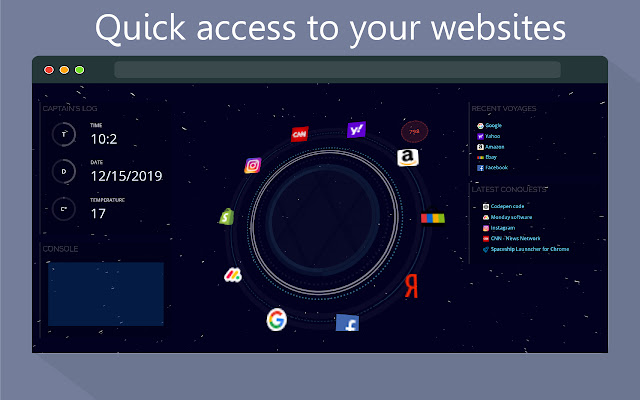


تحميل ملف CRX للإضافة Spaceship Launcher
قم بتنزيل ملفات الامتداد Spaceship Launcher بتنسيق crx ، وقم بتثبيت الامتدادات يدويًا في متصفح Chrome ، أو شارك ملفات crx مع الأصدقاء لتثبيت الامتدادات بسهولة.
تعليمات استخدام التمديد
                        New Tab page that gives you an opportunity to be the captain of you spaceship, while getting things done.
Onboard the Chrome spaceship with every new tab, and get reminded of our beautiful space with this coolest spaceship command center.

• Quick access to your popular sites
• View and access recent web pages
• View and access recent bookmarks
• See the weather and forecast
• Captain's console with actions, links, and search
• Special tricks and Warp Speed!

GET IN TOUCH (We would love to hear your suggestions)
Email us at [email protected]
معلومات أساسية عن التمديد
| الاسم |  Spaceship Launcher Spaceship Launcher |
| ID | lponbenffmiloooeglmaapadcjakmabi |
| عنوان URL الرسمي | https://chrome.google.com/webstore/detail/spaceship-launcher/lponbenffmiloooeglmaapadcjakmabi |
| الوصف | Welcome aboard the Chrome spaceship, captain |
| حجم الملف | 249 KB |
| عدد التثبيتات | 14 |
| النسخة الحالية | 1.0.1 |
| آخر تحديث | 2019-12-29 |
| تاريخ النشر | 2019-12-29 |
| تقييم | 4.50/5 مجموع تقييمات 2 |
| المطور | http://rdir.in |
| البريد الإلكتروني | [email protected] |
| نوع الدفع | free |
| عنوان صفحة سياسة الخصوصية | https://stacktab.io/privacy.html |
| اللغات المدعومة | en |
| manifest.json | |
{
    "update_url": "https:\/\/clients2.google.com\/service\/update2\/crx",
    "name": "Spaceship Launcher",
    "version": "1.0.1",
    "description": "Welcome aboard the Chrome spaceship, captain",
    "permissions": [
        "activeTab",
        "declarativeContent",
        "storage",
        "tabs",
        "topSites",
        "history",
        "bookmarks"
    ],
    "icons": {
        "16": "images\/fui16.png",
        "32": "images\/fui32.png",
        "48": "images\/fui48.png",
        "128": "images\/fui128.png"
    },
    "incognito": "split",
    "chrome_url_overrides": {
        "newtab": "newtab.html"
    },
    "content_scripts": [
        {
            "matches": [
                "https:\/\/rdir.in\/*"
            ],
            "js": [
                "resources\/actions.min.js"
            ],
            "run_at": "document_end"
        }
    ],
    "manifest_version": 2
} | |