MapJumper Plus
Jump to same location on a different map service (eg. from Google maps to OpenStreetMap and back). Works with many map services!
ما هو MapJumper Plus؟
MapJumper Plus هو إضافة Chrome تم تطويرها بواسطة Tomas Kafka، والميزة الرئيسية لها هي "Jump to same location on a different map service (eg. from Google maps to OpenStreetMap and back). Works with many map services!".
لقطات شاشة التمديد
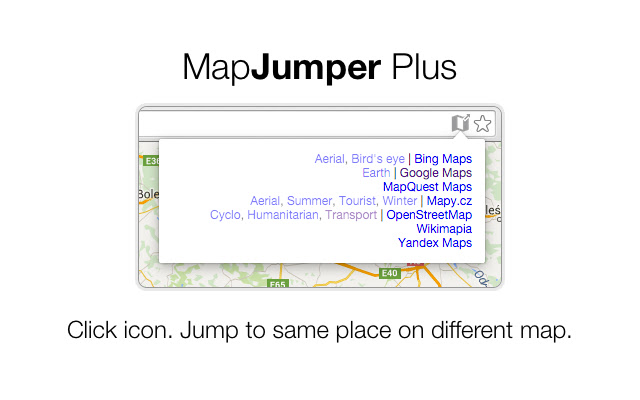
تحميل ملف CRX للإضافة MapJumper Plus
قم بتنزيل ملفات الامتداد MapJumper Plus بتنسيق crx ، وقم بتثبيت الامتدادات يدويًا في متصفح Chrome ، أو شارك ملفات crx مع الأصدقاء لتثبيت الامتدادات بسهولة.
تعليمات استخدام التمديد
                        Do you want to check out same place on a different map service? Click an icon in your address bar and jump there!

Supports many worldwide map providers (Google maps, OpenStreetMap, Bing maps, Yandex maps, 2gis, wikimapia, mapy.cz) and both standard and satellite view.
معلومات أساسية عن التمديد
| الاسم |  MapJumper Plus MapJumper Plus |
| ID | mdhfopoodheacfapdohpmjndgnfmdecj |
| عنوان URL الرسمي | https://chrome.google.com/webstore/detail/mapjumper-plus/mdhfopoodheacfapdohpmjndgnfmdecj |
| الوصف | Jump to same location on a different map service (eg. from Google maps to OpenStreetMap and back). Works with many map services! |
| حجم الملف | 32.04 KB |
| عدد التثبيتات | 40 |
| النسخة الحالية | 0.6.2 |
| آخر تحديث | 2017-04-18 |
| تاريخ النشر | 2017-04-18 |
| تقييم | 3.00/5 مجموع تقييمات 1 |
| المطور | Tomas Kafka |
| نوع الدفع | free |
| اللغات المدعومة | en |
| manifest.json | |
{
    "update_url": "https:\/\/clients2.google.com\/service\/update2\/crx",
    "name": "MapJumper Plus",
    "version": "0.6.2",
    "description": "Jump to same location on a different map service (eg. from Google maps to OpenStreetMap and back). Works with many map services!",
    "icons": {
        "512": "material512.png",
        "128": "material128.png",
        "64": "material64.png",
        "32": "material32.png",
        "24": "material24.png",
        "16": "material16.png"
    },
    "background": {
        "scripts": [
            "background.js"
        ]
    },
    "content_scripts": [
        {
            "matches": [
                "*:\/\/foursquare.com\/*",
                "*:\/\/www.google.com\/maps\/*",
                "*:\/\/www.google.co.uk\/maps\/*",
                "*:\/\/www.google.ru\/maps\/*",
                "*:\/\/www.google.com.ua\/maps\/*",
                "*:\/\/www.google.cz\/maps\/*",
                "*:\/\/maps.google.com\/*",
                "*:\/\/maps.google.ru\/*",
                "*:\/\/maps.google.com.ua\/*",
                "*:\/\/maps.google.co.uk\/*",
                "http:\/\/openstreetmap.org\/*",
                "http:\/\/www.openstreetmap.org\/*",
                "*:\/\/www.bing.com\/maps\/*",
                "http:\/\/wikimapia.org\/*",
                "*:\/\/maps.yandex.ru\/*",
                "*:\/\/maps.yandex.ua\/*",
                "*:\/\/maps.yandex.com\/*",
                "*:\/\/harita.yandex.com\/*",
                "*:\/\/2gis.ua\/*",
                "*:\/\/2gis.ru\/*",
                "*:\/\/2gis.com\/*",
                "*:\/\/2gis.com.cy\/*",
                "*:\/\/mapy.cz\/*"
            ],
            "js": [
                "mapProviders.js",
                "mapjumper_content_script.js"
            ]
        }
    ],
    "permissions": [
        "tabs"
    ],
    "page_action": {
        "default_name": "Jump to other Maps!",
        "default_icon": "material64.png",
        "default_popup": "popup.html"
    },
    "manifest_version": 2,
    "content_security_policy": "default-src 'none'; style-src 'self'; script-src 'self';"
} | |