Salesforce Credentials
Manage your Salesforce Credentials and login with one click.
ما هو Salesforce Credentials؟
Salesforce Credentials هو إضافة Chrome تم تطويرها بواسطة Alexandr Kurevlev، والميزة الرئيسية لها هي "Manage your Salesforce Credentials and login with one click.".
لقطات شاشة التمديد
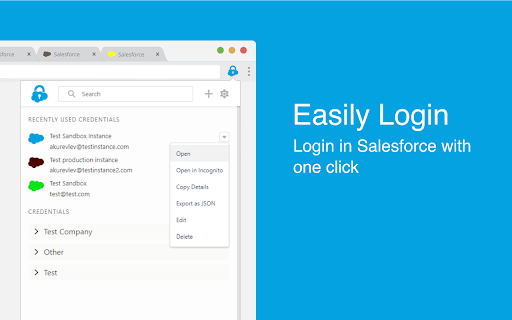


تحميل ملف CRX للإضافة Salesforce Credentials
قم بتنزيل ملفات الامتداد Salesforce Credentials بتنسيق crx ، وقم بتثبيت الامتدادات يدويًا في متصفح Chrome ، أو شارك ملفات crx مع الأصدقاء لتثبيت الامتدادات بسهولة.
تعليمات استخدام التمديد
                        This extension allows you to manage and store your Salesforce Credentials, login with one click and more...

Key features:

- Manage your credentials: Add/Edit/Delete your credentials within the extension

- Easily Login: Login in Salesforce with one click without the verification code

- Add credentials by logging in: Login in Salesforce as you usually do and click 'Add' to add credential

- Login from Address Bar: Enter 'sf' and space in your address bar and start typing username, name or group to login

- Never lose tab: Set your own color for every credential to work on multiple instances at the same time

- Collaborate with your сolleagues: Import and export credentials to file or clipboard to share with your colleagues

- Always in Sync: Keep your Credentials synced with your Google Account in Chrome
معلومات أساسية عن التمديد
| الاسم |  Salesforce Credentials Salesforce Credentials |
| ID | mneimgababoaidaajoibedahomnpmbja |
| عنوان URL الرسمي | https://chromewebstore.google.com/detail/salesforce-credentials/mneimgababoaidaajoibedahomnpmbja |
| الوصف | Manage your Salesforce Credentials and login with one click. |
| حجم الملف | 584 KB |
| عدد التثبيتات | 874 |
| النسخة الحالية | 1.4.3 |
| آخر تحديث | 2020-05-05 |
| تاريخ النشر | 2020-05-05 |
| تقييم | 4.67/5 مجموع تقييمات 3 |
| المطور | Alexandr Kurevlev |
| البريد الإلكتروني | [email protected] |
| نوع الدفع | free |
| اللغات المدعومة | en |
| manifest.json | |
{
    "update_url": "https:\/\/clients2.google.com\/service\/update2\/crx",
    "manifest_version": 2,
    "name": "Salesforce Credentials",
    "description": "Manage your Salesforce Credentials and login with one click.",
    "version": "1.4.3",
    "browser_action": {
        "default_icon": "icons\/logo\/icon48.png",
        "default_title": "Salesforce Credentials",
        "default_popup": "popup.html"
    },
    "icons": {
        "16": "icons\/logo\/icon16.png",
        "48": "icons\/logo\/icon48.png",
        "128": "icons\/logo\/icon128.png"
    },
    "content_scripts": [
        {
            "run_at": "document_end",
            "matches": [
                "https:\/\/*.salesforce.com\/*",
                "https:\/\/*.force.com\/*",
                "https:\/\/*.visualforce.com\/*"
            ],
            "js": [
                "js\/utils.js",
                "js\/setTabs.js"
            ]
        },
        {
            "matches": [
                "https:\/\/*.salesforce.com\/*",
                "https:\/\/*.force.com\/*",
                "https:\/\/*.visualforce.com\/*"
            ],
            "js": [
                "js\/loginHelper.js"
            ]
        }
    ],
    "web_accessible_resources": [
        "addCredentialPopup.html"
    ],
    "omnibox": {
        "keyword": "sf"
    },
    "background": {
        "scripts": [
            "js\/utils.js",
            "js\/background.build.js"
        ],
        "persistent": false
    },
    "permissions": [
        "https:\/\/*.salesforce.com\/*",
        "https:\/\/*.force.com\/*",
        "https:\/\/*.visualforce.com\/*",
        "storage",
        "tabs",
        "downloads",
        "cookies"
    ]
} | |