YouTube Next
Use you media keys to control YouTube
ما هو YouTube Next؟
YouTube Next هو إضافة Chrome تم تطويرها بواسطة Team Encil، والميزة الرئيسية لها هي "Use you media keys to control YouTube".
لقطات شاشة التمديد
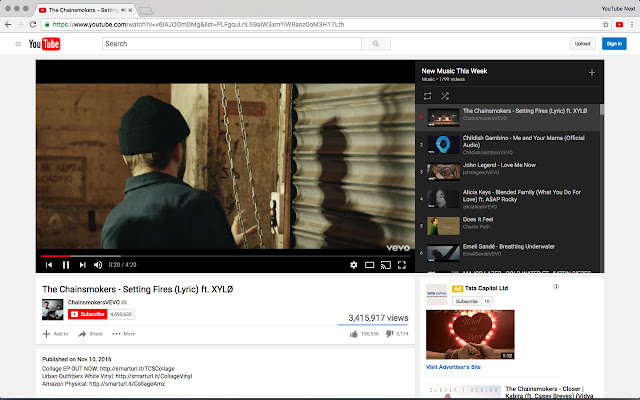


تحميل ملف CRX للإضافة YouTube Next
قم بتنزيل ملفات الامتداد YouTube Next بتنسيق crx ، وقم بتثبيت الامتدادات يدويًا في متصفح Chrome ، أو شارك ملفات crx مع الأصدقاء لتثبيت الامتدادات بسهولة.
تعليمات استخدام التمديد
                        Use your Media Keys to control YouTube. To Change a song, Click Next, Pause, Stop etc. from your Keyboard even without opening YouTube.

It's a simple and easy tool, which will help you if you love to hear Music on Youtube.

This extension will be enabled only when you visit YouTube and will be disabled for everything else.
معلومات أساسية عن التمديد
| الاسم |  YouTube Next YouTube Next |
| ID | mojigipbndoflnjonbejgkehjdeajlmm |
| عنوان URL الرسمي | https://chrome.google.com/webstore/detail/youtube-next/mojigipbndoflnjonbejgkehjdeajlmm |
| الوصف | Use you media keys to control YouTube |
| حجم الملف | 22.7 KB |
| عدد التثبيتات | 379 |
| النسخة الحالية | 0.1 |
| آخر تحديث | 2016-11-11 |
| تاريخ النشر | 2016-11-11 |
| تقييم | 4.42/5 مجموع تقييمات 19 |
| المطور | Team Encil |
| البريد الإلكتروني | [email protected] |
| نوع الدفع | free |
| اللغات المدعومة | en |
| manifest.json | |
{
    "update_url": "https:\/\/clients2.google.com\/service\/update2\/crx",
    "name": "YouTube Next",
    "version": "0.1",
    "icons": {
        "16": "icons\/icon16.png",
        "48": "icons\/icon48.png",
        "128": "icons\/icon128.png"
    },
    "description": "Use you media keys to control YouTube",
    "homepage_url": "http:\/\/youtube.com",
    "permissions": [
        "tabs",
        "contextMenus"
    ],
    "manifest_version": 2,
    "commands": {
        "prev": {
            "suggested_key": {
                "default": "MediaPrevTrack",
                "mac": "MediaPrevTrack"
            },
            "description": "Play Previous Track",
            "global": true
        },
        "play-pause": {
            "suggested_key": {
                "default": "MediaPlayPause",
                "mac": "MediaPlayPause"
            },
            "description": "Play\/Pause Active Audio",
            "global": true
        },
        "next": {
            "suggested_key": {
                "default": "MediaNextTrack",
                "mac": "MediaNextTrack"
            },
            "description": "Play Next Track",
            "global": true
        },
        "stop": {
            "suggested_key": {
                "default": "MediaStop",
                "mac": "MediaStop"
            },
            "description": "Stop Audio",
            "global": true
        }
    },
    "background": {
        "scripts": [
            "background.js"
        ],
        "persistent": true
    },
    "page_action": {
        "default_title": "Use you media keys to control YouTube",
        "default_icon": {
            "19": "icons\/icon19.png",
            "38": "icons\/icon38.png"
        }
    },
    "content_scripts": [
        {
            "matches": [
                "*:\/\/*.youtube.com\/*"
            ],
            "js": [
                "shared.js",
                "youtubenext.js"
            ]
        }
    ]
} | |