Level3 Google Calendar Integration
Easily start and schedule Level3 meetings in Google Calendar.
ما هو Level3 Google Calendar Integration؟
Level3 Google Calendar Integration هو إضافة Chrome تم تطويرها بواسطة CenturyLink، والميزة الرئيسية لها هي "Easily start and schedule Level3 meetings in Google Calendar.".
لقطات شاشة التمديد

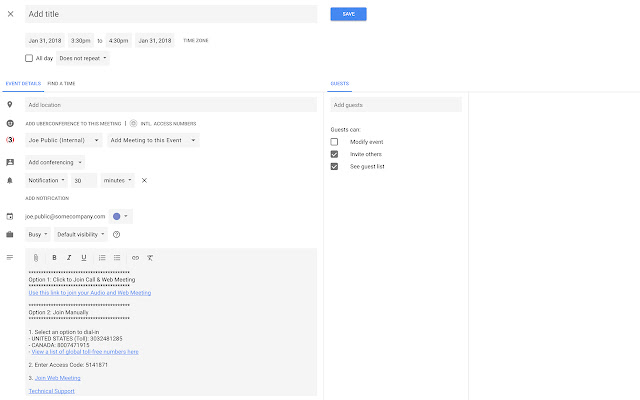
تحميل ملف CRX للإضافة Level3 Google Calendar Integration
قم بتنزيل ملفات الامتداد Level3 Google Calendar Integration بتنسيق crx ، وقم بتثبيت الامتدادات يدويًا في متصفح Chrome ، أو شارك ملفات crx مع الأصدقاء لتثبيت الامتدادات بسهولة.
تعليمات استخدام التمديد
                        Instantly start an on-demand meeting directly from the Google Calendar Extension.

Easily schedule meetings and seamlessly add Level3 meeting details to your Google Calendar appointment.

Allow participants to join your Level3 meeting quickly with a single click from your Google Calendar appointment.

Safely store multiple sets of credentials to help you stay organized.
معلومات أساسية عن التمديد
| الاسم |  Level3 Google Calendar Integration Level3 Google Calendar Integration |
| ID | mpegnbahaahknleoihghlhaalaahjjap |
| عنوان URL الرسمي | https://chrome.google.com/webstore/detail/level3-google-calendar-in/mpegnbahaahknleoihghlhaalaahjjap |
| الوصف | Easily start and schedule Level3 meetings in Google Calendar. |
| حجم الملف | 383 KB |
| عدد التثبيتات | 43 |
| النسخة الحالية | 0.9.8 |
| آخر تحديث | 2018-01-31 |
| تاريخ النشر | 2018-01-31 |
| المطور | CenturyLink |
| البريد الإلكتروني | [email protected] |
| نوع الدفع | free |
| موقع الإضافة | http://conferencing.level3.com/en/ |
| عنوان صفحة سياسة الخصوصية | http://www.level3.com/en/privacy |
| اللغات المدعومة | en-US |
| manifest.json | |
{
    "update_url": "https:\/\/clients2.google.com\/service\/update2\/crx",
    "manifest_version": 2,
    "name": "Level3 Google Calendar Integration",
    "description": "Easily start and schedule Level3 meetings in Google Calendar.",
    "version": "0.9.8",
    "browser_action": {
        "default_icon": "img\/icon.png",
        "default_title": "Level3 Google Calendar Integration",
        "default_popup": "popup.html"
    },
    "icons": {
        "48": "img\/icon48.png",
        "128": "img\/icon128.png"
    },
    "permissions": [
        "https:\/\/cc.callinfo.com\/",
        "background",
        "storage",
        "tabs",
        "webNavigation"
    ],
    "background": {
        "scripts": [
            "js\/xhr.js",
            "js\/util.js",
            "js\/vendor\/moment\/moment.min.js",
            "js\/vendor\/moment\/moment-round.min.js",
            "js\/vendor\/handlebars\/handlebars.runtime-v4.0.11.js",
            "js\/vendor\/handlebars\/helpers.hybrid.js",
            "js\/templates\/meetings.js",
            "js\/config.js",
            "js\/model.js",
            "js\/event.js"
        ],
        "persistent": false
    },
    "content_scripts": [
        {
            "matches": [
                "*:\/\/*\/calendar*"
            ],
            "css": [
                "style\/content.css",
                "style\/vendor\/mdc-web\/material-components-web.min.css"
            ],
            "js": [
                "js\/util.js",
                "js\/model.js",
                "js\/config.js",
                "js\/vendor\/mdc-web\/material-components-web.min.js",
                "js\/content.js"
            ]
        }
    ],
    "content_security_policy": "script-src 'self' https:\/\/www.google-analytics.com\/analytics.js; object-src 'self'",
    "web_accessible_resources": [
        "img\/*"
    ]
} | |