Collect Apps for Vend Register
Check rewards from within Vend
ما هو Collect Apps for Vend Register؟
Collect Apps for Vend Register هو إضافة Chrome تم تطويرها بواسطة https://collectapps.io، والميزة الرئيسية لها هي "Check rewards from within Vend".
لقطات شاشة التمديد
تحميل ملف CRX للإضافة Collect Apps for Vend Register
قم بتنزيل ملفات الامتداد Collect Apps for Vend Register بتنسيق crx ، وقم بتثبيت الامتدادات يدويًا في متصفح Chrome ، أو شارك ملفات crx مع الأصدقاء لتثبيت الامتدادات بسهولة.
تعليمات استخدام التمديد
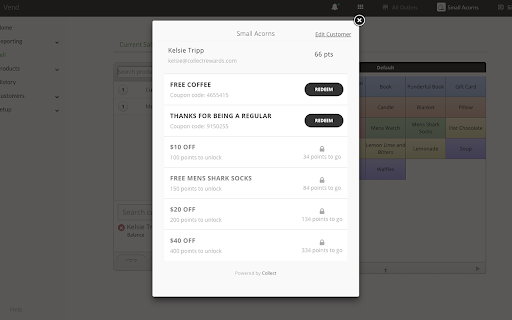
                        The Vend + Collect In-Store Redemption Extension makes it quick and easy to check customers' rewards and offers they have available and redeem them with a single click.
Once installed, when a customer is added in point-of-sale, the extension will load the customer's profile, prompting staff to ask the customer if they would like to redeem a reward and allowing them to double check that the customer is entitled to any coupon they present.

Now supports % OFF!
معلومات أساسية عن التمديد
| الاسم |  Collect Apps for Vend Register Collect Apps for Vend Register |
| ID | ncleoklhijegcelpebgdpplhbdjaaloj |
| عنوان URL الرسمي | https://chromewebstore.google.com/detail/collect-apps-for-vend-reg/ncleoklhijegcelpebgdpplhbdjaaloj |
| الوصف | Check rewards from within Vend |
| حجم الملف | 72.13 KB |
| عدد التثبيتات | 156 |
| النسخة الحالية | 2.0 |
| آخر تحديث | 2020-01-08 |
| تاريخ النشر | 2020-01-07 |
| تقييم | 5.00/5 مجموع تقييمات 6 |
| المطور | https://collectapps.io |
| البريد الإلكتروني | [email protected] |
| نوع الدفع | free |
| موقع الإضافة | http://loyalty.collectapps.io/vend |
| اللغات المدعومة | en-US |
| manifest.json | |
{
    "update_url": "https:\/\/clients2.google.com\/service\/update2\/crx",
    "manifest_version": 2,
    "name": "Collect Apps for Vend Register",
    "description": "Check rewards from within Vend",
    "version": "2.0",
    "content_scripts": [
        {
            "matches": [
                "http:\/\/*.vendhq.com\/*",
                "https:\/\/*.vendhq.com\/*"
            ],
            "css": [
                "fancybox\/jquery.fancybox.css"
            ],
            "js": [
                "jquery.min.js",
                "fancybox\/jquery.fancybox.js",
                "vend-override-v2.js",
                "vend-override-register-v2.js"
            ]
        }
    ],
    "icons": {
        "16": "images\/16.png",
        "48": "images\/48.png",
        "128": "images\/128.png"
    },
    "permissions": [
        "https:\/\/portal.collectapps.io"
    ],
    "browser_action": {
        "default_icon": "img\/collect-icon-57.png"
    }
} | |