Waves Enterprise Wallet
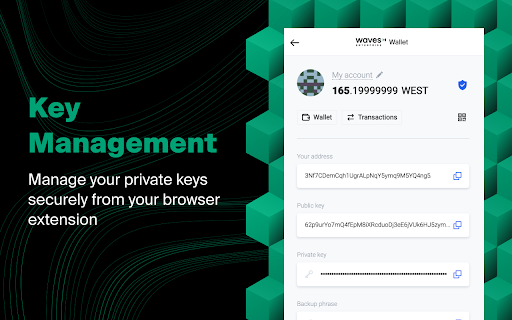
Manage your private keys securely
ما هو Waves Enterprise Wallet؟
Waves Enterprise Wallet هو إضافة Chrome تم تطويرها بواسطة Waves Platform، والميزة الرئيسية لها هي "Manage your private keys securely".
لقطات شاشة التمديد

تحميل ملف CRX للإضافة Waves Enterprise Wallet
قم بتنزيل ملفات الامتداد Waves Enterprise Wallet بتنسيق crx ، وقم بتثبيت الامتدادات يدويًا في متصفح Chrome ، أو شارك ملفات crx مع الأصدقاء لتثبيت الامتدادات بسهولة.
تعليمات استخدام التمديد
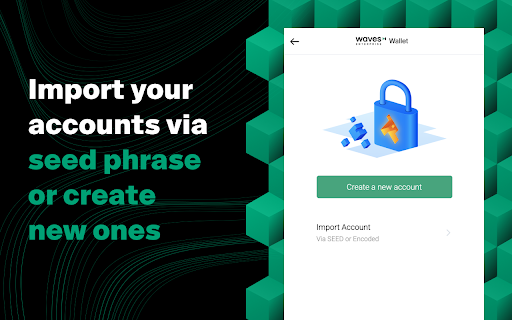
                        Waves Enterprise Wallet  is an extension that allows you to interact with Waves Enterprise-enabled web services securely from your Chrome browser.

SEEDs and private keys are encrypted and stored within the extension and cannot be accessed by the dApps and services on the web, giving you peace of mind that your funds are always safe from hackers and malicious sites. Completing a transaction doesn’t require entering any sensitive information.

Waves Enterprise Wallet is designed for convenience, so you can sign transactions with just a couple of clicks. Users can create multiple wallets and switch between them easily, and if you ever forget the password to the account you can recover it from your SEED, as normal.

You can view the source code for Waves Enterprise Wallet on GitHub, or check it like any other Chrome extension.

https://github.com/waves-enterprise/we-wallet
معلومات أساسية عن التمديد
| الاسم |  Waves Enterprise Wallet Waves Enterprise Wallet |
| ID | nhihjlnjgibefgjhobhcphmnckoogdea |
| عنوان URL الرسمي | https://chromewebstore.google.com/detail/waves-enterprise-wallet/nhihjlnjgibefgjhobhcphmnckoogdea |
| الوصف | Manage your private keys securely |
| حجم الملف | 3.31 MB |
| عدد التثبيتات | 574 |
| النسخة الحالية | 1.2.1 |
| آخر تحديث | 2022-12-26 |
| تاريخ النشر | 2021-07-08 |
| تقييم | 5.00/5 مجموع تقييمات 1 |
| المطور | Waves Platform |
| البريد الإلكتروني | [email protected] |
| نوع الدفع | free |
| موقع الإضافة | https://wavesenterprise.com/ |
| عنوان صفحة سياسة الخصوصية | https://s3.eu-central-1.amazonaws.com/waves.tech/Privacy_Policy_Waves_Keeper_fin_DL_Tech_9ce50e1fe0.pdf |
| اللغات المدعومة | en |
| manifest.json | |
{
    "update_url": "https:\/\/clients2.google.com\/service\/update2\/crx",
    "name": "__MSG_appName__",
    "short_name": "__MSG_appName__",
    "version": "1.2.1",
    "manifest_version": 2,
    "author": "[email protected]",
    "description": "__MSG_appDescription__",
    "commands": {
        "_execute_browser_action": {
            "suggested_key": {
                "windows": "Alt+Shift+K",
                "mac": "Alt+Shift+K",
                "chromeos": "Alt+Shift+K",
                "linux": "Alt+Shift+K"
            }
        }
    },
    "icons": {
        "16": "images\/icon_16.png",
        "20": "images\/icon_20.png",
        "24": "images\/icon_24.png",
        "30": "images\/icon_30.png",
        "42": "images\/icon_42.png",
        "44": "images\/icon_44.png",
        "50": "images\/icon_50.png",
        "54": "images\/icon_54.png",
        "70": "images\/icon_70.png",
        "90": "images\/icon_90.png",
        "120": "images\/icon_120.png",
        "128": "images\/icon_128.png",
        "150": "images\/icon_150.png",
        "210": "images\/icon_210.png",
        "270": "images\/icon_270.png"
    },
    "default_locale": "en",
    "background": {
        "scripts": [
            "background.js"
        ],
        "persistent": true
    },
    "browser_action": {
        "default_icon": {
            "16": "images\/icon_16.png",
            "20": "images\/icon_20.png",
            "24": "images\/icon_24.png",
            "30": "images\/icon_30.png",
            "42": "images\/icon_42.png",
            "44": "images\/icon_44.png",
            "50": "images\/icon_50.png",
            "54": "images\/icon_54.png",
            "70": "images\/icon_70.png",
            "90": "images\/icon_90.png",
            "120": "images\/icon_120.png",
            "128": "images\/icon_128.png",
            "150": "images\/icon_150.png",
            "210": "images\/icon_210.png",
            "270": "images\/icon_270.png"
        },
        "default_title": "Waves Enterprise Wallet",
        "default_popup": "popup.html"
    },
    "content_scripts": [
        {
            "matches": [
                "file:\/\/*\/*",
                "http:\/\/*\/*",
                "https:\/\/*\/*"
            ],
            "js": [
                "contentscript.js"
            ],
            "run_at": "document_start",
            "all_frames": true
        }
    ],
    "content_security_policy": "script-src 'self' 'unsafe-eval'; object-src 'self'",
    "permissions": [
        "storage",
        "unlimitedStorage",
        "clipboardWrite",
        "idle"
    ],
    "web_accessible_resources": [
        "inpage.js"
    ]
} | |