Salesforce API Fieldnames
Extension shows the API field names on detail pages
ما هو Salesforce API Fieldnames؟
Salesforce API Fieldnames هو إضافة Chrome تم تطويرها بواسطة Daniel Nakov، والميزة الرئيسية لها هي "Extension shows the API field names on detail pages".
لقطات شاشة التمديد
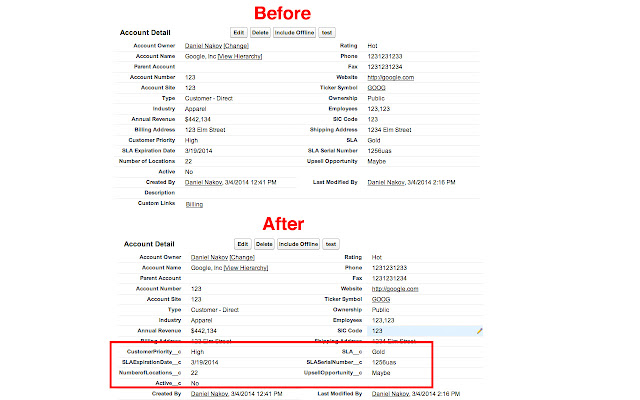
تحميل ملف CRX للإضافة Salesforce API Fieldnames
قم بتنزيل ملفات الامتداد Salesforce API Fieldnames بتنسيق crx ، وقم بتثبيت الامتدادات يدويًا في متصفح Chrome ، أو شارك ملفات crx مع الأصدقاء لتثبيت الامتدادات بسهولة.
تعليمات استخدام التمديد
                        Small extension to toggle between API field names and labels on salesforce detail pages

0.1.4
* Fixes issue where wrong API names are displayed
* removed jQuery to be hip

0.1.1
* Stopped using the tooling API. Uses REST api instead. Managed package fields now show up as well.

Complain and contribute on github: https://github.com/dnakov/force-apiNames
:)
معلومات أساسية عن التمديد
| الاسم |  Salesforce API Fieldnames Salesforce API Fieldnames |
| ID | oghajcjpbolpfoikoccffglngkphjgbo |
| عنوان URL الرسمي | https://chrome.google.com/webstore/detail/salesforce-api-fieldnames/oghajcjpbolpfoikoccffglngkphjgbo |
| الوصف | Extension shows the API field names on detail pages |
| حجم الملف | 13.16 KB |
| عدد التثبيتات | 30,000 |
| النسخة الحالية | 0.1.4 |
| آخر تحديث | 2016-07-28 |
| تاريخ النشر | 2016-07-28 |
| تقييم | 4.25/5 مجموع تقييمات 125 |
| المطور | Daniel Nakov |
| نوع الدفع | free |
| اللغات المدعومة | en |
| manifest.json | |
{
    "update_url": "https:\/\/clients2.google.com\/service\/update2\/crx",
    "name": "Salesforce API Fieldnames",
    "version": "0.1.4",
    "manifest_version": 2,
    "description": "Extension shows the API field names on detail pages",
    "icons": {
        "16": "images\/icon16__c.png",
        "128": "images\/icon128__c.png"
    },
    "default_locale": "en",
    "background": {
        "scripts": [
            "scripts\/background.js"
        ]
    },
    "browser_action": {
        "default_icon": {
            "19": "images\/iconOff19__c.png",
            "38": "images\/iconOff__c.png"
        },
        "default_title": "apinames"
    },
    "content_scripts": [
        {
            "matches": [
                "https:\/\/*.force.com\/*",
                "https:\/\/*.salesforce.com\/*"
            ],
            "js": [
                "scripts\/contentscript.js"
            ],
            "run_at": "document_end",
            "all_frames": false
        }
    ],
    "permissions": [
        "activeTab"
    ]
} | |