Mymarx CRM Analytics
Mymarx CRM Analytics is an automation tool for pre-sale analysts
ما هو Mymarx CRM Analytics؟
Mymarx CRM Analytics هو إضافة Chrome تم تطويرها بواسطة Mymarx.com، والميزة الرئيسية لها هي "Mymarx CRM Analytics is an automation tool for pre-sale analysts".
لقطات شاشة التمديد
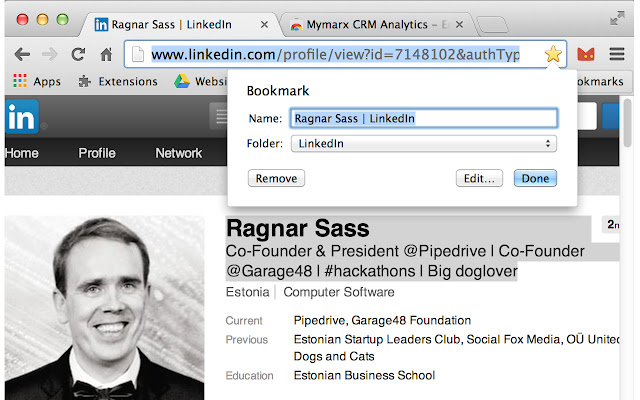

تحميل ملف CRX للإضافة Mymarx CRM Analytics
قم بتنزيل ملفات الامتداد Mymarx CRM Analytics بتنسيق crx ، وقم بتثبيت الامتدادات يدويًا في متصفح Chrome ، أو شارك ملفات crx مع الأصدقاء لتثبيت الامتدادات بسهولة.
تعليمات استخدام التمديد
                        Mymarx CRM Analytics is an automation tool for pre-sale analysts.

Mymarx CRM is the bridge between LinkedIn, AngelList in your browser and your company CRM System.

How it works:
 + You got to LinkedIn profile
 + You select contact information on the page
 + You bookmark the page and here Mymarx CRM starts its job:
  Mymarx CRM saves contact details as contact description,
  Mymarx CRM saves picture of LinkedIn that is opened

 + To see the list of saved contacts just press the Red Cat icon.

You are welcome!
معلومات أساسية عن التمديد
| الاسم |  Mymarx CRM Analytics Mymarx CRM Analytics |
| ID | ohlbminehmjeflbnoadihhabohefegjl |
| عنوان URL الرسمي | https://chrome.google.com/webstore/detail/mymarx-crm-analytics/ohlbminehmjeflbnoadihhabohefegjl |
| الوصف | Mymarx CRM Analytics is an automation tool for pre-sale analysts |
| حجم الملف | 654 KB |
| عدد التثبيتات | 20 |
| النسخة الحالية | 1.1.48 |
| آخر تحديث | 2014-04-07 |
| تاريخ النشر | 2014-04-07 |
| تقييم | 5.00/5 مجموع تقييمات 4 |
| المطور | Mymarx.com |
| نوع الدفع | free |
| اللغات المدعومة | en |
| manifest.json | |
{
"update_url": "https:\/\/clients2.google.com\/service\/update2\/crx",
"manifest_version": 2,
"name": "Mymarx CRM Analytics",
"short_name": "Mymarx CRM Analytics",
"description": "Mymarx CRM Analytics is an automation tool for pre-sale analysts",
"version": "1.1.48",
"author": "[email protected]",
"icons": {
"128": "cat.png"
},
"background": {
"page": "background.html",
"persistent": false
},
"browser_action": {
"default_icon": {
"19": "19.png",
"38": "38.png"
},
"default_title": "Mymarx Analytics"
},
"permissions": [
"bookmarks",
"pageCapture",
"tabs",
" | |