A.I. Resource Manager
Quickly add important resources you find to your Aggregate Intellect library.
ما هو A.I. Resource Manager؟
A.I. Resource Manager هو إضافة Chrome تم تطويرها بواسطة https://ai.science، والميزة الرئيسية لها هي "Quickly add important resources you find to your Aggregate Intellect library.".
لقطات شاشة التمديد
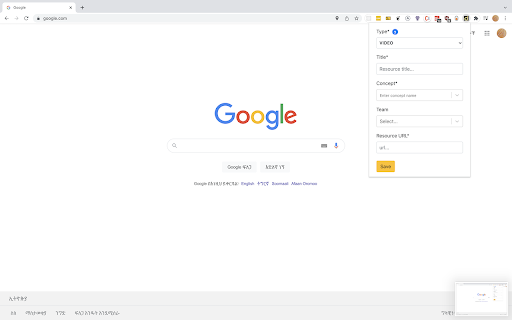
تحميل ملف CRX للإضافة A.I. Resource Manager
قم بتنزيل ملفات الامتداد A.I. Resource Manager بتنسيق crx ، وقم بتثبيت الامتدادات يدويًا في متصفح Chrome ، أو شارك ملفات crx مع الأصدقاء لتثبيت الامتدادات بسهولة.
تعليمات استخدام التمديد
Quickly add important resources to your A.I. library to better manage your knowledge for R&D projects. The more resources you add, the better we can recommend other relevant resources. معلومات أساسية عن التمديد
| الاسم |  A.I. Resource Manager A.I. Resource Manager |
| ID | ohldgknmhncmaclggpmcbglmglpkcoag |
| عنوان URL الرسمي | https://chromewebstore.google.com/detail/ai-resource-manager/ohldgknmhncmaclggpmcbglmglpkcoag |
| الوصف | Quickly add important resources you find to your Aggregate Intellect library. |
| حجم الملف | 1.14 MB |
| عدد التثبيتات | 134 |
| النسخة الحالية | 0.3.9 |
| آخر تحديث | 2023-02-12 |
| تاريخ النشر | 2021-12-10 |
| تقييم | 5.00/5 مجموع تقييمات 3 |
| المطور | https://ai.science |
| البريد الإلكتروني | [email protected] |
| نوع الدفع | free |
| موقع الإضافة | https://ai.science |
| اللغات المدعومة | en |
| manifest.json | |
{
"update_url": "https:\/\/clients2.google.com\/service\/update2\/crx",
"name": "A.I. Resource Manager",
"description": "Quickly add important resources you find to your Aggregate Intellect library.",
"version": "0.3.9",
"manifest_version": 3,
"incognito": "split",
"host_permissions": [
" | |