Translate into Urdu
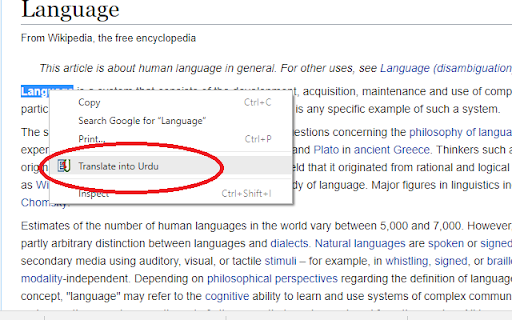
Simply select the word, right-click on it, int the Context Menu click "Translate into Urdu". A dialogue box displays the results.
ما هو Translate into Urdu؟
Translate into Urdu هو إضافة Chrome تم تطويرها بواسطة Mustafa Hussain، والميزة الرئيسية لها هي "Simply select the word, right-click on it, int the Context Menu click "Translate into Urdu". A dialogue box displays the results.".
لقطات شاشة التمديد
تحميل ملف CRX للإضافة Translate into Urdu
قم بتنزيل ملفات الامتداد Translate into Urdu بتنسيق crx ، وقم بتثبيت الامتدادات يدويًا في متصفح Chrome ، أو شارك ملفات crx مع الأصدقاء لتثبيت الامتدادات بسهولة.
تعليمات استخدام التمديد
                        nglish into Urdu Translate:
After installing, you can translate English words on a webpage into Urdu. Simply select the word, right-click on it, int the Context Menu click "Translate into Urdu". A dialogue box will display the results. You have to wait for Urdu meanings to load depending on your internet speed and Urdu meanings a word has. Results will display the meanings according to different parts of speech.
In a table against each meaning you can see the translation for almost all parts of speech for example noun, verb, adjective etc.
Good Practice:
Plural, complex words and sentences must be avoided.
Translation:
Make sure this add-on is for English into Urdu translation only. It means that the selected word must be an English word.
معلومات أساسية عن التمديد
| الاسم |  Translate into Urdu Translate into Urdu |
| ID | ohohbfcpbhmbomjilbokachdnoanpbfn |
| عنوان URL الرسمي | https://chromewebstore.google.com/detail/translate-into-urdu/ohohbfcpbhmbomjilbokachdnoanpbfn |
| الوصف | Simply select the word, right-click on it, int the Context Menu click "Translate into Urdu". A dialogue box displays the results. |
| حجم الملف | 83.33 KB |
| عدد التثبيتات | 824 |
| النسخة الحالية | 2.3 |
| آخر تحديث | 2022-07-30 |
| تاريخ النشر | 2018-10-17 |
| تقييم | 1.00/5 مجموع تقييمات 1 |
| المطور | Mustafa Hussain |
| البريد الإلكتروني | [email protected] |
| نوع الدفع | free |
| اللغات المدعومة | en |
| manifest.json | |
{
"update_url": "https:\/\/clients2.google.com\/service\/update2\/crx",
"description": "Simply select the word, right-click on it, int the Context Menu click \"Translate into Urdu\". A dialogue box displays the results.",
"manifest_version": 2,
"name": "Translate into Urdu",
"version": "2.3",
"background": {
"scripts": [
"js\/background.js"
]
},
"permissions": [
"contextMenus",
"storage",
" | |