Simple Word Highlighter
This extension highlights words on a webpage as specified by the user
ما هو Simple Word Highlighter؟
Simple Word Highlighter هو إضافة Chrome تم تطويرها بواسطة berdinemail، والميزة الرئيسية لها هي "This extension highlights words on a webpage as specified by the user".
لقطات شاشة التمديد
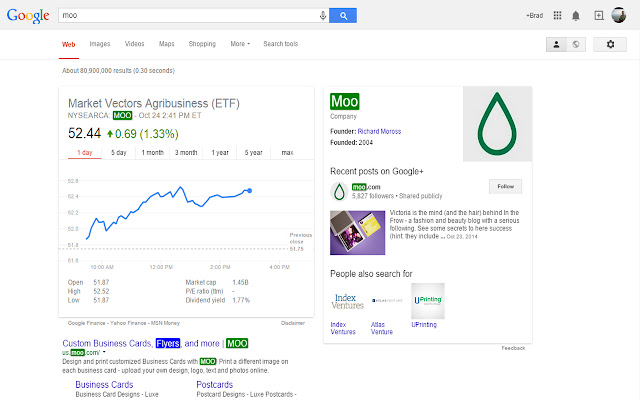
تحميل ملف CRX للإضافة Simple Word Highlighter
قم بتنزيل ملفات الامتداد Simple Word Highlighter بتنسيق crx ، وقم بتثبيت الامتدادات يدويًا في متصفح Chrome ، أو شارك ملفات crx مع الأصدقاء لتثبيت الامتدادات بسهولة.
تعليمات استخدام التمديد
                        This extension allows you highlight words on any website.

You can specify which websites to run on

You can specify which words to highlight per page

You can specify which color you would like to highlight with
معلومات أساسية عن التمديد
| الاسم |  Simple Word Highlighter Simple Word Highlighter |
| ID | ojmcbcojgmdcdmnidlgjjajoniomibdj |
| عنوان URL الرسمي | https://chrome.google.com/webstore/detail/simple-word-highlighter/ojmcbcojgmdcdmnidlgjjajoniomibdj |
| الوصف | This extension highlights words on a webpage as specified by the user |
| حجم الملف | 103 KB |
| عدد التثبيتات | 926 |
| النسخة الحالية | 1.0 |
| آخر تحديث | 2014-10-24 |
| تاريخ النشر | 2014-10-24 |
| تقييم | 3.89/5 مجموع تقييمات 9 |
| المطور | berdinemail |
| نوع الدفع | free |
| اللغات المدعومة | en |
| manifest.json | |
{
    "update_url": "https:\/\/clients2.google.com\/service\/update2\/crx",
    "manifest_version": 2,
    "name": "Simple Word Highlighter",
    "description": "This extension highlights words on a webpage as specified by the user",
    "version": "1.0",
    "background": {
        "scripts": [
            "Configure.js"
        ],
        "persistent": false
    },
    "content_scripts": [
        {
            "matches": [
                "http:\/\/*\/*",
                "https:\/\/*\/*"
            ],
            "js": [
                "jquery.min.js",
                "ModifyPage.js"
            ],
            "css": [
                "Highlight.css"
            ],
            "all_frames": true
        }
    ],
    "icons": {
        "16": "icon_16.png",
        "48": "icon_48.png",
        "128": "icon.png"
    },
    "browser_action": {
        "default_icon": "icon.png",
        "default_popup": "popup.html"
    },
    "permissions": [
        "tabs",
        "http:\/\/*\/*",
        "https:\/\/*\/*",
        "storage"
    ]
} | |