Autosave Text
Save edited text fields to sync storage (available in syncing chrome installations), except for input type password.
ما هو Autosave Text؟
Autosave Text هو إضافة Chrome تم تطويرها بواسطة [email protected]، والميزة الرئيسية لها هي "Save edited text fields to sync storage (available in syncing chrome installations), except for input type password.".
لقطات شاشة التمديد



تحميل ملف CRX للإضافة Autosave Text
قم بتنزيل ملفات الامتداد Autosave Text بتنسيق crx ، وقم بتثبيت الامتدادات يدويًا في متصفح Chrome ، أو شارك ملفات crx مع الأصدقاء لتثبيت الامتدادات بسهولة.
تعليمات استخدام التمديد
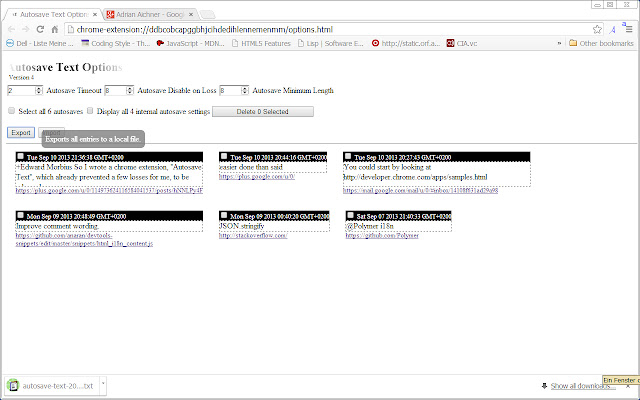
                        * Text will be saved automatically when no changes to it are made within a timeout period in seconds.
Any change restarts the timeout operation.

* Text will no longer be automatically saved when it shortens by more than the given number of characters from its last autosave length.
Autosaving resumes when it grows within bounds again.

* Text will only be automatically saved when it has at least the given number of characters.
This avoids saving cleartext account numbers and the like.

* All edited and input text fields are automatically saved to sync storage, except for input type password.
The texts are available in all chrome installations you are signed in to when syncing is turned on.
You can still use the extension when offline.
Syncing commences once you go online again.

*Contributing Translations*

Translations of the "message" texts (keep "description" for a reference) of
https://code.google.com/p/autosave-text/source/browse/autoSaveText/_locales/en/messages.json
to other languages (German is already covered) would be greatly appreciated.

Just submit your translation as attachment and specify the name of the language in the *Summary:* line at
https://code.google.com/p/autosave-text/issues/entry?summary=translation%20to%20LANGUAGE
معلومات أساسية عن التمديد
| الاسم |  Autosave Text Autosave Text |
| ID | omgpghebcjlafeegihofjnhhmllplnie |
| عنوان URL الرسمي | https://chrome.google.com/webstore/detail/autosave-text/omgpghebcjlafeegihofjnhhmllplnie |
| الوصف | Save edited text fields to sync storage (available in syncing chrome installations), except for input type password. |
| حجم الملف | 22.41 KB |
| عدد التثبيتات | 809 |
| النسخة الحالية | 14 |
| آخر تحديث | 2013-11-11 |
| تاريخ النشر | 2013-11-11 |
| تقييم | 2.75/5 مجموع تقييمات 8 |
| المطور | [email protected] |
| نوع الدفع | free |
| موقع الإضافة | https://code.google.com/p/autosave-text |
| عنوان صفحة المساعدة | https://code.google.com/p/autosave-text/issues/list |
| اللغات المدعومة | de,en |
| manifest.json | |
{
"update_url": "https:\/\/clients2.google.com\/service\/update2\/crx",
"manifest_version": 2,
"name": "__MSG_extension_name__",
"version": "14",
"minimum_chrome_version": "29.0.1521.3",
"default_locale": "en",
"description": "__MSG_extension_description__",
"icons": {
"48": "autosave48x48.png",
"128": "autosave2_128x128.png"
},
"web_accessible_resources": [
"autosave48x48.png",
"autosave2_128x128.png"
],
"permissions": [
"activeTab",
"contextMenus",
"storage",
"unlimitedStorage"
],
"background": {
"scripts": [
"autosave_bg.js",
"toast.js"
]
},
"commands": {
"review_autosaves": {
"suggested_key": {
"default": "Alt+Shift+A"
},
"description": "__MSG_review_autosaves__"
},
"capture_tab": {
"suggested_key": {
"default": "Alt+Shift+C"
},
"description": "__MSG_capture_tab__"
}
},
"content_scripts": [
{
"all_frames": true,
"matches": [
" | |