Audio Capture
You can track audio from websites with this extension
ما هو Audio Capture؟
Audio Capture هو إضافة Chrome تم تطويرها بواسطة Audio Capture، والميزة الرئيسية لها هي "You can track audio from websites with this extension".
لقطات شاشة التمديد

تحميل ملف CRX للإضافة Audio Capture
قم بتنزيل ملفات الامتداد Audio Capture بتنسيق crx ، وقم بتثبيت الامتدادات يدويًا في متصفح Chrome ، أو شارك ملفات crx مع الأصدقاء لتثبيت الامتدادات بسهولة.
تعليمات استخدام التمديد
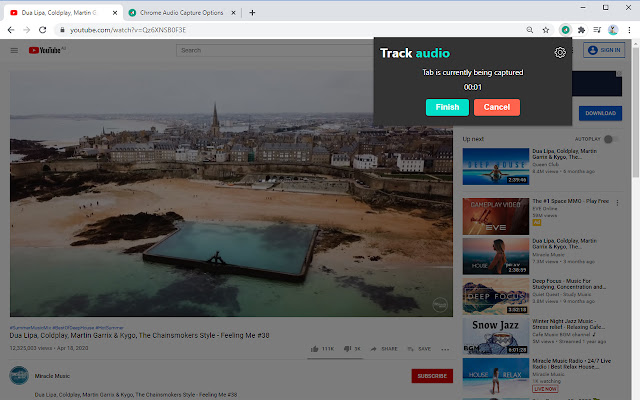
                        This extension is Audio Tab recorder for chrome browser. You can record and save the audio of the current tab (few tabs recording is also available). You can save the output file in two different formats – mp3 and wav. You can also mute tabs while recording and it`s really convenient, because the outgoing sound of the tab you currently record will not disturb you while interacting with other tabs. To start recording you simply click on extension icon in right upper corner of chrome browser. Use keyboard shortcuts or extension interface buttons to initialize recording.
We want you to help us to improve this extension, so feel free to leave your comment or request.
معلومات أساسية عن التمديد
| الاسم |  Audio Capture Audio Capture |
| ID | padjipbilemhhpppjmkabednoeiaaaac |
| عنوان URL الرسمي | https://chrome.google.com/webstore/detail/audio-capture/padjipbilemhhpppjmkabednoeiaaaac |
| الوصف | You can track audio from websites with this extension |
| حجم الملف | 247 KB |
| عدد التثبيتات | 50,000 |
| النسخة الحالية | 1.3.2 |
| آخر تحديث | 2021-10-01 |
| تاريخ النشر | 2020-11-21 |
| تقييم | 2.69/5 مجموع تقييمات 64 |
| المطور | Audio Capture |
| البريد الإلكتروني | [email protected] |
| نوع الدفع | free |
| اللغات المدعومة | id,ms,de,en,en-GB,en-US,fil,fr,nl,no,vi,tr,ca,da,et,es,hr,it,lv,lt,hu,pl,pt-BR,pt-PT,ro,sk,sl,fi,sv,cs,el,sr,bg,ru,mr,hi,bn,gu,ta,te,ml,th,zh-CN,zh-TW,ja,ko |
| manifest.json | |
{
"update_url": "https:\/\/clients2.google.com\/service\/update2\/crx",
"manifest_version": 2,
"name": "Audio Capture",
"description": "You can track audio from websites with this extension",
"version": "1.3.2",
"default_locale": "en",
"icons": {
"128": "\/assets\/images\/defa.png"
},
"browser_action": {
"default_icon": "\/assets\/images\/defa.png",
"default_popup": "\/assets\/pages\/cert.html",
"default_title": "Open Chrome Audio Capture interface"
},
"options_page": "\/assets\/pages\/qweda.html",
"background": {
"scripts": [
"\/assets\/js\/config.js",
"assets\/js\/classComponent.js",
"\/assets\/js\/alphach.js",
"\/assets\/js\/vewa.js",
"\/assets\/js\/lis.js",
"\/assets\/js\/workWithStream.js",
"\/assets\/js\/workWithLocalStorage.js"
],
"persistent": true
},
"permissions": [
"tabCapture",
"downloads",
"storage",
" | |