Selection Rectangle Highlighting
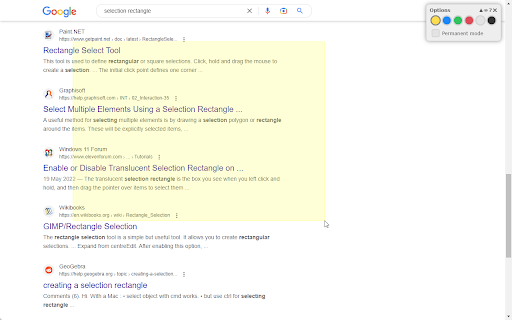
Highlight any part of a page by drawing a selection rectangle like on your desktop.
ما هو Selection Rectangle Highlighting؟
Selection Rectangle Highlighting هو إضافة Chrome تم تطويرها بواسطة https://mjh.at، والميزة الرئيسية لها هي "Highlight any part of a page by drawing a selection rectangle like on your desktop.".
لقطات شاشة التمديد
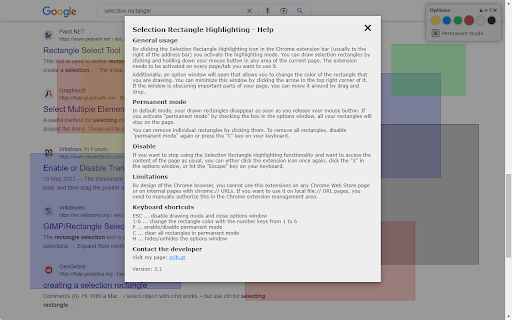
تحميل ملف CRX للإضافة Selection Rectangle Highlighting
قم بتنزيل ملفات الامتداد Selection Rectangle Highlighting بتنسيق crx ، وقم بتثبيت الامتدادات يدويًا في متصفح Chrome ، أو شارك ملفات crx مع الأصدقاء لتثبيت الامتدادات بسهولة.
تعليمات استخدام التمديد
                        If you share your browser window during a presentation via Google Meet, Microsoft Teams, Skype or any other virtual meet-up tool, you can use this extension to highlight any area of the page that you show to your audience. This helps you to direct their attention to the points you are currently talking about.

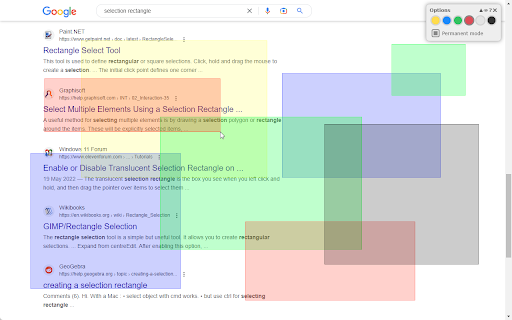
It works like the selection rectangle on your desktop: Press and hold down your mouse button and draw a rectangle. Once you stop holding the mouse button, the rectangle will disappear. If you activate "permanent mode", you can draw multiple rectangles that will remain visible until you remove them.

You can choose from different colors to adapt the selection rectangle and make sure it is clearly visible on the current page.

For more details, please have a look at the help screen of the extension.
معلومات أساسية عن التمديد
| الاسم |  Selection Rectangle Highlighting Selection Rectangle Highlighting |
| ID | pdeniodjbhkniaknghlgmgecemeeofae |
| عنوان URL الرسمي | https://chromewebstore.google.com/detail/selection-rectangle-highl/pdeniodjbhkniaknghlgmgecemeeofae |
| الوصف | Highlight any part of a page by drawing a selection rectangle like on your desktop. |
| حجم الملف | 22.82 KB |
| عدد التثبيتات | 432 |
| النسخة الحالية | 2.1 |
| آخر تحديث | 2023-02-17 |
| تاريخ النشر | 2020-11-20 |
| تقييم | 3.00/5 مجموع تقييمات 2 |
| المطور | https://mjh.at |
| البريد الإلكتروني | [email protected] |
| نوع الدفع | free |
| اللغات المدعومة | de,en |
| manifest.json | |
{
    "update_url": "https:\/\/clients2.google.com\/service\/update2\/crx",
    "manifest_version": 3,
    "name": "Selection Rectangle Highlighting",
    "version": "2.1",
    "author": "Martin Huber (mjh.at)",
    "default_locale": "en",
    "icons": {
        "16": "icon16.png",
        "32": "icon32.png",
        "48": "icon48.png",
        "64": "icon64.png",
        "128": "icon128.png"
    },
    "description": "__MSG_ext_description__",
    "action": {
        "default_icon": "icon16.png",
        "default_title": "Selection Rectangle Highlighting"
    },
    "background": {
        "service_worker": "background.js"
    },
    "offline_enabled": true,
    "permissions": [
        "activeTab",
        "scripting"
    ],
    "minimum_chrome_version": "88"
} | |