Basketball HD new free tab theme
Get colorful basketball wallpapers, just opening a new tab.
ما هو Basketball HD new free tab theme؟
Basketball HD new free tab theme هو إضافة Chrome تم تطويرها بواسطة http://freetabtheme.ru، والميزة الرئيسية لها هي "Get colorful basketball wallpapers, just opening a new tab.".
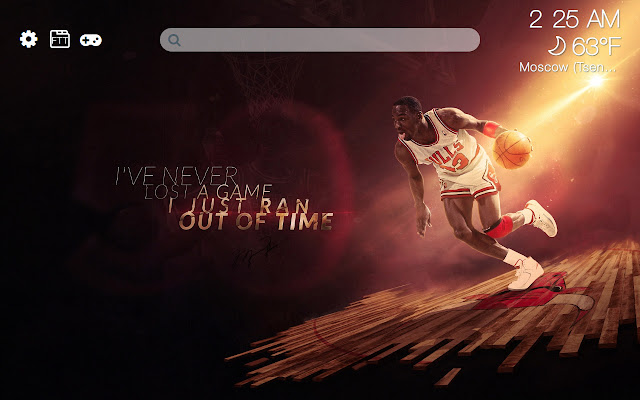
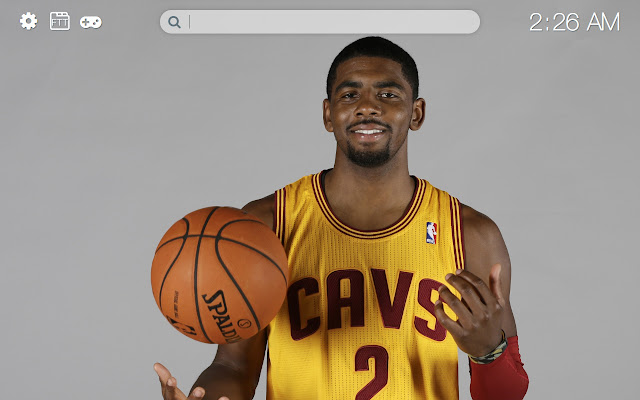
لقطات شاشة التمديد



تحميل ملف CRX للإضافة Basketball HD new free tab theme
قم بتنزيل ملفات الامتداد Basketball HD new free tab theme بتنسيق crx ، وقم بتثبيت الامتدادات يدويًا في متصفح Chrome ، أو شارك ملفات crx مع الأصدقاء لتثبيت الامتدادات بسهولة.
تعليمات استخدام التمديد
                        The extension will replace the standard background of the new browser tab on the HD NBA wallpapers theme. Having installed this extension, you can see famous players and basketball teams, just opening a new browser tab.

Additional features:
- weather display setting
- time display setting
- displayed images settings
- search
- mini-games
معلومات أساسية عن التمديد
| الاسم |  Basketball HD new free tab theme Basketball HD new free tab theme |
| ID | pemaolnmgmljnhchbechkfnmmppcfccl |
| عنوان URL الرسمي | https://chrome.google.com/webstore/detail/basketball-hd-new-free-ta/pemaolnmgmljnhchbechkfnmmppcfccl |
| الوصف | Get colorful basketball wallpapers, just opening a new tab. |
| حجم الملف | 35.8 MB |
| عدد التثبيتات | 26 |
| النسخة الحالية | 0.3.0 |
| آخر تحديث | 2021-03-26 |
| تاريخ النشر | 2018-09-27 |
| المطور | http://freetabtheme.ru |
| البريد الإلكتروني | [email protected] |
| نوع الدفع | free |
| موقع الإضافة | https://freetabtheme.ru |
| عنوان صفحة المساعدة | https://freetabtheme.ru/form |
| عنوان صفحة سياسة الخصوصية | https://freetabtheme.ru/eula |
| اللغات المدعومة | en |
| manifest.json | |
{
    "update_url": "https:\/\/clients2.google.com\/service\/update2\/crx",
    "manifest_version": 2,
    "default_locale": "en",
    "name": "__MSG_chrome_extension_name__",
    "version": "0.3.0",
    "description": "__MSG_chrome_extension_description__",
    "background": {
        "scripts": [
            "vars.js",
            "js\/ls.js",
            "js\/lib\/lib.js",
            "js\/background\/api_b.js",
            "js\/background\/core_b.js"
        ],
        "persistent": true
    },
    "icons": {
        "16": "icons\/icon-16.png",
        "32": "icons\/icon-32.png",
        "48": "icons\/icon-48.png",
        "128": "icons\/icon-128.png"
    },
    "web_accessible_resources": [
        "icons\/*"
    ],
    "chrome_url_overrides": {
        "newtab": "page.html"
    },
    "content_security_policy": "script-src 'self' 'unsafe-eval'; object-src 'self'",
    "browser_action": {
        "default_title": "__MSG_chrome_extension_title__",
        "default_icon": {
            "16": "icons\/icon-16.png",
            "32": "icons\/icon-32.png",
            "48": "icons\/icon-48.png",
            "128": "icons\/icon-128.png"
        }
    }
} | |









![Retro Bowl Online Unlocked [Free Game]](https://lh3.googleusercontent.com/dRQMmypUkccs84rY-FCvOfAasbzdxzjLQwrOUHIvQP6E6R84nsM1ED_CvLIszlMG76rF4rv8Yea_xr-lcxfP_osXiQ=w128-h128-e365-rj-sc0x00ffffff)