Ultraman Search
Search with Ultraman and get the lastest Ultraman Netflix News!
ما هو Ultraman Search؟
Ultraman Search هو إضافة Chrome تم تطويرها بواسطة Tab Pages Unlimited، والميزة الرئيسية لها هي "Search with Ultraman and get the lastest Ultraman Netflix News!".
لقطات شاشة التمديد
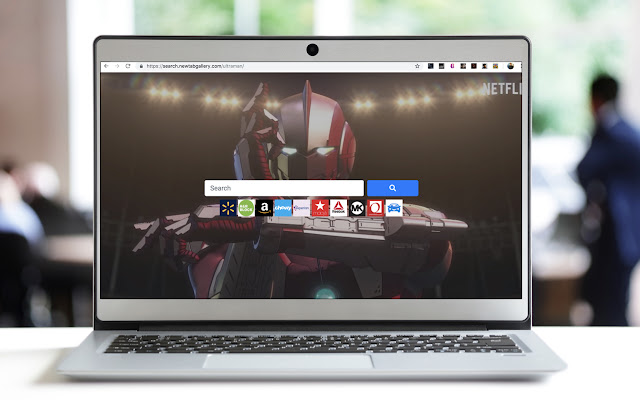
تحميل ملف CRX للإضافة Ultraman Search
قم بتنزيل ملفات الامتداد Ultraman Search بتنسيق crx ، وقم بتثبيت الامتدادات يدويًا في متصفح Chrome ، أو شارك ملفات crx مع الأصدقاء لتثبيت الامتدادات بسهولة.
تعليمات استخدام التمديد
                        Search the Web with your Favorite Netflix Show: Ultraman!

This Search Extension gives you easy access to the best search all while having the best Ultraman images in the background and when you click on the icon in toolbar,  the LATEST NEWS from Ultraman!

In order to get the best-related search, this extension updates your browser Omnibox search to allow metadata search for the topic you’ve installed.

We would appreciate you giving us a 5-STAR rating!

If you have any questions or feedback support can be reached at [email protected]
معلومات أساسية عن التمديد
| الاسم |  Ultraman Search Ultraman Search |
| ID | phkddcmhlffhhpccnmohidlonnoecoki |
| عنوان URL الرسمي | https://chrome.google.com/webstore/detail/ultraman-search/phkddcmhlffhhpccnmohidlonnoecoki |
| الوصف | Search with Ultraman and get the lastest Ultraman Netflix News! |
| حجم الملف | 281 KB |
| عدد التثبيتات | 74 |
| النسخة الحالية | 0.3 |
| آخر تحديث | 2019-04-22 |
| تاريخ النشر | 2019-04-22 |
| المطور | Tab Pages Unlimited |
| البريد الإلكتروني | [email protected] |
| نوع الدفع | free |
| عنوان صفحة المساعدة | https://www.newtabgallery.com/support |
| عنوان صفحة سياسة الخصوصية | https://newtabgallery.com/privacy |
| اللغات المدعومة | en-US |
| manifest.json | |
{
    "update_url": "https:\/\/clients2.google.com\/service\/update2\/crx",
    "manifest_version": 2,
    "name": "Ultraman Search",
    "version": "0.3",
    "description": "Search with Ultraman and get the lastest Ultraman Netflix News!",
    "icons": {
        "16": "icon16.png",
        "32": "icon32.png",
        "48": "icon48.png",
        "128": "icon128.png"
    },
    "background": {
        "scripts": [
            "background.js"
        ]
    },
    "browser_action": {
        "default_title": "Ultraman Search",
        "default_icon": {
            "16": "icon16.png",
            "32": "icon32.png"
        }
    },
    "chrome_settings_overrides": {
        "search_provider": {
            "name": "Ultraman",
            "keyword": "ultraman",
            "search_url": "https:\/\/search.newtabgallery.com\/omnibus-search.php?q={searchTerms}",
            "favicon_url": "https:\/\/home.newtabgallery.com\/ultraman\/icon32.png",
            "encoding": "UTF-8",
            "is_default": true
        }
    }
} | |