Stackoverflow Code Beautify
Beautify and format selected code as needed.
ما هو Stackoverflow Code Beautify؟
Stackoverflow Code Beautify هو إضافة Chrome تم تطويرها بواسطة Making Odd Edit Studios، والميزة الرئيسية لها هي "Beautify and format selected code as needed.".
لقطات شاشة التمديد
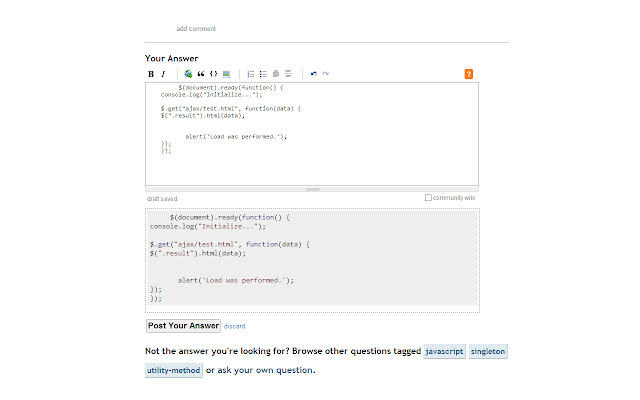


تحميل ملف CRX للإضافة Stackoverflow Code Beautify
قم بتنزيل ملفات الامتداد Stackoverflow Code Beautify بتنسيق crx ، وقم بتثبيت الامتدادات يدويًا في متصفح Chrome ، أو شارك ملفات crx مع الأصدقاء لتثبيت الامتدادات بسهولة.
تعليمات استخدام التمديد
                        Format and beautify selected code when editing questions and answers on Stackoverflow (or anywhere else for that matter).

This extension is not limited to the Stackoverflow web site - I just came up with the idea while reviewing on Stackoverflow - so it can be used anywhere.

If you have any feature requests or found any bugs, just post a comment.

Based on jsbeautifier.org.
معلومات أساسية عن التمديد
| الاسم |  Stackoverflow Code Beautify Stackoverflow Code Beautify |
| ID | pljeafjjkkbacckkollfejkciddacmeb |
| عنوان URL الرسمي | https://chrome.google.com/webstore/detail/stackoverflow-code-beauti/pljeafjjkkbacckkollfejkciddacmeb |
| الوصف | Beautify and format selected code as needed. |
| حجم الملف | 187 KB |
| عدد التثبيتات | 1,000 |
| النسخة الحالية | 1.0 |
| آخر تحديث | 2014-03-12 |
| تاريخ النشر | 2014-03-12 |
| تقييم | 3.95/5 مجموع تقييمات 19 |
| المطور | Making Odd Edit Studios |
| نوع الدفع | free |
| اللغات المدعومة | en-US |
| manifest.json | |
{
"update_url": "https:\/\/clients2.google.com\/service\/update2\/crx",
"name": "Stackoverflow Code Beautify",
"version": "1.0",
"manifest_version": 2,
"description": "Beautify and format selected code as needed.",
"minimum_chrome_version": "14",
"offline_enabled": true,
"options_page": "options.html",
"icons": {
"16": "Content\/Images\/CodeBeautify16.png",
"48": "Content\/Images\/CodeBeautify48.png",
"128": "Content\/Images\/CodeBeautify128.png",
"256": "Content\/Images\/CodeBeautify256.png"
},
"web_accessible_resources": [
"Content\/Images\/CodeBeautify48.png"
],
"permissions": [
" | |