Save Participants (Google Meet & MS Teams)
This extensions allows to download the list of participants in a meeting in Microsoft Teams or Google Meet as a text file
Co je Save Participants (Google Meet & MS Teams)?
Save Participants (Google Meet & MS Teams) je rozšíření Chrome vyvinuté leo.robol, a jeho hlavní funkcí je „This extensions allows to download the list of participants in a meeting in Microsoft Teams or Google Meet as a text file“.
Snímky obrazovky rozšíření
Stáhnout soubor CRX rozšíření Save Participants (Google Meet & MS Teams)
Stáhněte si soubory rozšíření Save Participants (Google Meet & MS Teams) ve formátu crx, ručně nainstalujte rozšíření Chrome do prohlížeče nebo sdílejte soubory crx s přáteli, abyste jednoduše nainstalovali rozšíření Chrome.
Pokyny pro Použití Rozšíření
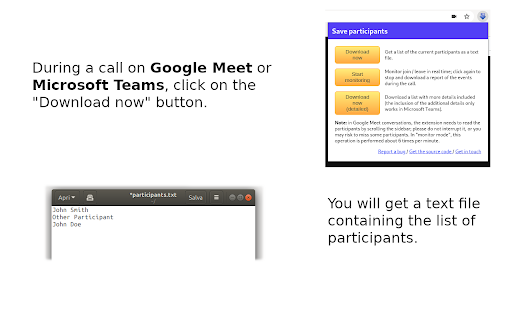
                        This extension can be used during a meeting on teams.microsoft.com or on meet.google.com to download the list of current participants as a text file.

This might be useful in a classroom or in meetings where the presence needs to be certified, to avoid a lengthy and error-prone copy-paste.
Základní Informace o Rozšíření
| Název |  Save Participants (Google Meet & MS Teams) Save Participants (Google Meet & MS Teams) |
| ID | amajpgnakbemacnkmnjbkoacbaephjfd |
| Oficiální URL | https://chromewebstore.google.com/detail/save-participants-google/amajpgnakbemacnkmnjbkoacbaephjfd |
| Popis | This extensions allows to download the list of participants in a meeting in Microsoft Teams or Google Meet as a text file |
| Velikost souboru | 26.33 KB |
| Počet instalací | 5,076 |
| Aktuální Verze | 2.7 |
| Poslední Aktualizace | 2021-02-19 |
| Datum Vydání | 2020-05-01 |
| Hodnocení | 4.86/5 Celkem 7 Hodnocení |
| Vývojář | leo.robol |
| [email protected] | |
| Typ Platby | free |
| Webové stránky Rozšíření | https://github.com/robol/save-participants-extension |
| Podporované Jazyky | en |
| manifest.json | |
{
    "update_url": "https:\/\/clients2.google.com\/service\/update2\/crx",
    "name": "Save Participants (Google Meet & MS Teams)",
    "version": "2.7",
    "description": "This extensions allows to download the list of participants in a meeting in Microsoft Teams or Google Meet as a text file",
    "permissions": [
        "downloads",
        "activeTab",
        "declarativeContent",
        "storage"
    ],
    "background": {
        "scripts": [
            "background.js"
        ],
        "persistent": false
    },
    "page_action": {
        "default_popup": "popup.html",
        "default_icon": {
            "16": "images\/particip_16.png",
            "32": "images\/particip_32.png",
            "48": "images\/particip_48.png",
            "128": "images\/particip_128.png"
        }
    },
    "manifest_version": 2,
    "web_accessible_resources": [
        "get-call.js"
    ]
} | |