C2D URL
This extension allows to dial phone numbers via configurable URLs.
Co je C2D URL?
C2D URL je rozšíření Chrome vyvinuté Daniel Weuthen, a jeho hlavní funkcí je „This extension allows to dial phone numbers via configurable URLs.“.
Snímky obrazovky rozšíření
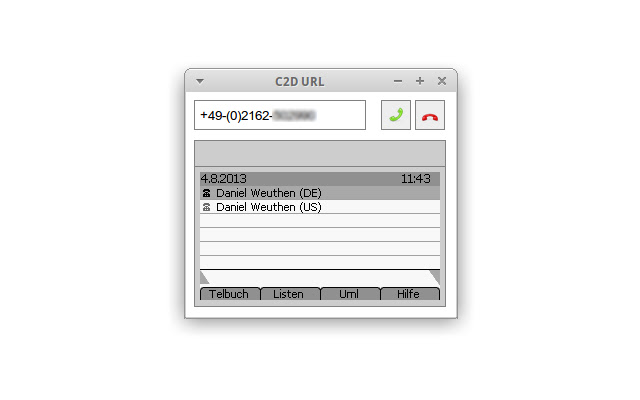
Stáhnout soubor CRX rozšíření C2D URL
Stáhněte si soubory rozšíření C2D URL ve formátu crx, ručně nainstalujte rozšíření Chrome do prohlížeče nebo sdílejte soubory crx s přáteli, abyste jednoduše nainstalovali rozšíření Chrome.
Pokyny pro Použití Rozšíření
                        Most modern VoIP phones allow to execute certain actions such as dialing or hanging up via HTTP requests.

This C2D URL ("click to dial by URL") extension allows you to dial any number supported by your VoIP phone either by manually entering the number in the extension's popup or by simply right clicking onto a previously selected number on any website.

If the phone even allows grabbing a screenshot of the phone's display, it will also be shown in the extension's popup.

The current version has been successfully tested with SNOM 370 phones. Due to its generic approach, it should work with any other VoIP phone that can be controlled via HTTP requests as well.
Základní Informace o Rozšíření
| Název |  C2D URL C2D URL |
| ID | caglkdbdnlmmonphghdpfpkmojlenehm |
| Oficiální URL | https://chrome.google.com/webstore/detail/c2d-url/caglkdbdnlmmonphghdpfpkmojlenehm |
| Popis | This extension allows to dial phone numbers via configurable URLs. |
| Velikost souboru | 27.5 KB |
| Počet instalací | 507 |
| Aktuální Verze | 0.9.2 |
| Poslední Aktualizace | 2014-02-03 |
| Datum Vydání | 2014-02-03 |
| Hodnocení | 4.44/5 Celkem 9 Hodnocení |
| Vývojář | Daniel Weuthen |
| Typ Platby | free |
| Webové stránky Rozšíření | https://github.com/dweuthen/crx-c2d-url |
| URL Stránky Nápovědy | https://github.com/dweuthen/crx-c2d-url |
| Podporované Jazyky | en |
| manifest.json | |
{
"update_url": "https:\/\/clients2.google.com\/service\/update2\/crx",
"manifest_version": 2,
"name": "C2D URL",
"description": "This extension allows to dial phone numbers via configurable URLs.",
"version": "0.9.2",
"options_page": "options.html",
"browser_action": {
"default_icon": "images\/input-dialpad48.png",
"default_popup": "popup.html"
},
"background": {
"scripts": [
"contextmenu.js"
]
},
"icons": {
"16": "images\/input-dialpad16.png",
"32": "images\/input-dialpad32.png",
"48": "images\/input-dialpad48.png"
},
"permissions": [
" | |