Finance Toolbar - Real Time Stock Tracker
Get real time stock market information about your favorite stocks.
Co je Finance Toolbar - Real Time Stock Tracker?
Finance Toolbar - Real Time Stock Tracker je rozšíření Chrome vyvinuté https://www.stefanvd.net, a jeho hlavní funkcí je „Get real time stock market information about your favorite stocks.“.
Snímky obrazovky rozšíření


Stáhnout soubor CRX rozšíření Finance Toolbar - Real Time Stock Tracker
Stáhněte si soubory rozšíření Finance Toolbar - Real Time Stock Tracker ve formátu crx, ručně nainstalujte rozšíření Chrome do prohlížeče nebo sdílejte soubory crx s přáteli, abyste jednoduše nainstalovali rozšíření Chrome.
Pokyny pro Použití Rozšíření
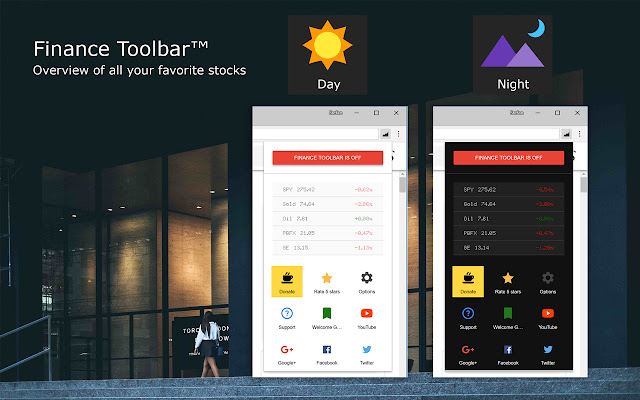
                        This extension adds a toolbar below your address bar and it shows you the latest stock in the dynamic scrolling bar. You get real time information from your favorite stock.

Finance Toolbar is a lightweight and useful add-in designed for getting a quick peek of your favorite stocks. You see a real time stock tracker just below the address bar of your web browser. And it dynamically moves the stocks from right to left. And updates automatically. If you want to know more details about that stock, you can click on the name. It then opens a new page with a detailed information and a stock graph. You can add all stock you want from NASDAQ, S&P Dow Jones, Toronto Stock Exchange, London Stock Exchange, etc.

A few great features in this browser extension:
+ Real time stock information about the 'Ask', 'Percent', 'Price' and 'Market Capitalization'
+ Option for Asian users to invert red & green color
+ Option to add and remove your favorite stocks
+ Option for double stock ticker bar
+ Option to track the Bitcoin currency value
And more...

Finance Data is coming from the Stefan vd Finance API. For a more robust and stable data.

Project Information:
https://www.stefanvd.net/project/finance-toolbar/browser/

Required Permissions:
"tabs":
This is needed for the following features: to show you the welcome and guide page, add or remove the finance bar, and to open the Options page.

"storage":
This to save the settings on your local computer, and to sync it to your web browser account.

"":
This to control the bar on all websites that include http, and https.

<<< Option feature >>>
To protect your eyes at night and to get focus on the video player such as YouTube™. It's recommend to use and install the Turn Off the Lights
https://chrome.google.com/webstore/detail/bfbmjmiodbnnpllbbbfblcplfjjepjdn
Základní Informace o Rozšíření
| Název |  Finance Toolbar - Real Time Stock Tracker Finance Toolbar - Real Time Stock Tracker |
| ID | cichbngoomgnobmmjpagmbkimbamigie |
| Oficiální URL | https://chrome.google.com/webstore/detail/finance-toolbar-real-time/cichbngoomgnobmmjpagmbkimbamigie |
| Popis | Get real time stock market information about your favorite stocks. |
| Velikost souboru | 657 KB |
| Počet instalací | 41,488 |
| Aktuální Verze | 1.0.0.6 |
| Poslední Aktualizace | 2020-03-25 |
| Datum Vydání | 2020-03-21 |
| Hodnocení | 3.62/5 Celkem 766 Hodnocení |
| Vývojář | https://www.stefanvd.net |
| [email protected] | |
| Typ Platby | free |
| Webové stránky Rozšíření | https://www.stefanvd.net/project/finance-toolbar/browser/ |
| URL Stránky Nápovědy | https://www.stefanvd.net/support/ |
| URL Stránky Zásad Ochrany Soukromí | https://www.stefanvd.net/privacy |
| Podporované Jazyky | id,ms,de,en,en-GB,en-US,fil,fr,nl,no,vi,tr,ca,da,et,es,es-419,hr,it,lv,lt,hu,pl,pt-BR,pt-PT,ro,sk,sl,fi,sv,cs,el,sr,bg,ru,uk,mr,hi,bn,gu,ta,te,ml,th,zh-CN,zh-TW,ja,ko |
| manifest.json | |
{
    "update_url": "https:\/\/clients2.google.com\/service\/update2\/crx",
    "manifest_version": 2,
    "name": "__MSG_name__",
    "short_name": "Finance Toolbar",
    "version": "1.0.0.6",
    "description": "__MSG_description__",
    "author": "Stefan vd",
    "homepage_url": "https:\/\/www.stefanvd.net\/support\/",
    "icons": {
        "16": "icons\/icon16.png",
        "32": "icons\/icon32.png",
        "48": "icons\/icon48.png",
        "128": "icons\/icon128.png"
    },
    "default_locale": "en",
    "background": {
        "page": "background.html",
        "persistent": true
    },
    "content_security_policy": "script-src 'self'; img-src *; object-src 'self'",
    "web_accessible_resources": [
        "js\/toolbar.js",
        "toolbar.html"
    ],
    "commands": {
        "_execute_browser_action": {
            "suggested_key": {
                "default": "Ctrl+Shift+M",
                "mac": "MacCtrl+Shift+M"
            }
        },
        "toggle-feature-financetoolbar": {
            "suggested_key": {
                "default": "Ctrl+Shift+P",
                "mac": "MacCtrl+Shift+P"
            },
            "description": "__MSG_titelshortfinance__"
        }
    },
    "browser_action": {
        "default_icon": {
            "19": "icons\/icon1.png",
            "38": "icons\/[email protected]"
        },
        "default_title": "__MSG_browserbutton__",
        "default_popup": "popup.html"
    },
    "content_scripts": [
        {
            "matches": [
                "*:\/\/*\/*"
            ],
            "exclude_matches": [
                "*:\/\/*.stefanvd.net\/project\/finance-toolbar\/browser\/options.html"
            ],
            "css": [
                "css\/body.css"
            ],
            "js": [
                "js\/constants.js",
                "js\/content.js"
            ],
            "run_at": "document_end"
        },
        {
            "matches": [
                "*:\/\/*.stefanvd.net\/project\/finance-toolbar\/browser\/options.html"
            ],
            "js": [
                "js\/constants.js",
                "js\/options.js"
            ],
            "run_at": "document_end"
        }
    ],
    "options_ui": {
        "page": "options.html",
        "open_in_tab": true
    },
    "offline_enabled": true,
    "minimum_chrome_version": "18",
    "permissions": [
        "contextMenus",
        "tabs",
        "http:\/\/*\/*",
        "https:\/\/*\/*",
        "storage",
        "alarms"
    ]
} | |