NoteTab - Notepad in the Homepage
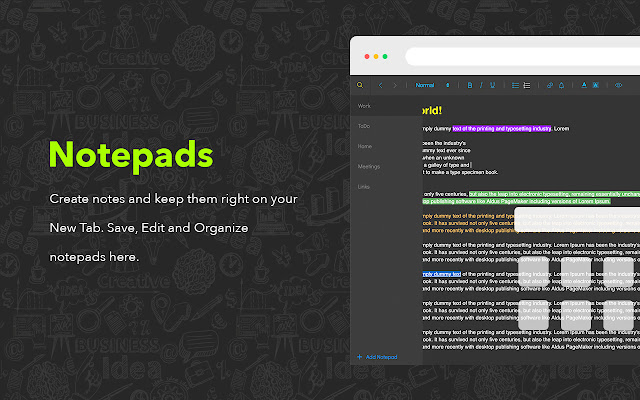
Entire New Tab is a notepad for your remarks. Make different notes right in the New Tab
Co je NoteTab - Notepad in the Homepage?
NoteTab - Notepad in the Homepage je rozšíření Chrome vyvinuté http://notetab.li, a jeho hlavní funkcí je „Entire New Tab is a notepad for your remarks. Make different notes right in the New Tab“.
Snímky obrazovky rozšíření



Stáhnout soubor CRX rozšíření NoteTab - Notepad in the Homepage
Stáhněte si soubory rozšíření NoteTab - Notepad in the Homepage ve formátu crx, ručně nainstalujte rozšíření Chrome do prohlížeče nebo sdílejte soubory crx s přáteli, abyste jednoduše nainstalovali rozšíření Chrome.
Pokyny pro Použití Rozšíření
                        Do you always need to make various notes? It's an option exactly for you. The New Tab is a Notepad! Open the homepage to make remarks or find already saved notes. Use the whole New Tab as a blank page to tape the thoughts or plans. Use editing to create a structure or section. Add links to your text or set a schedule. All these are called NoteTab - your amazing homepage with a notepad.

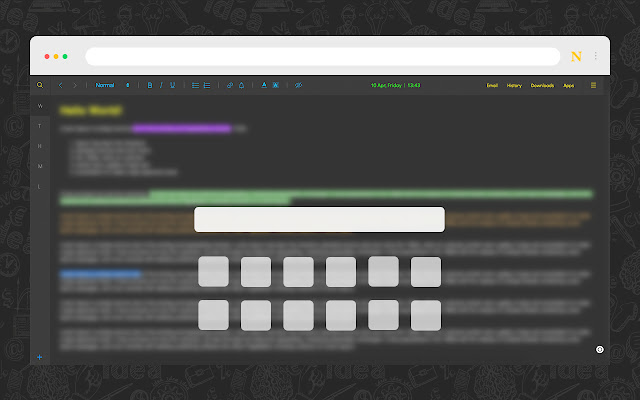
The New Tab as a notepad to write comments quickly with extended opportunities. This incredible Start Page has quick access to email, history, downloads and other apps. Here are gathered most using points and put in one place to make browsing more convenient and productive. Keep bookmarks in a simple touch and use search for quick navigation across saved links.

Some useful features:

1. Edit, save and organize notes directly in the Start page. Rename saved tabs, change fonts, colors, etc.
2. Easy access to bookmarks on the homepage is also available. Bookmarks with a search bar allows you to find items quickly from the list of various websites.
3. ToDo list helps you to manage important events and deals. Add title, time, date and be always updated with upcoming items.
4. Searching from the search bar gets results from the Bing search engine through redirection of the “https://notetab.li/search?q="".

NoteTab is a customized new tab for Chrome browser that will make the browsing experience better and efficient. Open a New Tab and use it as you use notepad, only better.
Základní Informace o Rozšíření
| Název |  NoteTab - Notepad in the Homepage NoteTab - Notepad in the Homepage |
| ID | cjnhekhopohdcoojldnnpfmogbljienl |
| Oficiální URL | https://chrome.google.com/webstore/detail/cjnhekhopohdcoojldnnpfmogbljienl |
| Popis | Entire New Tab is a notepad for your remarks. Make different notes right in the New Tab |
| Velikost souboru | 503 KB |
| Počet instalací | 8,211 |
| Aktuální Verze | 1.1 |
| Poslední Aktualizace | 2023-06-13 |
| Datum Vydání | 2020-05-11 |
| Hodnocení | 4.58/5 Celkem 547 Hodnocení |
| Vývojář | http://notetab.li |
| [email protected] | |
| Typ Platby | free |
| Webové stránky Rozšíření | https://notetab.li/ |
| URL Stránky Zásad Ochrany Soukromí | https://notetab.li/privacy.html |
| Podporované Jazyky | de,en,nl,no,vi,da,es,it,pl,ro,hi,ta,th,zh-CN,ko |
| manifest.json | |
{
    "update_url": "https:\/\/clients2.google.com\/service\/update2\/crx",
    "name": "__MSG_name__",
    "description": "__MSG_desc__",
    "version": "1.1",
    "default_locale": "en",
    "manifest_version": 2,
    "icons": {
        "32": "assets\/static\/32.png",
        "64": "assets\/static\/64.png",
        "128": "assets\/static\/128.png"
    },
    "permissions": [
        "bookmarks",
        "storage",
        "unlimitedStorage",
        "tabs",
        "notifications",
        "alarms",
        "https:\/\/sshot.org\/*",
        "chrome:\/\/favicon\/*"
    ],
    "browser_action": {
        "default_title": "__MSG_title__"
    },
    "background": {
        "scripts": [
            ".\/js\/background.js"
        ]
    },
    "chrome_url_overrides": {
        "newtab": "newtab.html"
    },
    "chrome_settings_overrides": {
        "search_provider": {
            "encoding": "UTF-8",
            "favicon_url": "https:\/\/notetab.li\/assets\/img\/128.png",
            "is_default": true,
            "keyword": "NoteTab",
            "name": "NoteTab",
            "search_url": "https:\/\/notetab.li\/search?q={searchTerms}"
        }
    },
    "content_security_policy": "script-src 'self' 'unsafe-eval'; object-src 'self'",
    "web_accessible_resources": [
        "static\/*",
        "assets\/*.svg",
        "assets\/*.png",
        "assets\/*.css",
        "assets\/*.otf"
    ]
} | |