Post To Tumblr
Enables right-click posting of content to Tumblr
Co je Post To Tumblr?
Post To Tumblr je rozšíření Chrome vyvinuté markd.co, a jeho hlavní funkcí je „Enables right-click posting of content to Tumblr“.
Snímky obrazovky rozšíření


Stáhnout soubor CRX rozšíření Post To Tumblr
Stáhněte si soubory rozšíření Post To Tumblr ve formátu crx, ručně nainstalujte rozšíření Chrome do prohlížeče nebo sdílejte soubory crx s přáteli, abyste jednoduše nainstalovali rozšíření Chrome.
Pokyny pro Použití Rozšíření
                        PLEASE LEAVE A REVIEW IF YOU LIKE THIS APP :)

Post To Tumblr is an extension that adds simple right-click-post functionality to Chrome.

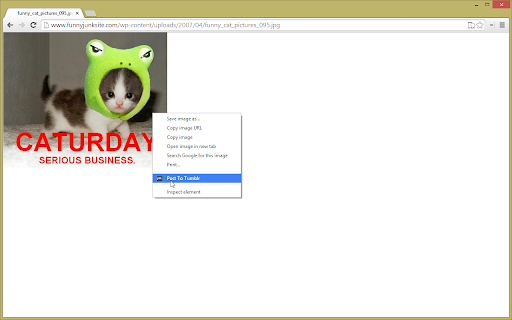
You can right click on any image, page, link or video to quickly upload to Tumblr. You can even drag images into chrome and upload them directly!

(also check out https://markd.co/ - save and organize social profiles with one click!)

Thanks everyone for your support and suggestions. If you would like to keep up to date with updates or suggest new features to me, send me a message on Twitter: @mikeysee or subscribe to my blog: http://www.mikecann.co.uk

If you really like the extension and want to help me out and speed up its development you can donate. There is a button in the options page to do this, cheers!

Note: You can optionally donate or display ads  for extra features!
Základní Informace o Rozšíření
| Název |  Post To Tumblr Post To Tumblr |
| ID | dbpicbbcpanckagpdjflgojlknomoiah |
| Oficiální URL | https://chromewebstore.google.com/detail/post-to-tumblr/dbpicbbcpanckagpdjflgojlknomoiah |
| Popis | Enables right-click posting of content to Tumblr |
| Velikost souboru | 7.97 MB |
| Počet instalací | 11,715 |
| Aktuální Verze | 6.71 |
| Poslední Aktualizace | 2022-04-11 |
| Datum Vydání | 2020-04-15 |
| Hodnocení | 3.40/5 Celkem 706 Hodnocení |
| Vývojář | markd.co |
| [email protected] | |
| Typ Platby | free |
| Webové stránky Rozšíření | http://www.post-to-tumblr.com/ |
| URL Stránky Zásad Ochrany Soukromí | https://markd.ltd/privacy-policy |
| Podporované Jazyky | en |
| manifest.json | |
{
    "update_url": "https:\/\/clients2.google.com\/service\/update2\/crx",
    "name": "Post To Tumblr",
    "short_name": "PTT",
    "manifest_version": 2,
    "description": "Enables right-click posting of content to Tumblr",
    "version": "6.71",
    "permissions": [
        "contextMenus",
        "notifications",
        "http:\/\/*\/*",
        "https:\/\/*\/*",
        "file:\/\/*\/*",
        "tabs",
        "storage",
        "unlimitedStorage"
    ],
    "optional_permissions": [
        "clipboardRead"
    ],
    "background": {
        "page": "html\/background.html"
    },
    "options_page": "html\/options.html",
    "minimum_chrome_version": "50",
    "browser_action": {
        "default_icon": "images\/icon48.png",
        "default_title": "Post To Tumblr"
    },
    "icons": {
        "16": "images\/icon16.png",
        "32": "images\/icon32.png",
        "48": "images\/icon48.png",
        "128": "images\/icon128.png"
    },
    "web_accessible_resources": [
        "images\/*",
        "html\/*.html"
    ],
    "content_security_policy": "script-src 'self' https:\/\/www.google-analytics.com\/analytics.js https:\/\/ssl.google-analytics.com https:\/\/www.google-analytics.com https:\/\/ptt-server.herokuapp.com https:\/\/connect.facebook.net https:\/\/npmcdn.com https:\/\/cdnjs.cloudflare.com https:\/\/api.sandbox.braintreegateway.com https:\/\/api.braintreegateway.com https:\/\/client-analytics.sandbox.braintreegateway.com https:\/\/client-analytics.braintreegateway.com; object-src 'self'",
    "content_scripts": [
        {
            "matches": [
                "http:\/\/*\/*",
                "https:\/\/*\/*",
                "file:\/\/\/*\/*"
            ],
            "js": [
                "js\/mouseWatcher-bundle.js"
            ]
        }
    ]
} | |