MyNotesApp
write notes, search youtube, search google, translate notes, open docs, send notes to gmail...
Co je MyNotesApp?
MyNotesApp je rozšíření Chrome vyvinuté javier villarreal, a jeho hlavní funkcí je „write notes, search youtube, search google, translate notes, open docs, send notes to gmail...“.
Snímky obrazovky rozšíření

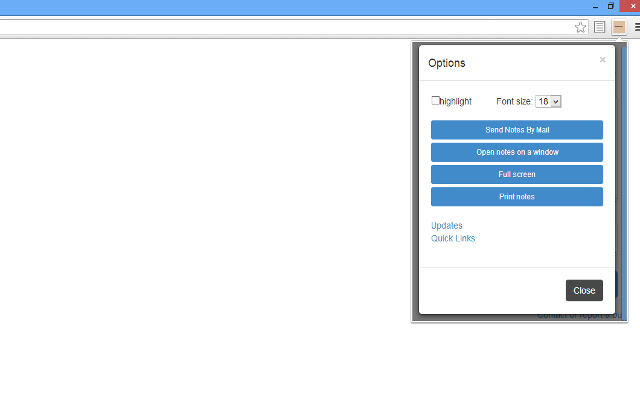

Stáhnout soubor CRX rozšíření MyNotesApp
Stáhněte si soubory rozšíření MyNotesApp ve formátu crx, ručně nainstalujte rozšíření Chrome do prohlížeče nebo sdílejte soubory crx s přáteli, abyste jednoduše nainstalovali rozšíření Chrome.
Pokyny pro Použití Rozšíření
                        This is my contribution, while i´m navigating, sometimes i want to write notes or paste links or even mails that i´ll probably use later and i think that with this application you can solve the problem. Then you can save a note even if you are going to close chrome.

The program let you write notes and modify it. When you need to modify a note, you have to click on button Modify and background change the color to blue until you finish. In addition, there is a hidden button to clear all notes, if you move the mouse to the middle of the page you could see the button.

This is a first version of the program, i´m developing improvements that i´ll publish soon.

I hope you like it.

Thanks.

----------------------------------------------------------------------------------------------------------------------
IMPORTANT:
Don´t use the extension to save relevant information like passwords or other private data, because the extension wasn´t made for that purpose.

IMPORTANTE:
No uses la extensión para salvar información relevante como contraseñas o otros datos privados porque la extensión no fue diseñada con ese fin.
----------------------------------------------------------------------------------------------------------------------

Some Options:

- Get your notes on Gmail.
- Search on google.
- Search on YouTube.
- Open Google Docs.
- Translate Text.
- change the font size
- open notes in a new tab
- full screen
- Print notes.

To search on google,  youtube or translate text, you only have to write on the field where you writes notes and two icons will appear on the top. You only have to click on it.

To get your notes on Gmail you only have to open the option menu and click on the button.

You can open google docs, only open the site for you to work with it, (not to get notes like documents).

************************************** VERSION 2.4 PUBLISHED ********************

****************************************** INFO ***************************************
                 Windows           MAC OS        Linux
- Copy:     CTRL+C          CMD+C           CTRL+SHIFT+C
- Paste:    CTRL+V          CMD+V            CTRL+SHIFT+V

***************************************** OTHERS ************************************
Do you want to do the same but with a special links support and more functionalities?
Test the extension: Quick Links

https://chrome.google.com/webstore/detail/aegkifofjmpcimhejjpjhafihlcpcifl
Základní Informace o Rozšíření
| Název |  MyNotesApp MyNotesApp |
| ID | dekfkaejjjbaanacipopikcebhmjplce |
| Oficiální URL | https://chrome.google.com/webstore/detail/mynotesapp/dekfkaejjjbaanacipopikcebhmjplce |
| Popis | write notes, search youtube, search google, translate notes, open docs, send notes to gmail... |
| Velikost souboru | 549 KB |
| Počet instalací | 614 |
| Aktuální Verze | 3.0 |
| Poslední Aktualizace | 2013-08-05 |
| Datum Vydání | 2013-08-05 |
| Hodnocení | 3.98/5 Celkem 42 Hodnocení |
| Vývojář | javier villarreal |
| Typ Platby | free |
| Podporované Jazyky | en |
| manifest.json | |
{
    "update_url": "https:\/\/clients2.google.com\/service\/update2\/crx",
    "manifest_version": 2,
    "name": "MyNotesApp",
    "version": "3.0",
    "description": "write notes, search youtube, search google, translate notes, open docs, send notes to gmail...",
    "permissions": [
        "tabs"
    ],
    "browser_action": {
        "default_icon": "fondoIcon.png",
        "default_popup": "index.html"
    }
} | |